cancel
Showing results for 
Search instead for 
Did you mean: 

The Power BI Data Visualization World Championships is back! Get ahead of the game and start preparing now! Learn more

Reply
Anonymous
Not applicable

Table with multiple measures

Hi,

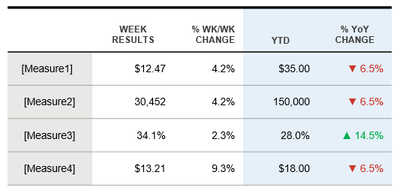
I have request for table with multiple measures, report has Date Slicer.

Table with multiple measures.PNG

I have a whole series of measures that are all coming from a single table, so total I have 16 Measures.

For each Measure I have set of 4 calculations: [Measure1 Week], [Measure1 wk/wk], [Measure1 YTD], [Measure1 YoY]

Currently they are all separate cards.

Using Table or Matrix I am able to show all Measures Label with one dimension in one row or one column

but  how to put them all together and still be responsive to time intelligence, Date Slicer?


Any ideas will be appreciated.

Thanks

2 ACCEPTED SOLUTIONS
Greg_Deckler
Community Champion
Community Champion

In general, to use a measure in that way, you need to use the Disconnected Table Trick as this article demonstrates: https://community.powerbi.com/t5/Community-Blog/Solving-Attendance-with-the-Disconnected-Table-Trick...


Follow on LinkedIn
@ me in replies or I'll lose your thread!!!
Instead of a Kudo, please vote for this idea
Become an expert!: Enterprise DNA
External Tools: MSHGQM
YouTube Channel!: Microsoft Hates Greg
Latest book!:
DAX For Humans

DAX is easy, CALCULATE makes DAX hard...

View solution in original post

v-zhenbw-msft
Community Support
Community Support

Hi @Anonymous ,


We can use the following steps to meet your requirement.


1. Create a crossjoin table that contains the measure of row name and the measure of column name.


crossjoin table = CROSSJOIN(DATATABLE("Row",STRING,{{"Measure 1"},{"Measure 2"}}),DATATABLE("Column",STRING,{{"A"},{"B"}}))
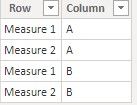
 

table 1.jpg


2. We can create a measure in crossjoin table,


Measure = 
SUMX (
    VALUES ( 'crossjoin table'[Row] ),
    SWITCH (
        'crossjoin table'[Row],
        "Measure 1", SUMX (
            VALUES ( 'crossjoin table'[Column] ),
            SWITCH ( 'crossjoin table'[Column], "A", [Measure 1 - A], "B", [Measure 1 - B] )
        ),
        "Measure 2", SUMX (
            VALUES ( 'crossjoin table'[Column] ),
            SWITCH ( 'crossjoin table'[Column], "A", [Measure 2 - A], "B", [Measure 2 - B] )
        )
    )
)


3. At last we can get the result like this, select a matrix table, and put the crossjoin table[Row] in Rows, put the crossjoin table[Column] in Columns, put the [Measure] in Values.
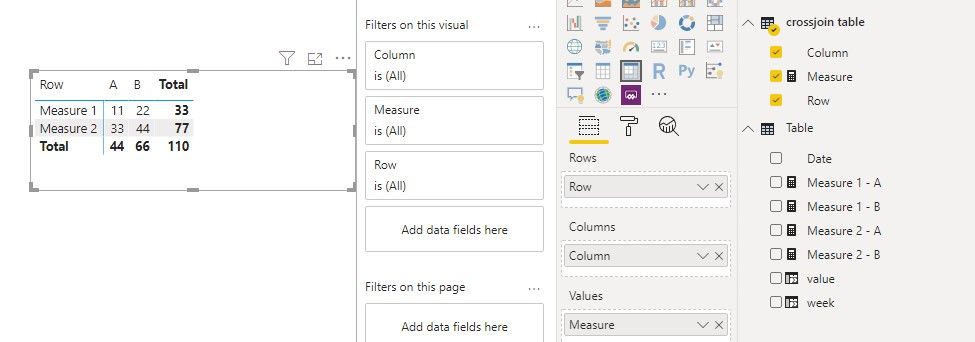
 

table 2.jpg


If it doesn’t meet your requirement, could you please show the exact expected result based on the table that you have shared?

BTW, pbix as attached.


Best regards,


Community Support Team _ zhenbw

If this post helps, then please consider Accept it as the solution to help the other members find it more quickly.

View solution in original post

2 REPLIES 2
v-zhenbw-msft
Community Support
Community Support

Hi @Anonymous ,


We can use the following steps to meet your requirement.


1. Create a crossjoin table that contains the measure of row name and the measure of column name.


crossjoin table = CROSSJOIN(DATATABLE("Row",STRING,{{"Measure 1"},{"Measure 2"}}),DATATABLE("Column",STRING,{{"A"},{"B"}}))


table 1.jpg


2. We can create a measure in crossjoin table,


Measure = 
SUMX (
    VALUES ( 'crossjoin table'[Row] ),
    SWITCH (
        'crossjoin table'[Row],
        "Measure 1", SUMX (
            VALUES ( 'crossjoin table'[Column] ),
            SWITCH ( 'crossjoin table'[Column], "A", [Measure 1 - A], "B", [Measure 1 - B] )
        ),
        "Measure 2", SUMX (
            VALUES ( 'crossjoin table'[Column] ),
            SWITCH ( 'crossjoin table'[Column], "A", [Measure 2 - A], "B", [Measure 2 - B] )
        )
    )
)


3. At last we can get the result like this, select a matrix table, and put the crossjoin table[Row] in Rows, put the crossjoin table[Column] in Columns, put the [Measure] in Values.


table 2.jpg


If it doesn’t meet your requirement, could you please show the exact expected result based on the table that you have shared?

BTW, pbix as attached.


Best regards,


Community Support Team _ zhenbw

If this post helps, then please consider Accept it as the solution to help the other members find it more quickly.

Greg_Deckler
Community Champion
Community Champion

In general, to use a measure in that way, you need to use the Disconnected Table Trick as this article demonstrates: https://community.powerbi.com/t5/Community-Blog/Solving-Attendance-with-the-Disconnected-Table-Trick...


Follow on LinkedIn
@ me in replies or I'll lose your thread!!!
Instead of a Kudo, please vote for this idea
Become an expert!: Enterprise DNA
External Tools: MSHGQM
YouTube Channel!: Microsoft Hates Greg
Latest book!:
DAX For Humans

DAX is easy, CALCULATE makes DAX hard...

Helpful resources

Announcements
Power BI DataViz World Championships

Power BI Dataviz World Championships

The Power BI Data Visualization World Championships is back! Get ahead of the game and start preparing now!

December 2025 Power BI Update Carousel

Power BI Monthly Update - December 2025

Check out the December 2025 Power BI Holiday Recap!

FabCon Atlanta 2026 carousel

FabCon Atlanta 2026

Join us at FabCon Atlanta, March 16-20, for the ultimate Fabric, Power BI, AI and SQL community-led event. Save $200 with code FABCOMM.