cancel
Showing results for 
Search instead for 
Did you mean: 

The Power BI Data Visualization World Championships is back! Get ahead of the game and start preparing now! Learn more

Reply
Anonymous
Not applicable

Table visualisation for KPIs

Hi all, 

This might be a long shot but thought to give it a try.

I'm trying to work out how can I create a table visualisation shown percentages across different fields in rows.

For instance, I have this table (from my ppt file) and would like to see if it would be easy to get that done on a pbix report: 


Capture1.JPG


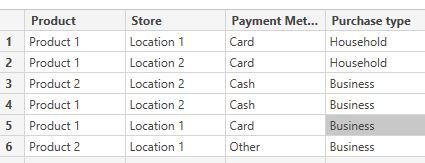
The fields shown correspond to different columns and reflect on percentage of total volume (for instance Location 1 did 12% of all sales). Here is the table:

Capture2.JPG
If anyone has an idea how this can be shown on a table visualisation on Power BI report (if possible), I would really appreciated it! 

Many thanks,
Kostas


1 ACCEPTED SOLUTION
amitchandak
Super User
Super User

Using union and summarize put your results into a table and then display it.


Balance Sheet = union(SUMMARIZE(Sales,Sales[Brand],"Col1",sum(Sales[Sales]),"Col2",sum(Sales[COGS]),"sort",COUNTROWS(Sales))
,SUMMARIZE(Sales1,Sales1[Brand],"Col1",sum(Sales1[Sales]),"Col2",sum(Sales1[COGS]),"sort",COUNTROWS(Sales1)) )


you can use static text as a new  column too


Appreciate your Kudos. In case, this is the solution you are looking for, mark it as the Solution. In case it does not help, please provide additional information and mark me with @
Thanks.

My Recent Blog - https://community.powerbi.com/t5/Community-Blog/Comparing-Data-Across-Date-Ranges/ba-p/823601

Share with Power BI Enthusiasts: Full Power BI Video (20 Hours) YouTube
Microsoft Fabric Series 60+ Videos YouTube
Microsoft Fabric Hindi End to End YouTube

View solution in original post

2 REPLIES 2
amitchandak
Super User
Super User

Using union and summarize put your results into a table and then display it.


Balance Sheet = union(SUMMARIZE(Sales,Sales[Brand],"Col1",sum(Sales[Sales]),"Col2",sum(Sales[COGS]),"sort",COUNTROWS(Sales))
,SUMMARIZE(Sales1,Sales1[Brand],"Col1",sum(Sales1[Sales]),"Col2",sum(Sales1[COGS]),"sort",COUNTROWS(Sales1)) )


you can use static text as a new  column too


Appreciate your Kudos. In case, this is the solution you are looking for, mark it as the Solution. In case it does not help, please provide additional information and mark me with @
Thanks.

My Recent Blog - https://community.powerbi.com/t5/Community-Blog/Comparing-Data-Across-Date-Ranges/ba-p/823601

Share with Power BI Enthusiasts: Full Power BI Video (20 Hours) YouTube
Microsoft Fabric Series 60+ Videos YouTube
Microsoft Fabric Hindi End to End YouTube
Anonymous
Not applicable

Hi @amitchandak 

Can you please share a screenshot of the actual table you used for this DAX command? 

Found it a bit troubling to adjust it to my columns/tables. 

Many thanks,
K

Helpful resources

Announcements
Power BI DataViz World Championships

Power BI Dataviz World Championships

The Power BI Data Visualization World Championships is back! Get ahead of the game and start preparing now!

December 2025 Power BI Update Carousel

Power BI Monthly Update - December 2025

Check out the December 2025 Power BI Holiday Recap!

FabCon Atlanta 2026 carousel

FabCon Atlanta 2026

Join us at FabCon Atlanta, March 16-20, for the ultimate Fabric, Power BI, AI and SQL community-led event. Save $200 with code FABCOMM.