Join us at FabCon Atlanta from March 16 - 20, 2026, for the ultimate Fabric, Power BI, AI and SQL community-led event. Save $200 with code FABCOMM.
Register now!The Power BI Data Visualization World Championships is back! Get ahead of the game and start preparing now! Learn more
Good day.
Simple data below and I want PowerBi a Table display the same.
| Name | Order |
| John | 1 |
| Kate | 2 |
| Lilly | 3 |
| David | 4 |
| Maggie | 5 |
| Ted | 6 |
| Will | 7 |
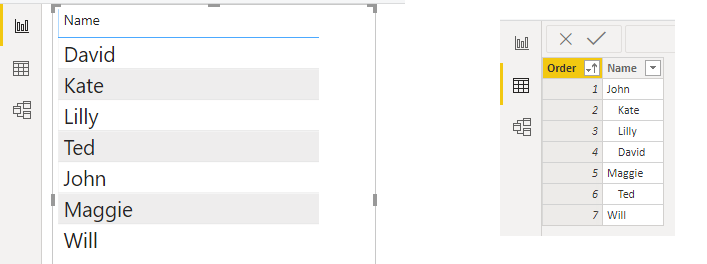
Data view looks ok, and it's sorting by the Order column.
But Visual's not. (I only want the Name column in the table.)
The spaces in front of texts are removed, and the sorting seems not working.
How can I have a table shows the texts like above? Thank you.
Solved! Go to Solution.
Hi,
To sort a column based on another one, use the "Sort by column" in the Modeling menu.
To keep the spaces, disable "Word Wrap" in the Values section of the table settings.
Best Regards // Ulf
Hi,
To sort a column based on another one, use the "Sort by column" in the Modeling menu.
To keep the spaces, disable "Word Wrap" in the Values section of the table settings.
Best Regards // Ulf
@amitchandak, thank you! actually I need to choose the Column "Name" to Sort by Column "Order", instead of doing it on "Order".
@UlfBergqvist, thank you for the solution
The Power BI Data Visualization World Championships is back! Get ahead of the game and start preparing now!
| User | Count |
|---|---|
| 63 | |
| 45 | |
| 41 | |
| 36 | |
| 23 |
| User | Count |
|---|---|
| 189 | |
| 124 | |
| 106 | |
| 78 | |
| 52 |