cancel
Showing results for 
Search instead for 
Did you mean: 

The Power BI Data Visualization World Championships is back! Get ahead of the game and start preparing now! Learn more

Reply
Pakovich
Frequent Visitor

Table show last day parameter

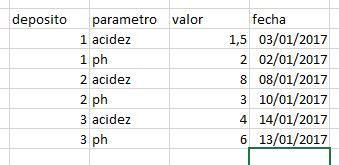
I have this table. In multiple days


parametro.JPG


I would need to know what was the last parameter of the table by deposit.


final example:


parametro1.JPG


In different oil tanks the pH and acidity parameters are measured every 5 days, and saved in a table (capture 1), you would need a table, measure, or filter that tells me the last values that was taken in that tank. A table that would finally show the last date for each deposit of those parameters.


En distintos depósitos de aceite se mide cada 5 días los parámetros de acidez y ph, y se guarda en una tabla (captura 1) necesitaría una tabla, medida, o filtro que me indique los últimos valores que se tomó en ese depósito. Una tabla que mostraría finalmente la última fecha por cada depósito de esos parámetros ph y acidez.

1 ACCEPTED SOLUTION

The M code you need is this one: 


let
    Origen = Table.FromRows(Json.Document(Binary.Decompress(Binary.FromText("fZDNCoAgEITfxbOQu/7Vs0SHqKBunXv6HOnPREHE5ZuZdbfvhSIhxTht83KEBwpFTTisyItBXoJ9DRcDcg5ft7SQ6FTCt98AmgLUgDaHT3js7mrRvuJuIWgL7jh1V/kYqRTq/86IckF0oy9xATpAXYnGWPTZ2HAC", BinaryEncoding.Base64), Compression.Deflate)), let _t = ((type text) meta [Serialized.Text = true]) in type table [deposito = _t, parametro = _t, valor = _t, fecha = _t]),
    #"Tipo cambiado" = Table.TransformColumnTypes(Origen,{{"deposito", Int64.Type}, {"parametro", type text}, {"valor", type number}, {"fecha", type date}}),
    #"Grouped Rows" = Table.Group(#"Tipo cambiado", {"deposito", "parametro"}, {{"fecha", each List.Max([fecha]), type date}}),
    
    JoinTbls = Table.NestedJoin(#"Grouped Rows", {"deposito","fecha","parametro"}, #"Tipo cambiado", {"deposito","fecha","parametro"}, "TblToExp", JoinKind.Inner),
    #"Expanded TblToExp" = Table.ExpandTableColumn(JoinTbls, "TblToExp", {"valor"}, {"valor"})
    
    
in
    #"Expanded TblToExp"


Did I answer your question correctly? Mark my answer as a solution!


Proud to be a Datanaut!  

View solution in original post

4 REPLIES 4
LivioLanzo
Solution Sage
Solution Sage

Hola @Pakovich


I see you are ysing Power Query. You basically have to perform 3 steps:


1) Group by deposito, parametro and get the Max of fecha


2) Join the table in step 1 with the original table by Deposite, Parametro and Fecha


3) expand the table column created in step 2, only choosing Valor


if you post a copiable version of the table, the Power Query code could be provided


Did I answer your question correctly? Mark my answer as a solution!


Proud to be a Datanaut!  

hi @LivioLanzo thank you very much. Here the pbix link, a copiable version of the table

https://drive.google.com/file/d/1B5rhR4O8zBr6Y4cLdKnTBzeofUZuiwZe/view?usp=sharing

The M code you need is this one: 


let
    Origen = Table.FromRows(Json.Document(Binary.Decompress(Binary.FromText("fZDNCoAgEITfxbOQu/7Vs0SHqKBunXv6HOnPREHE5ZuZdbfvhSIhxTht83KEBwpFTTisyItBXoJ9DRcDcg5ft7SQ6FTCt98AmgLUgDaHT3js7mrRvuJuIWgL7jh1V/kYqRTq/86IckF0oy9xATpAXYnGWPTZ2HAC", BinaryEncoding.Base64), Compression.Deflate)), let _t = ((type text) meta [Serialized.Text = true]) in type table [deposito = _t, parametro = _t, valor = _t, fecha = _t]),
    #"Tipo cambiado" = Table.TransformColumnTypes(Origen,{{"deposito", Int64.Type}, {"parametro", type text}, {"valor", type number}, {"fecha", type date}}),
    #"Grouped Rows" = Table.Group(#"Tipo cambiado", {"deposito", "parametro"}, {{"fecha", each List.Max([fecha]), type date}}),
    
    JoinTbls = Table.NestedJoin(#"Grouped Rows", {"deposito","fecha","parametro"}, #"Tipo cambiado", {"deposito","fecha","parametro"}, "TblToExp", JoinKind.Inner),
    #"Expanded TblToExp" = Table.ExpandTableColumn(JoinTbls, "TblToExp", {"valor"}, {"valor"})
    
    
in
    #"Expanded TblToExp"


Did I answer your question correctly? Mark my answer as a solution!


Proud to be a Datanaut!  

¡Wow! Thank you very much. It's right


Helpful resources

Announcements
November Power BI Update Carousel

Power BI Monthly Update - November 2025

Check out the November 2025 Power BI update to learn about new features.

Fabric Data Days Carousel

Fabric Data Days

Advance your Data & AI career with 50 days of live learning, contests, hands-on challenges, study groups & certifications and more!

FabCon Atlanta 2026 carousel

FabCon Atlanta 2026

Join us at FabCon Atlanta, March 16-20, for the ultimate Fabric, Power BI, AI and SQL community-led event. Save $200 with code FABCOMM.

Top Solution Authors
Top Kudoed Authors