cancel
Showing results for 
Search instead for 
Did you mean: 

The Power BI Data Visualization World Championships is back! Get ahead of the game and start preparing now! Learn more

Reply
aaditya2000
Helper II
Helper II

Table refresh problem

Hello:


one of my table is not getting refresh from Power BI Desktop.


my connection is working fine, i dropped & created table, but no luck.


I also clear the cache from options, no luck.


Did anybody encounter this issue & what was resolution?


Thanking in advance.


5 REPLIES 5
v-frfei-msft
Community Support
Community Support

Hi @aaditya2000,


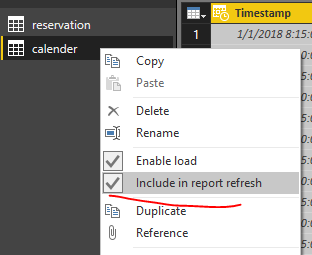
Could you please check did you disable the option ?


22.PNG


Regards,

Frank

Community Support Team _ Frank
If this post helps, then please consider Accept it as the solution to help the others find it more quickly.

Thanks for your reply. while loading from recent sources is showing empty, whereas when i check table in database, there rows in that table.

Why does Power BI table shows ''This table is empty" when data exits in oracle table?

I'm having the same problem. The query uses a sql server source. Other tables from that database load fine. It's only the largest table that is showing "table is empty".

check whether table is empty?

if data are getting inserted in that table, make sure COMMIT is performed for each or in bactch.

if data is there and timing out from Power BI refresh then UNCHECK parallel load process in Power BI option

Helpful resources

Announcements
Power BI DataViz World Championships

Power BI Dataviz World Championships

The Power BI Data Visualization World Championships is back! Get ahead of the game and start preparing now!

December 2025 Power BI Update Carousel

Power BI Monthly Update - December 2025

Check out the December 2025 Power BI Holiday Recap!

FabCon Atlanta 2026 carousel

FabCon Atlanta 2026

Join us at FabCon Atlanta, March 16-20, for the ultimate Fabric, Power BI, AI and SQL community-led event. Save $200 with code FABCOMM.