Join us at FabCon Atlanta from March 16 - 20, 2026, for the ultimate Fabric, Power BI, AI and SQL community-led event. Save $200 with code FABCOMM.
Register now!Vote for your favorite vizzies from the Power BI Dataviz World Championship submissions. Vote now!
Hi,
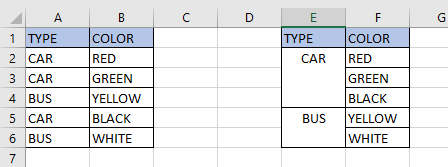
I would like to ask you for help. I have table with many columns and i want to re-organize the visualization, see below for example:
On the left side there is the current situation, on the rigt side there is what i want.
Is it possible to do this in Power Bi Desktop?
Thanks, have a nice day
R.
Solved! Go to Solution.
Hi @Randalnik,
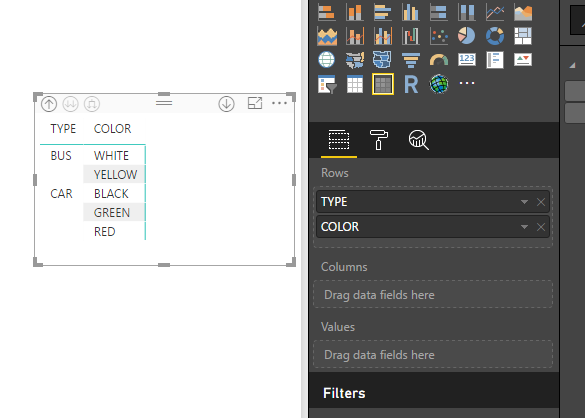
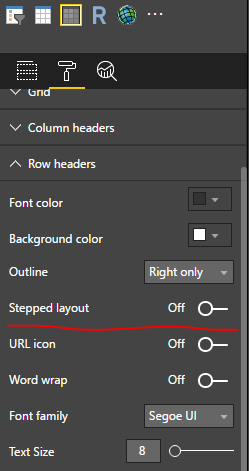
In Power BI desktop version 2.48.4792.721 64-bit (July 2017), you can create a matrix visual, place both the TYPE and COLOR columns in Rows property, turn off the Stepped layout OFF. You can download attached pbix file.
Best Regards,
QiuyunYu
Hi @Randalnik,
In Power BI desktop version 2.48.4792.721 64-bit (July 2017), you can create a matrix visual, place both the TYPE and COLOR columns in Rows property, turn off the Stepped layout OFF. You can download attached pbix file.
Best Regards,
QiuyunYu
Hi @v-qiuyu-msft,
Thanks for your fast help! I would like to ask you one more questiono.
I have been solving problem with conditional formating text in table (its impossible to do this) but i had found some sick solution.
Anyway my status is following:
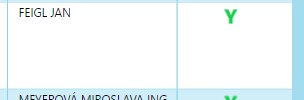
I have main table with data (name, adress... and some values in (-1,1) and small tables constist of 2 columns: value (-1,1 >>> its connected to main table) and images (Y,N). I have created table with these atributes (name... Y/N) but these pictures show as big but they are very small, see below:
Is there any optin how to setup the size of pictures in POwerBI (data category: Image URL) ? I cant create smaller N/Y (has cca 40x40 pixels)
Thanks, have a nice day,
R.
Hi, I was going through this post today and Thought to share the details if it helps to get to the solution. Refer the below link.
http://nisalbi.blogspot.com/2018/01/how-to-visualize-images-dynamically.html
Refer the link ( https://www.iconsdb.com ) to download the popular icons with different sizes (16*16 or 24*24 or 32*32 or 48*48 or 64*64 etc.)
Thank you.
Vote for your favorite vizzies from the Power BI World Championship submissions!
If you love stickers, then you will definitely want to check out our Community Sticker Challenge!
Check out the January 2026 Power BI update to learn about new features.
| User | Count |
|---|---|
| 64 | |
| 51 | |
| 46 | |
| 23 | |
| 19 |
| User | Count |
|---|---|
| 138 | |
| 111 | |
| 50 | |
| 33 | |
| 29 |