FabCon is coming to Atlanta
Join us at FabCon Atlanta from March 16 - 20, 2026, for the ultimate Fabric, Power BI, AI and SQL community-led event. Save $200 with code FABCOMM.
Register now!- Power BI forums
- Get Help with Power BI
- Desktop
- Service
- Report Server
- Power Query
- Mobile Apps
- Developer
- DAX Commands and Tips
- Custom Visuals Development Discussion
- Health and Life Sciences
- Power BI Spanish forums
- Translated Spanish Desktop
- Training and Consulting
- Instructor Led Training
- Dashboard in a Day for Women, by Women
- Galleries
- Data Stories Gallery
- Themes Gallery
- Contests Gallery
- QuickViz Gallery
- Quick Measures Gallery
- Visual Calculations Gallery
- Notebook Gallery
- Translytical Task Flow Gallery
- TMDL Gallery
- R Script Showcase
- Webinars and Video Gallery
- Ideas
- Custom Visuals Ideas (read-only)
- Issues
- Issues
- Events
- Upcoming Events
Get Fabric Certified for FREE during Fabric Data Days. Don't miss your chance! Request now
- Power BI forums
- Forums
- Get Help with Power BI
- Desktop
- Re: Table border color in JSON
- Subscribe to RSS Feed
- Mark Topic as New
- Mark Topic as Read
- Float this Topic for Current User
- Bookmark
- Subscribe
- Printer Friendly Page

- Mark as New
- Bookmark
- Subscribe
- Mute
- Subscribe to RSS Feed
- Permalink
- Report Inappropriate Content
Table border color in JSON
Hello,
I am trying to change the border color for tables in JSON, but I am unable to find out the code for this. The color I want to change is located under "Grid" and "Border".
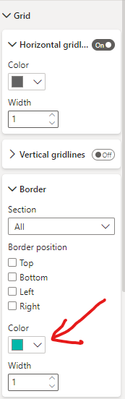
This will change this line:
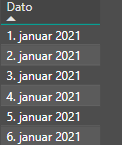
This is how I have implemented the table code into the JSON document:
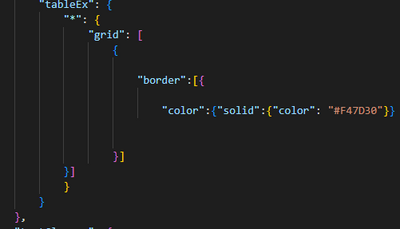
However, this doesn't seem to work. Any ideas how this is done?
Also, are there any place where I can find updated JSON codes for each elements in Power BI? As Power BI gets an update, I am unable to find out how to edit in JSON.
Thanks in advance!
Solved! Go to Solution.


- Mark as New
- Bookmark
- Subscribe
- Mute
- Subscribe to RSS Feed
- Permalink
- Report Inappropriate Content
Hi again @ThomasCh ,
One last try for the sake of our pride:
Try adding this line of code to the "Grid" section instead of border:

If this works, you buy me coffee later 🙂
If it doesn't work, at least we gave our best!
Hope I was of assistance!
Cheers
Joao Marcelino
Ps- Did I answer your question? Mark my post as a solution! Kudos are also appreciated 🙂
- Mark as New
- Bookmark
- Subscribe
- Mute
- Subscribe to RSS Feed
- Permalink
- Report Inappropriate Content
I'm glad I could help, it was a pleasure 🙂
- Mark as New
- Bookmark
- Subscribe
- Mute
- Subscribe to RSS Feed
- Permalink
- Report Inappropriate Content
Hi @ThomasCh ,
How are you? 🙂
There is an amazing JSON visuals repository for Power BI, that the brilliant and kind Matt Rudy ( MattRudy (Matt Rudy) · GitHub) did and shares for free: GitHub - MattRudy/PowerBI-ThemeTemplates: JSON Templates for assembling Power BI Themes
What you probably need to do is:
Go to the specific visual you need
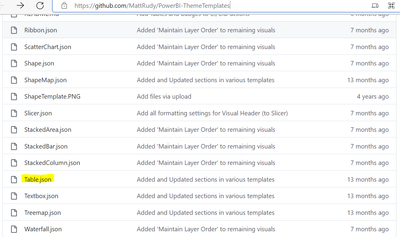
And then, by keeping the same structure, add the piece of code you need, probably this:
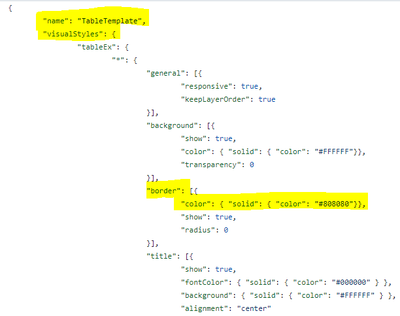
I hope this helps!
Hope I was of assistance!
Cheers
Joao Marcelino
Ps- Did I answer your question? Mark my post as a solution! Kudos are also appreciated 🙂
- Mark as New
- Bookmark
- Subscribe
- Mute
- Subscribe to RSS Feed
- Permalink
- Report Inappropriate Content
Hello there, and thank you for your reply!
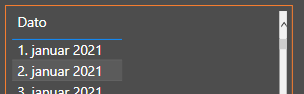
I know about this site, and unfortunately it doesn't look like it has been updated lately. As you can see from my attached photo, that attribute changes the border for the whole table, and not where I want it to change (that blue line should be orange).
- Mark as New
- Bookmark
- Subscribe
- Mute
- Subscribe to RSS Feed
- Permalink
- Report Inappropriate Content
Hi again @ThomasCh ,
One last try for the sake of our pride:
Try adding this line of code to the "Grid" section instead of border:
If this works, you buy me coffee later 🙂
If it doesn't work, at least we gave our best!
Hope I was of assistance!
Cheers
Joao Marcelino
Ps- Did I answer your question? Mark my post as a solution! Kudos are also appreciated 🙂

- Mark as New
- Bookmark
- Subscribe
- Mute
- Subscribe to RSS Feed
- Permalink
- Report Inappropriate Content
Hi @JoaoMarcelino ,
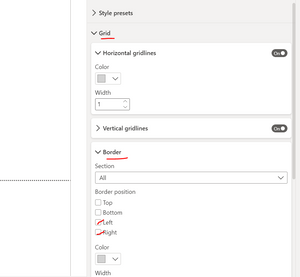
I am also facing similar issue. I followed the suggestion you made but not sure why it is not working in my case. Still I am unable to invoke left and right border to the grid. If possible can you please correct my mistake.

{
	"name": "TableTemplate",
	"visualStyles": {
		"tableEx": {
			"*": {
				"grid": [{
					"gridVertical": true,
					"gridVerticalColor": { "solid": { "color": "#D3D3D3"}},
					"gridVerticalWeight": 1,
					"gridHorizontal": true,
					"gridHorizontalColor": { "solid": { "color": "#D3D3D3"}},
					"gridHorizontalWeight": 1,
					"gridBorder": true,
					"gridBorderColor": { "solid": { "color": "#D3D3D3"}},
					"gridBorderWeight": 1,
					"rowPadding": 5,
					"outlineColor": { "solid": { "color": "#D3D3D3"}},
					"outlineWeight": 1,
					"textSize": 8,
					"imageHeight": 100
				}],
				"columnHeaders": [{
					"fontColor": { "solid": { "color": "#FFFFFF"}},
					"backColor": { "solid": { "color": "#808080"}},
					"outline": "Frame",
					"autoSizeColumnWidth": true,
					"fontFamily": "Segoe UI",
					"fontSize": 8,
					"alignment": "Center",
					"wordWrap": true,
					"bold": true

				}],
				"values": [{
					"fontColorPrimary": { "solid": { "color": "#252423"}},
					"backColorPrimary": { "solid": { "color": "#FFFFFF"}},
					"fontColorSecondary": { "solid": { "color": "#252423"}},
					"backColorSecondary": { "solid": { "color": "#FFFFFF"}},
					"outline": "Frame",
					"urlIcon": true,
					"wordWrap": true,
					"fontFamily": "Segoe UI",
					"fontSize": 8
				}],
				"total": [{
					"totals": true,
					"fontColor": { "solid": { "color": "#FFFFFF"}},
					"backColor": { "solid": { "color": "#808080"}},
					"outline": "Frame",
					"fontFamily": "Segoe UI",
					"fontSize": 8,
					"bold": true
				}],
				"stylePreset": [{
					"name": "BoldHeader"
				}],
				"border":[{
					"show" :true ,
					"color": { "solid": { "color": "#808080"}},
					"radius": 0
				}],
				"title": [{
					"show": true,
					"text":  "Enter Title Using Title Property",
					"alignment": "center",
					"fontColor": { "solid": { "color": "#FFFFFF" } },
					"background": { "solid": { "color": "#808080" } },
					"fontSize": 13,
					"fontFamily": "Calibri",
					"bold": true
				}]
			}
		}
	}
}
Thanks in advance.
- Mark as New
- Bookmark
- Subscribe
- Mute
- Subscribe to RSS Feed
- Permalink
- Report Inappropriate Content
Hey @itsmebvk 🙂
How are you?
It's pretty cool to see that a post from months ago still is read and helps people around the world from this amazing community 🙂
Let me check if I can help... but 1st, is this what you are looking for?

Hope I was of assistance!
Cheers
Joao Marcelino
- Mark as New
- Bookmark
- Subscribe
- Mute
- Subscribe to RSS Feed
- Permalink
- Report Inappropriate Content
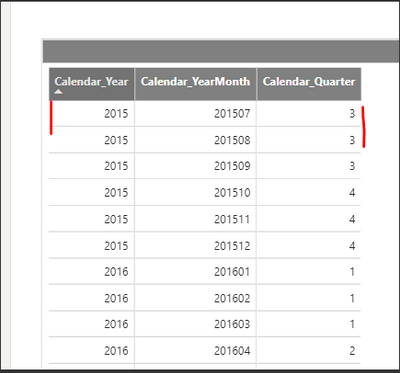
@JoaoMarcelino Thanks for your reply. I am able to get Table border as you can see in below screenshot. But if you look closely first and last column in the table doesn't have borders. but all other columns in the table have borders. I am not sure what I am missing here. Please suggest.
- Mark as New
- Bookmark
- Subscribe
- Mute
- Subscribe to RSS Feed
- Permalink
- Report Inappropriate Content
Hi @itsmebvk 🙂
I tried to replicate what I believe you are looking for:
- To play with the "borders" inside the table, you want to configure the Grids (both horizontal grid and vertical grid);
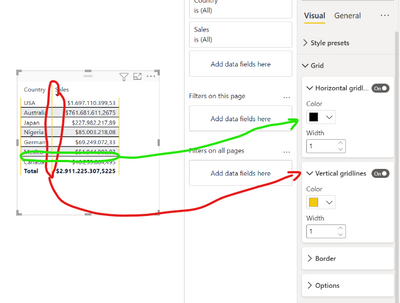
- On the other hand, to activate the borders on the left and right side (at the beginning and end of the table) I would keep it simple and wouldn't touch the code, but configure the table definitions at Grid -> Border -> Section all (in case you want it to catch both the rows and headers) -> left and right.
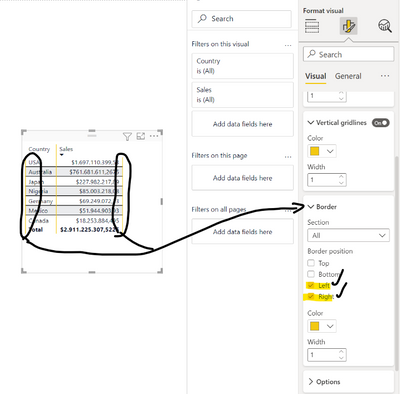
I've attached my example file, so that you can check what I did and try for yourself 😉
Hope I was of assistance!
Cheers,
Joao Marcelino
Ps- Did I answer your question? Mark my post as a solution! Kudos are also appreciated 🙂
- Mark as New
- Bookmark
- Subscribe
- Mute
- Subscribe to RSS Feed
- Permalink
- Report Inappropriate Content
Coffee sent, thanks!

Helpful resources

Power BI Monthly Update - November 2025
Check out the November 2025 Power BI update to learn about new features.

Fabric Data Days
Advance your Data & AI career with 50 days of live learning, contests, hands-on challenges, study groups & certifications and more!

FabCon Atlanta 2026
Join us at FabCon Atlanta, March 16-20, for the ultimate Fabric, Power BI, AI and SQL community-led event. Save $200 with code FABCOMM.


