cancel
Showing results for 
Search instead for 
Did you mean: 

Learn from the best! Meet the four finalists headed to the FINALS of the Power BI Dataviz World Championships! Register now

Reply
jamalq123
Advocate III
Advocate III

Table Visualization Issue (I need ROW level headers)


Dear All,


I have a table which have following fields:

-Business unit

-Month

-Total revenue

-Cost of revenue

-HR Cost

-Overheads

-Profit

Currently I can generate report in the following format whereas I am using Table Visualization :BU Data.jpg


This is a report only for the month of Nov'16 of Business Unit "A". I have a monthly data of all the business units.


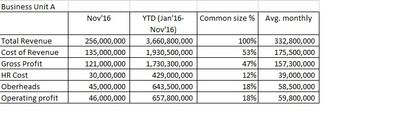
But I want to use ROW header which can be very suitable for me and can provide many info. My requirement is given below:

BU Data.jpg


Since I have all the data, if i could convert label in ROW then i can solve the issue easily, it requires some measures which will cater all the issue.


Kindly help me in this issue.


Regards,


Jamal

5 REPLIES 5
v-haibl-msft
Microsoft Employee
Microsoft Employee

@jamalq123


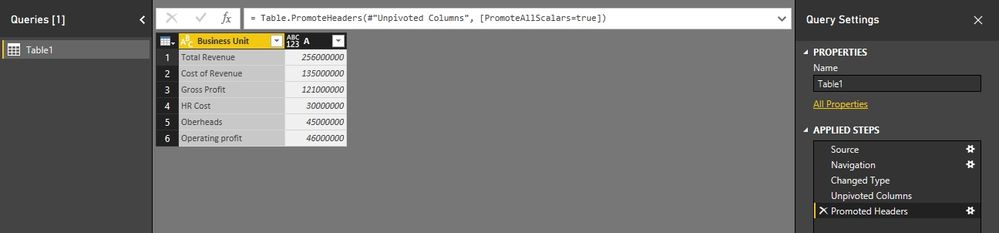
For the first two columns, I think you can get it through unpivot columns in Query Editor. For the reset columns, you may need to create calculate measure/column to show the desired values.


Table Visualization Issue (I need ROW level headers)_1.jpg


Best Regards,
Herbert


Dear Herbert,


Thanks a lot for your response, I have done it, definitely have to work on the unpivot and then worked on filter. I used an extra table where i run s.no. and Accounts heads i.e. Net Revenue, Other Revenue, Total revenue etc. The purpse of this table is to maiantan the data in accounting format.


I did a lot here, incorporated CAGR, current month financials and same month last year, Year to date comparision vs. sama perod last year comparision. Please check, neeed the community feedback to further improve it. This will be abslutely fine for the financials guys.


If you need pbix, please share email. Since we should always spread the knowledge.


https://app.powerbi.com/view?r=eyJrIjoiYTA2MjA3MTQtNzkzNy00NTI2LWE3ODEtNTAyOWYwOGNjNWJkIiwidCI6ImY5Y...


Regards,


Jamal Qamar


jamalq123
Advocate III
Advocate III


Dear All,


I have a table which have following fields:

-Business unit

-Month

-Total revenue

-Cost of revenue

-HR Cost

-Overheads

-Profit

Currently I can generate report in the following format whereas I am using Table Visualization :BU Data.jpg


This is a report only for the month of Nov'16 of Business Unit "A". I have a monthly data of all the business units.


But I want to use ROW header which can be very suitable for me and can provide many info. My requirement is given below:

BU Data.jpg


 Since I have all the data, if i could convert label in ROW then i can solve the issue easily, it requires some measures which will cater all the issue.


Kindly help me in this issue.


Regards,


Jamal

Please see the Embed Code given below:


https://app.powerbi.com/view?r=eyJrIjoiMDBhZDI1MWYtYTA2My00MGUyLWJkNzUtOWY3ZjNlYThiOTMyIiwidCI6ImY5Y...


I have incorporated some dummy figures and I need report in the form of  "Table - B"


I also tried to use Unpivot, but it can not solve the issue. 

Helpful resources

Announcements
Join our Fabric User Panel

Join our Fabric User Panel

Share feedback directly with Fabric product managers, participate in targeted research studies and influence the Fabric roadmap.

February Power BI Update Carousel

Power BI Monthly Update - February 2026

Check out the February 2026 Power BI update to learn about new features.

FabCon Atlanta 2026 carousel

FabCon Atlanta 2026

Join us at FabCon Atlanta, March 16-20, for the ultimate Fabric, Power BI, AI and SQL community-led event. Save $200 with code FABCOMM.