cancel
Showing results for 
Search instead for 
Did you mean: 

A new Data Days event is coming soon! This time we’re going bigger than ever. Fabric, Power BI, SQL, AI and more. Don't miss out.

Reply
newpbiuser01
Helper V
Helper V

Table Visual Conditional Filtering

Hello,


I have a table visual that I'd like to filter based on the max value in a column - so as an example, in the table visual below, I'd like to only include the rows where the FY-FQ = max(FY-FQ). 

Before:

CountryCurrencyFY-FQ
USUSD2021-1
CanadaCAD2022-2
UKGBP2022-1
AustraliaAUD2020-0


After:

CountryCurrencyFY-FQ
CanadaCAD2022-2


Would anyone know how to do this in Power BI? I'd really appreciate any help!

Thank you!


1 ACCEPTED SOLUTION
ribisht17
Super User
Super User

@newpbiuser01 


Step - 0

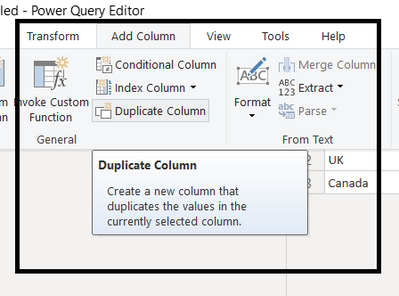
NOTE: >> Duplicate your Date Column so that one column can be used to Split

ribisht17_0-1652809787773.png


Step 1

Split FY-FQ by delimiter


Step-2

ribisht17_0-1652808990693.png

Step - 3

Combine both the splits as below

COMBINE = CONCATENATE(Sheet1[FY-FQ.1],Sheet1[FY-FQ.2])
 
Step - 4
Filter = if( CALCULATE(MAX(Sheet1[COMBINE]),ALL(Sheet1))=MAX(Sheet1[COMBINE]),1,0)
 
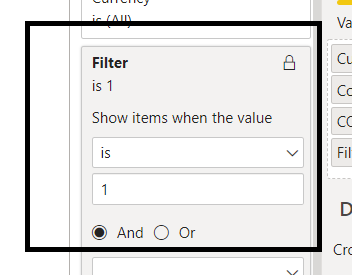
Filter Step - 4 as 1
 
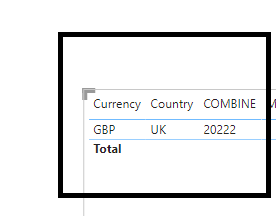
FINAL OUTPUT
ribisht17_1-1652809144140.png


ribisht17_2-1652809185008.png


Regards,
Ritesh
Mark my post as a solution if it helped you| Munde and Kudis (Ladies and Gentlemen) I like your Kudos!! !!
My YT Channel Dancing With Data !! Connect on Linkedin !!Power BI for Tableau Users 


View solution in original post

1 REPLY 1
ribisht17
Super User
Super User

@newpbiuser01 


Step - 0

NOTE: >> Duplicate your Date Column so that one column can be used to Split

ribisht17_0-1652809787773.png


Step 1

Split FY-FQ by delimiter


Step-2

ribisht17_0-1652808990693.png

Step - 3

Combine both the splits as below

COMBINE = CONCATENATE(Sheet1[FY-FQ.1],Sheet1[FY-FQ.2])
 
Step - 4
Filter = if( CALCULATE(MAX(Sheet1[COMBINE]),ALL(Sheet1))=MAX(Sheet1[COMBINE]),1,0)
 
Filter Step - 4 as 1
 
FINAL OUTPUT
ribisht17_1-1652809144140.png


ribisht17_2-1652809185008.png


Regards,
Ritesh
Mark my post as a solution if it helped you| Munde and Kudis (Ladies and Gentlemen) I like your Kudos!! !!
My YT Channel Dancing With Data !! Connect on Linkedin !!Power BI for Tableau Users 


Helpful resources

Announcements
May Power BI Update Carousel

Power BI Monthly Update - May 2026

Check out the May 2026 Power BI update to learn about new features.

Fabric SQL PBI Data Days

Data Days 2026 coming soon!

Sign up to receive a private message when registration opens and key events begin.

New to Fabric survey Carousel

New to Fabric Survey

If you have recently started exploring Fabric, we'd love to hear how it's going. Your feedback can help with product improvements.

Power BI DataViz World Championships carousel

Power BI DataViz World Championships - June 2026

A new Power BI DataViz World Championship is coming this June! Don't miss out on submitting your entry.