Join us at FabCon Atlanta from March 16 - 20, 2026, for the ultimate Fabric, Power BI, AI and SQL community-led event. Save $200 with code FABCOMM.
Register now!The Power BI Data Visualization World Championships is back! Get ahead of the game and start preparing now! Learn more
I've got a tricky one ... tricky for me at least 🙂
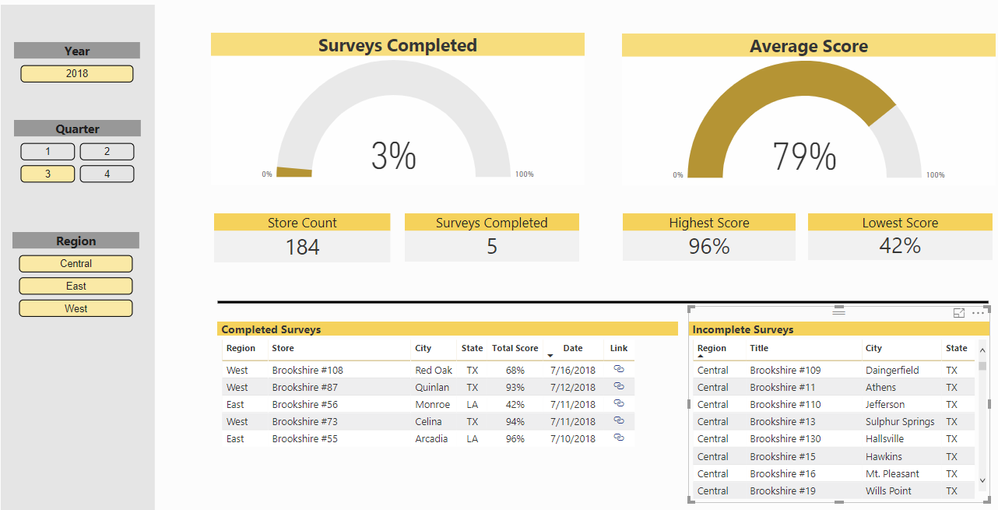
I have a table of Stores and a table of Surveys with a Many (Surveys) to One (Stores) relationship. Surveys are completed each quarter for every store.
I have a DAX formula in place that says if survey score > 0 then 1. That filters the 'Completed Surveys' table (also filtered by the Survey Date slicers). but I'm having trouble identifying the exceptions to filter the 'Incomplete Surveys' table. I can't simply say where Survey Score = 0 because the Date filters knock them all out as a Survey Date doesn't exist for those not completed.
Essentially I'm looking for something that says if exists in 'Completed Surveys' then don't show in 'Incomplete Surveys'
Appreciate any help or ideas!!!
Hi @timothywright27,
You don't need to post your senssive data. Just need some dummy data sharing the same table structure with your actual dataset. And please show us your desired output.
Regards,
Yuliana Gu
Here is the file:
https://drive.google.com/file/d/1mvyhtcGR4ybRBIl3fm9b_jr1KMSpKn1S/view?usp=sharing
Just to recap...
Stores (One) to Surveys (Many)
One survey per store, per quarter.
I can't seem to figure out how to exclude Completed items from the Incomplete list. And of course a date does not exist until the survey complete.
Any help would be greatly appreacited. Thanks!
Hello, @timothywright27
Create Calculate Column at Survey Table, somthing like this:
Survey Status = IF (Survey[Survey Score] > 0, "Completed", "Incomleted" ) and use this column in slicer.
Thanks for the response. However, this doesn't factor in the Date Slicers. The lists need to be filtered by the dates, but if no date exists then they will be eliminated from the 'Incomplete' List.
Can you share your .pbix file?
I appreciate the help, but there is too much sensitive data attached to share publicly. Thanks.
The Power BI Data Visualization World Championships is back! Get ahead of the game and start preparing now!
| User | Count |
|---|---|
| 143 | |
| 125 | |
| 100 | |
| 80 | |
| 55 |