cancel
Showing results for 
Search instead for 
Did you mean: 

The Power BI Data Visualization World Championships is back! Get ahead of the game and start preparing now! Learn more

Reply
Chacos
Helper I
Helper I

Tabbed visualization like the one in example. How to create?

Guys,


Here is the report in Gallery :

https://community.powerbi.com/t5/Data-Stories-Gallery/COVID-19-NSW-Transport-Impact/m-p/1193474/high...

(I had also downloaded .pbix from their website).

How did they come out with the tabbed viz in the top left quadrant ("Percentage Change by Month (2020 vs 2019)")?

From the reverse engineering I've gathered:

1) the 3 tabs ("YoY Comparison", "Monthly", "Fare Type") are just buttons. Intersting is that when they are clicked they increase, intersting.

2) They used Bookmarks I think to select layout (?)

3) Then they hide/unhide the viz?


Anyone, can you please take a look and see what else you found out?


Thanks!


1 ACCEPTED SOLUTION
v-deddai1-msft
Community Support
Community Support

Hi @Chacos ,


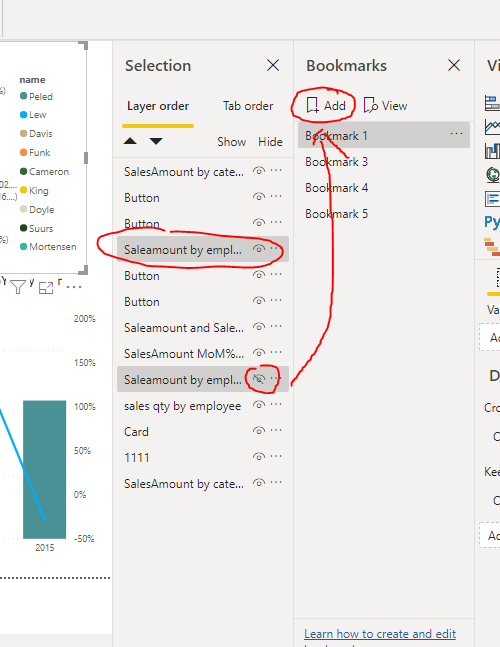
Yes, it is the use of combination of buttons and bookmarks. You can create three button and three bookmarks. For each bookmark, you need to keep the visual you want to show and hide two other viusals that you want to hide. Then mulitple select the viusals in selection pane ,add a new bookmark and choose selected visuals for the bookmark(lets you choose which visuals are affected by a bookmark : https://www.wiseowl.co.uk/blog/s2583/bookmarks-visuals.htm

Capture.PNGCapture2.PNG


When you try to create the next bookmark, now very importantly we must unselect the current bookmark ( if you don't then you overwrite it. To unselect a bookmark either create an object then delete it or toggle the visibility of any visual. So far this Owl hasn't found another way to unselect a bookmark!) 


And at last you need to create action for button to the bookmark:

Capture3.PNG


If this post helps, then please consider Accept it as the solution to help the other members find it more quickly.


Best Regards,

Dedmon Dai

View solution in original post

2 REPLIES 2
v-deddai1-msft
Community Support
Community Support

Hi @Chacos ,


Yes, it is the use of combination of buttons and bookmarks. You can create three button and three bookmarks. For each bookmark, you need to keep the visual you want to show and hide two other viusals that you want to hide. Then mulitple select the viusals in selection pane ,add a new bookmark and choose selected visuals for the bookmark(lets you choose which visuals are affected by a bookmark : https://www.wiseowl.co.uk/blog/s2583/bookmarks-visuals.htm

Capture.PNGCapture2.PNG


When you try to create the next bookmark, now very importantly we must unselect the current bookmark ( if you don't then you overwrite it. To unselect a bookmark either create an object then delete it or toggle the visibility of any visual. So far this Owl hasn't found another way to unselect a bookmark!) 


And at last you need to create action for button to the bookmark:

Capture3.PNG


If this post helps, then please consider Accept it as the solution to help the other members find it more quickly.


Best Regards,

Dedmon Dai

amitchandak
Super User
Super User

@Chacos , To me it seems like usages of bookmarks

refer this from Guyinacube -https://www.youtube.com/watch?v=hEAtbGrlKhY

Share with Power BI Enthusiasts: Full Power BI Video (20 Hours) YouTube
Microsoft Fabric Series 60+ Videos YouTube
Microsoft Fabric Hindi End to End YouTube

Helpful resources

Announcements
Power BI DataViz World Championships

Power BI Dataviz World Championships

The Power BI Data Visualization World Championships is back! Get ahead of the game and start preparing now!

December 2025 Power BI Update Carousel

Power BI Monthly Update - December 2025

Check out the December 2025 Power BI Holiday Recap!

FabCon Atlanta 2026 carousel

FabCon Atlanta 2026

Join us at FabCon Atlanta, March 16-20, for the ultimate Fabric, Power BI, AI and SQL community-led event. Save $200 with code FABCOMM.