cancel
Showing results for 
Search instead for 
Did you mean: 

The Power BI Data Visualization World Championships is back! Get ahead of the game and start preparing now! Learn more

Reply
FEninja_
Helper I
Helper I

TODAY()-1 VS MAX(date) - Weird Behavior

Hello!

I am encountering a weird problem, let me explain it:

Today is 03/13/2023 - and I need to reference Yesterday in my equation.

I have a dax function that when this value is hard-coded (2023,03,12) - the graph shows the appropriate line "f.scope".

FEninja__0-1678718828322.png


However, when the hard-coded line is replaced with a measure (that has the same value) - the line disappears! (see screenshot, "Release-Last Visible Date" has same date value).

FEninja__1-1678718860387.png

Can anybody shed some light into what may be happening?? (DAX BELOW)

BD User Story Scope Forecast = 
VAR rStart = [BD Release Start]
VAR rEnd = [BD Release End]
VAR lastDt= [Release - Last Visible Date]
VAR lastval = CALCULATE(
    [BD User Story Scope]
    ,'DATE'[Date]= lastDt //DATE(2023,03,12)// TODAY()-1
)

RETURN
if( 
    ISBLANK(
        COUNTROWS(
            Filter(
                'DATE',
                'DATE'[Date] >= TODAY() && 'DATE'[Date] <= [BD Release End]
            )
        )
    ),BLANK(),lastval  
1 ACCEPTED SOLUTION

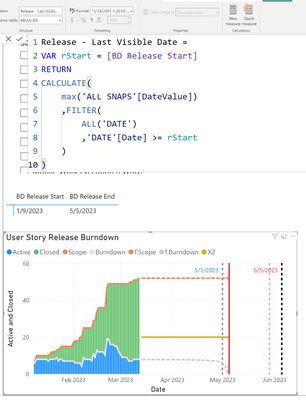
Thank you for your feedback! I did check this, & that was the case - however my issue didn't go away. But I ended up resolving it by taking a closer look at "Release - Last Visible Date" - I realized that the date column was being filtered which was limiting my results. However, after adding a FILTER to this measure + ALL() - My issue was resolved.

Thanks for helping me get there!

FEninja__0-1678800610541.png


View solution in original post

2 REPLIES 2
johnt75
Super User
Super User

Is it possible that [Release - Last Visible Date] is returning a datetime rather than just a date ? One way to check might be to use Performance Analyzer to copy the code for the visual, paste it into DAX Studio and then amend the measure to return the lastDt variable, or simply add a new column to the SUMMARIZECOLUMNS which shows the [Release - Last Visible Date] measure.

Thank you for your feedback! I did check this, & that was the case - however my issue didn't go away. But I ended up resolving it by taking a closer look at "Release - Last Visible Date" - I realized that the date column was being filtered which was limiting my results. However, after adding a FILTER to this measure + ALL() - My issue was resolved.

Thanks for helping me get there!

FEninja__0-1678800610541.png


Helpful resources

Announcements
Power BI DataViz World Championships

Power BI Dataviz World Championships

The Power BI Data Visualization World Championships is back! Get ahead of the game and start preparing now!

December 2025 Power BI Update Carousel

Power BI Monthly Update - December 2025

Check out the December 2025 Power BI Holiday Recap!

FabCon Atlanta 2026 carousel

FabCon Atlanta 2026

Join us at FabCon Atlanta, March 16-20, for the ultimate Fabric, Power BI, AI and SQL community-led event. Save $200 with code FABCOMM.