cancel
Showing results for 
Search instead for 
Did you mean: 

Did you hear? There's a new SQL AI Developer certification (DP-800). Start preparing now and be one of the first to get certified. Register now

Reply
ThomasWeppler
Impactful Individual

Syntax error when add multiple colums

Hi,

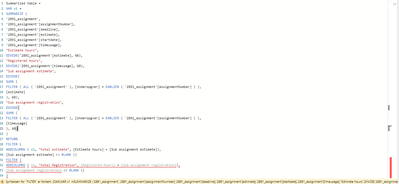
I try to create a new table with multiple new colums, but I get a syntax error.
When I Ctrl+X Ctrl+V the last lines of code and swift the positions of the two filters the later will not work anymore, while the first one starts to work.

syntax error.png

Does anyone know where I made the mistake?

1 ACCEPTED SOLUTION
Anonymous
Not applicable

Hi  @ThomasWeppler  ,

You can change the Dax function after Return to try the following sub-functions:

Var x2=
Filter(
ADDCOLUMNS(x1,”total estimate”,[Estimate hours] + [Sub assignment estimate] ),
[ Sub assignment estimate] <> BLANK())
Return
filter(
ADDCOLUMNS ( x2,”total Registration”,[Registered hours] + [Sub assignment registration]),
[Sub assignment registration] <>BLANK())


Best Regards,

Liu Yang

If this post helps, then please consider Accept it as the solution to help the other members find it more quickly.

View solution in original post

5 REPLIES 5
Anonymous
Not applicable

Hello @ThomasWeppler 
Please check the below codes and change the table and measures accordingly.
Summarized table =
VAR x1 =
SUMMARIZE (
'Recordings',
'Recordings'[ID],
'Recordings'[Actor],
Recordings[Hour],
"Estimate hours", DIVIDE ( Recordings[Hour], 60 ),
"Registered hours", DIVIDE ( Recordings[Hour], 60 ),
"Sub assignment estimate",
DIVIDE (
SUMX (
FILTER ( ALL ( Recordings ), Recordings[Hour] = EARLIER ( Recordings[Hour] ) ),
Recordings[Hour]
),
60
),
"Sub assignment registration",
DIVIDE (
SUMX (
FILTER ( ALL ( Recordings ), Recordings[Hour] = EARLIER ( Recordings[Hour] ) ),
Recordings[Hour]
),
60
)
)
VAR x2 =
FILTER (
ADDCOLUMNS (
x1,
"total estimate", [Estimate hours] + [Sub assignment estimate]
),
[Sub assignment estimate] <> BLANK ()
)
VAR x3 =
FILTER (
ADDCOLUMNS (
x1,
"total Registration", [Registered hours] + [Sub assignment registration]
),
[Sub assignment registration] <> BLANK ()
)
RETURN
UNION ( x2, x3 )

Anonymous
Not applicable

Hi  @ThomasWeppler  ,

You can change the Dax function after Return to try the following sub-functions:

Var x2=
Filter(
ADDCOLUMNS(x1,”total estimate”,[Estimate hours] + [Sub assignment estimate] ),
[ Sub assignment estimate] <> BLANK())
Return
filter(
ADDCOLUMNS ( x2,”total Registration”,[Registered hours] + [Sub assignment registration]),
[Sub assignment registration] <>BLANK())


Best Regards,

Liu Yang

If this post helps, then please consider Accept it as the solution to help the other members find it more quickly.

Anonymous
Not applicable

Hello @ThomasWeppler 

Check your second last filter end bracket.

amitchandak
Super User
Super User

@ThomasWeppler , Can you please share formula in text format. I think some paranthesis are misplaced

Share with Power BI Enthusiasts: Full Power BI Video (20 Hours) YouTube
Microsoft Fabric Series 60+ Videos YouTube
Microsoft Fabric Hindi End to End YouTube

Sure


Summarized table =
VAR x1 =
SUMMARIZE (
'2891_assignment',
'2891_assignment'[assignmentNumber],
'2891_assignment'[deadline],
'2891_assignment'[estimate],
'2891_assignment'[startdate],
'2891_assignment'[timeusage],
"Estimate hours",
DIVIDE('2891_assignment'[estimate], 60),
"Registered hours",
DIVIDE('2891_assignment'[timeusage], 60),
"Sub assignment estimate",
DIVIDE(
SUMX (
FILTER ( ALL ( '2891_assignment' ), [Underopgver] = EARLIER ( '2891_assignment'[assignmentNumber] ) ),
[estimate]
), 60),
"Sub assignment registration",
DIVIDE(
SUMX (
FILTER ( ALL ( '2891_assignment' ), [Underopgver] = EARLIER ( '2891_assignment'[assignmentNumber] ) ),
[timeusage]
), 60)
)
RETURN
FILTER (
ADDCOLUMNS ( x1, "total estimate", [Estimate hours] + [Sub assignment estimate]),
[Sub assignment estimate] <> BLANK ()
)
FILTER (
ADDCOLUMNS ( x1, "total Registration", [Registered hours] + [Sub assignment registration]),
[Sub assignment registration] <> BLANK ()
)

Helpful resources

Announcements
April Power BI Update Carousel

Power BI Monthly Update - April 2026

Check out the April 2026 Power BI update to learn about new features.

Fabric SQL PBI Data Days

Data Days 2026 coming soon!

Sign up to receive a private message when registration opens and key events begin.

New to Fabric survey Carousel

New to Fabric Survey

If you have recently started exploring Fabric, we'd love to hear how it's going. Your feedback can help with product improvements.

Power BI DataViz World Championships carousel

Power BI DataViz World Championships - June 2026

A new Power BI DataViz World Championship is coming this June! Don't miss out on submitting your entry.