cancel
Showing results for 
Search instead for 
Did you mean: 

Learn from the best! Meet the four finalists headed to the FINALS of the Power BI Dataviz World Championships! Register now

Reply
Anonymous
Not applicable

Synoptic Panel

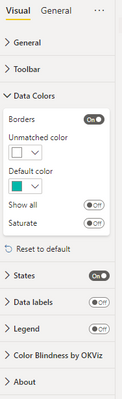
I have problems with implementing Synoptic Panel into my PowerBI report. Firstly, everything worked. I selected the needed areas in a Synoptic Designer online and implemented the map as .svg in PowerBI report, my category are fields and measure is another infomation that I would like to have when someone hovers over it. When I tried to open PowerBI the next day and even now, with creating a new map in Synoptic Designer, it only recognizes 3 out of 7 fields and shows this unmatched colour part in the visalization part.

NikolinaS_0-1661239736503.png

Did anyone encounter this problem?

1 ACCEPTED SOLUTION
Anonymous
Not applicable

@Anonymous The problem was that I had filters on that were on another in-page so I had to edit interactions. It actually works now 🙂

View solution in original post

2 REPLIES 2
Anonymous
Not applicable

Hi @Anonymous ,

Hope the online document can help you.

Visual Awesomeness Unlocked – Using the Synoptic Panel | Blog de Microsoft Power BI | Microsoft Power BI

Visual Properties

  • Unmatched areas
    • Show: shows areas that do not match your data – when off, only areas that match Legend/Details measures are visible.
    • Colorize: applies Default Color to unmatched areas.
    • Labels: shows the area name over every unmatched area.


If I have misunderstand your meaning, please provide more details with the error.


Best Regards

Community Support Team _ Polly


If this post helps, then please consider Accept it as the solution to help the other members find it more quickly.

Anonymous
Not applicable

@Anonymous The problem was that I had filters on that were on another in-page so I had to edit interactions. It actually works now 🙂

Helpful resources

Announcements
Join our Fabric User Panel

Join our Fabric User Panel

Share feedback directly with Fabric product managers, participate in targeted research studies and influence the Fabric roadmap.

February Power BI Update Carousel

Power BI Monthly Update - February 2026

Check out the February 2026 Power BI update to learn about new features.

FabCon Atlanta 2026 carousel

FabCon Atlanta 2026

Join us at FabCon Atlanta, March 16-20, for the ultimate Fabric, Power BI, AI and SQL community-led event. Save $200 with code FABCOMM.