Forum Discussion

Switch statement With Dates - Calculated Column vs Measure - Different results?

- 7 years ago
I have the following switch statement
term test = SWITCH(TRUE(),
MAX(test[month])>=9&&MAX(test[month])<=12,"fall",
MAX(test[month])>=1&&MAX(test[month])<=3,"winter",
MAX(test[month])>=4&&MAX(test[month])<=6,"spring",
MAX(test[month])>=7&&MAX(test[month])<=8,"summer")
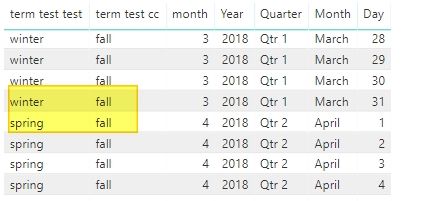
the statement is evaluating to "fall" in all rows; your logic isn't correct.
I think you'll find this to work as intended; allowing you to use as a calculated column:
term test =
SWITCH(
    TRUE(),
    test[month] <= 3, "winter",
    test[month] <= 6, "spring",
    test[month] <= 9, "summer",
    test[month] <= 12, "fall"
)
As far as the differences, I generally think about using a Calculated Column to 'get' a value that did not exist in my dataset as its own "thing". To help me "see" the data. I realize that is enormously generalized, however in your calendar example you can see something similar where you extracted the [month] from the [Date] so you could use/see that number.
You could modify my example to the following code thereby not needing to extract the [month] in its own column:
Column =
SWITCH(
    TRUE(),
    MONTH(test[Date]) <= 3, "winter",
    MONTH(test[Date]) <= 6, "spring",
    MONTH(test[Date]) <= 9, "summer",
    MONTH(test[Date]) <= 12, "fall"
)
Maybe someone else has a better explanation that they're willing to share.
 7 years ago
I'd like to elaborate further.
Measures output dynamic values (not stored in data) that operate over your entire model. This means that they don't care what table they sit on.
CalcColumns generate an output based on the input row data, and store the output in data. You can still call values from other tables, but it must be from a lookup or aggregate such as max.
Now to explain why the measure worked and the column didn't.
When you specified MAX() on month and date, it exited the row context and looked at the entire table, and took the MAX value. Since the MAX(Month) on your table is 12, every row returned Fall. Since MAX is an aggregate, it ignores the row context / values. In addition, CalcColumns are calculated only when the table is refreshed, so it only does it once, and doesn't apply any filters unless specified in the formula.
This means the CalcColumn should be written without MAX(). I've also removed the table name because it doesn't matter when referencing values on the same row, though you do need the table name when aggregating.
term test =
SWITCH( TRUE(),
    [month] >= 1 && [month] <=  3, "winter",
    [month] >= 4 && [month] <=  6, "spring",
    [month] >= 7 && [month] <=  8, "summer",
    [month] >= 9 && [month] <= 12, "fall"
)
So why did this work as a measure? It's because you unknowingly filtered the dataset used by the measure when you added the [date] column to your table. So while the measure looks at an entire table, it also considers the incoming filters, in this case [date] was a filter applied to each row in your table visual. It's like writing FILTER(MyTable, [date] = "2018-04-03"), but it does this on each table visual row. Filtered dataset is then passed to your measure which says MAX(Month), and since the dataset is filtered for this row to 2019/4/3, it uses the month number 4.
I hope this has helped. I know it's confusing, but there are higher level concepts than a rule set of when to use either. It's easier to understand the concept that the rules.
Thanks,
Jon

I have the following switch statement
term test = SWITCH(TRUE(),
MAX(test[month])>=9&&MAX(test[month])<=12,"fall",
MAX(test[month])>=1&&MAX(test[month])<=3,"winter",
MAX(test[month])>=4&&MAX(test[month])<=6,"spring",
MAX(test[month])>=7&&MAX(test[month])<=8,"summer")
the statement is evaluating to "fall" in all rows; your logic isn't correct.
I think you'll find this to work as intended; allowing you to use as a calculated column:
term test =
SWITCH(
    TRUE(),
    test[month] <= 3, "winter",
    test[month] <= 6, "spring",
    test[month] <= 9, "summer",
    test[month] <= 12, "fall"
)
As far as the differences, I generally think about using a Calculated Column to 'get' a value that did not exist in my dataset as its own "thing". To help me "see" the data. I realize that is enormously generalized, however in your calendar example you can see something similar where you extracted the [month] from the [Date] so you could use/see that number.
You could modify my example to the following code thereby not needing to extract the [month] in its own column:
Column =
SWITCH(
    TRUE(),
    MONTH(test[Date]) <= 3, "winter",
    MONTH(test[Date]) <= 6, "spring",
    MONTH(test[Date]) <= 9, "summer",
    MONTH(test[Date]) <= 12, "fall"
)
Maybe someone else has a better explanation that they're willing to share.

Hi Chris. Wonder if you can help. I need the same type of formula. A switch command in custom column that will return a value of 01 2023, if an invoice date held in ky table is onor after 2 28 2023 and on or before 4 2 2023. I can't make it work with specific dates. I want to use switch so I can include conditions for q2 and q3 etc. Any ideas?
- ChrisMendoza3 years agoResident Rockstar
Anonymous - I'm not sure I fully understand your question. I mocked up what I think you are looking for:
Column =
SWITCH (
    TRUE (),
    TableName[InvoiceDate] >= DATE ( 2023, 02, 28 )
        && TableName[InvoiceDate] <= DATE ( 2023, 04, 2 ), "01 2023",
    "something"
)