cancel
Showing results for 
Search instead for 
Did you mean: 

The Power BI Data Visualization World Championships is back! Get ahead of the game and start preparing now! Learn more

Reply
rudiklein
Advocate III
Advocate III

Switch Theme button missing from ribbon

Hi,


I read that theme switching would be available in the March update.  I am running 2.44.4675.521 64-bit (March 2017), but I don't see the button in the ribbon. De-install/re-install didn't do the trick either.


Am I missing something? (except for the button Smiley Very Happy )


Thanks,


Rudi

1 ACCEPTED SOLUTION
Phil_Seamark
Microsoft Employee
Microsoft Employee

Hi @rudiklein


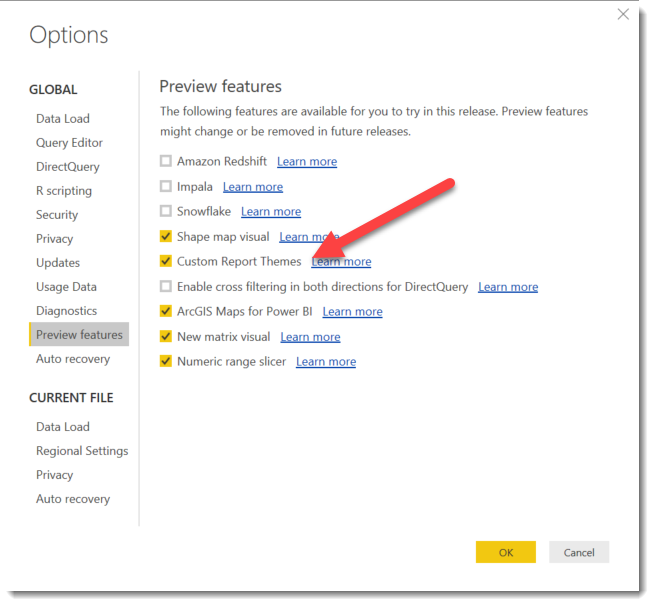
Have you enabled it in the Preview Features?


File -> Options and Settings -> Options -> Preview Features


Optinos.png


To learn more about DAX visit : aka.ms/practicalDAX

Proud to be a Datanaut!

View solution in original post

6 REPLIES 6
Phil_Seamark
Microsoft Employee
Microsoft Employee

Hi @rudiklein


Have you enabled it in the Preview Features?


File -> Options and Settings -> Options -> Preview Features


Optinos.png


To learn more about DAX visit : aka.ms/practicalDAX

Proud to be a Datanaut!

Hi.  I do not have the "Preview Features" in Options.  Does anyone know why would that be?

Anonymous
Not applicable

Hi,


I have the same issue I don't see that choice in the ribbon list . Is this normal? anybody has a suggestion ?

@Phil_Seamark,


I wasn't aware I had to enable it. I did look in the preview settings on a gut feeling, but missed it completely anyway.


Thanks,


Rudi

Please enable this option:

Power BI Desktop--> File --> Options and Settings --> Options --> Preview Features--> Check the option 'Custom Report Themes'.


After enabling this option, restart Power BI.

It should work.

Helpful resources

Announcements
Power BI DataViz World Championships

Power BI Dataviz World Championships

The Power BI Data Visualization World Championships is back! Get ahead of the game and start preparing now!

December 2025 Power BI Update Carousel

Power BI Monthly Update - December 2025

Check out the December 2025 Power BI Holiday Recap!

FabCon Atlanta 2026 carousel

FabCon Atlanta 2026

Join us at FabCon Atlanta, March 16-20, for the ultimate Fabric, Power BI, AI and SQL community-led event. Save $200 with code FABCOMM.