Join us at FabCon Atlanta from March 16 - 20, 2026, for the ultimate Fabric, Power BI, AI and SQL community-led event. Save $200 with code FABCOMM.
Register now!The Power BI Data Visualization World Championships is back! Get ahead of the game and start preparing now! Learn more
Hello,
There is a similar issue I found but there are fixed rows where to swap two values. In my case, I have to define dynamically in which rows to swap the values.
I have a Relations table with 3 columns where I need to check 2 columns (item_id and item_to_id) and swap them if needed.
Relations table
| id | item_id | item_to_id | ||
| 1 | 10 | 51 | ||
| 2 | 20 | 61 | ||
| 3 | 51 | 20 | ||
| 4 | 30 | 20 |
A decision which values to swap depends on values on the other two tables (Task and SubTask)
Task table
| id | description | |
| 10 | Task A | |
| 20 | Task B | |
| 30 | Task C |
Subtask table
| id | description | |
| 51 | Subtask X | |
| 61 | Subtask Y |
I'd like to have the Relation table be sorted so that item_id column contains id from the Task table, and item_to_id column contains id from the Subtask or Task table. The resulting table should look like below
| id | item_id | item_to_id | item_id_swapped | item_to_id_swapped | ||||
| 1 | 10 | 51 | 10 | 51 | ||||
| 2 | 20 | 61 | 20 | 61 | ||||
| 3 | 51 | 20 | 20 | 51 | ||||
| 4 | 30 | 20 | 30 | 20 |
Looking forward to any advice.
Solved! Go to Solution.
Thank you @MFelix for your reply. Yes, you understood my issue correctly.
There is an unexpected result in your screenshot - 1st, 2nd, and 4th rows should not be swapped.
Meanwhile, I found more easy way to solve that.
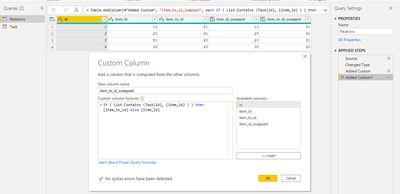
I added Custom Column with the following formula:
for item_id_swapped
= if ( List.Contains (Task[id], [item_id] ) ) then [item_id] else [item_to_id]
and for item_to_id_swapped
= if ( List.Contains (Task[id], [item_id] ) ) then [item_to_id] else [item_id]
The result looks as expected
Hi @Hennadii ,
Not sure if this is what you need but I assume that for each line that the item_id is no present in the task you want to make the change.
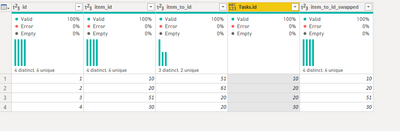
What I did in the query editor was the following:
if [Tasks.id] = null then[item_id]else [Tasks.id]
= Table.ReplaceValue(#"Added Custom",each [Tasks.id],each if [Tasks.id] = null then [item_to_id] else [Tasks.id] ,Replacer.ReplaceValue,{"Tasks.id"})
Final result below and in attach PBIX file (december version).
let
Source = Table.FromRows(Json.Document(Binary.Decompress(Binary.FromText("i45WMlTSUTI0ABKmhkqxOtFKRkCmEYhvBuEbQ6TAgiC+CZBpbADlxwIA", BinaryEncoding.Base64), Compression.Deflate)), let _t = ((type nullable text) meta [Serialized.Text = true]) in type table [id = _t, item_id = _t, item_to_id = _t]),
#"Changed Type" = Table.TransformColumnTypes(Source,{{"id", Int64.Type}, {"item_id", Int64.Type}, {"item_to_id", Int64.Type}}),
#"Merged Queries" = Table.NestedJoin(#"Changed Type", {"item_id"}, Tasks, {"id"}, "Tasks", JoinKind.FullOuter),
#"Expanded Tasks" = Table.ExpandTableColumn(#"Merged Queries", "Tasks", {"id"}, {"Tasks.id"}),
#"Added Custom" = Table.AddColumn(#"Expanded Tasks", "item_to_id_swapped", each if [Tasks.id] = null then[item_id]else [Tasks.id] , Int64.Type),
#"Replaced Value" = Table.ReplaceValue(#"Added Custom",each [Tasks.id],each if [Tasks.id] = null then [item_to_id] else [Tasks.id] ,Replacer.ReplaceValue,{"Tasks.id"}),
#"Renamed Columns" = Table.RenameColumns(#"Replaced Value",{{"Tasks.id", "item_id_swapped"}})
in
#"Renamed Columns"
Regards
Miguel Félix
Proud to be a Super User!
Check out my blog: Power BI em PortuguêsThank you @MFelix for your reply. Yes, you understood my issue correctly.
There is an unexpected result in your screenshot - 1st, 2nd, and 4th rows should not be swapped.
Meanwhile, I found more easy way to solve that.
I added Custom Column with the following formula:
for item_id_swapped
= if ( List.Contains (Task[id], [item_id] ) ) then [item_id] else [item_to_id]
and for item_to_id_swapped
= if ( List.Contains (Task[id], [item_id] ) ) then [item_to_id] else [item_id]
The result looks as expected
Hi @Hennadii ,
My bad when I wrote the formulas I mixed up the two column names.
But glad you were abble to figure out a solution. Don't forget to mark the rigth answer to help others.
Regards
Miguel Félix
Proud to be a Super User!
Check out my blog: Power BI em PortuguêsThe Power BI Data Visualization World Championships is back! Get ahead of the game and start preparing now!
| User | Count |
|---|---|
| 61 | |
| 46 | |
| 40 | |
| 38 | |
| 22 |
| User | Count |
|---|---|
| 178 | |
| 127 | |
| 117 | |
| 77 | |
| 56 |