cancel
Showing results for 
Search instead for 
Did you mean: 

Learn from the best! Meet the four finalists headed to the FINALS of the Power BI Dataviz World Championships! Register now

Reply
Anonymous
Not applicable

Support for SQL the language...

Hi All,

We are asking for Developers to start working with Power BI Desktop and the question has come up about SQL support.

So they are asking for getting data using SQL 200 language is it supported?

Can you call a stored procedure from Power BI?

Can you do group by's using SQL language?


Seems to me like it might be but I am not sure it is. Sorry for the newbe questions. Developers work at a different level.

-Tony

1 ACCEPTED SOLUTION
Anonymous
Not applicable

Hey @Anonymous


I'm going to answer your questions in order as best I can:


So they are asking for getting data using SQL 200 language is it supported? - The simple answer is no. Power BI uses Power Query like excel which uses the lanugage M. You can embed SQL language in M, but M is simple enough and similar enough to SQL this is not usually necessary. When you use "Get Data" from SQL you can use an SQL Query.


Can you call a stored procedure from Power BI? - Yes. Check out these links for more information on this: 


1. https://intellipaat.com/community/3763/how-to-use-sql-server-stored-procedures-in-microsoft-powerbi

2. https://community.powerbi.com/t5/Desktop/Use-SQL-Store-Procedure-in-Power-BI/td-p/20269

3. https://stackoverflow.com/questions/37589448/how-to-use-sql-server-stored-procedures-in-microsoft-powerbi


Can you do group by's using SQL language? - Check out these links: 


1. https://docs.microsoft.com/en-us/power-bi/desktop-common-query-tasks

2. https://community.powerbi.com/t5/Desktop/Group-by-and-Having/td-p/448502


If this helps please kudo.

If this solves your problem please accept it as a solution.

View solution in original post

3 REPLIES 3
v-eachen-msft
Community Support
Community Support

Hi @Anonymous ,


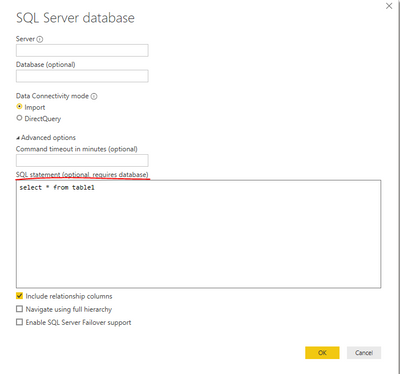
You could also add SQL queries in the "Get data" option.

2-1.PNG

It can reduce the amount of data and enables you to run queries in Power BI more efficiently.


Community Support Team _ Eads
If this post helps, then please consider Accept it as the solution to help the other members find it.
Anonymous
Not applicable

Hey @Anonymous


I'm going to answer your questions in order as best I can:


So they are asking for getting data using SQL 200 language is it supported? - The simple answer is no. Power BI uses Power Query like excel which uses the lanugage M. You can embed SQL language in M, but M is simple enough and similar enough to SQL this is not usually necessary. When you use "Get Data" from SQL you can use an SQL Query.


Can you call a stored procedure from Power BI? - Yes. Check out these links for more information on this: 


1. https://intellipaat.com/community/3763/how-to-use-sql-server-stored-procedures-in-microsoft-powerbi

2. https://community.powerbi.com/t5/Desktop/Use-SQL-Store-Procedure-in-Power-BI/td-p/20269

3. https://stackoverflow.com/questions/37589448/how-to-use-sql-server-stored-procedures-in-microsoft-powerbi


Can you do group by's using SQL language? - Check out these links: 


1. https://docs.microsoft.com/en-us/power-bi/desktop-common-query-tasks

2. https://community.powerbi.com/t5/Desktop/Group-by-and-Having/td-p/448502


If this helps please kudo.

If this solves your problem please accept it as a solution.

Anonymous
Not applicable

Many thanks!! I will try these suggestions today and forward to some others internally.


Thanks!

Helpful resources

Announcements
New to Fabric survey Carousel

New to Fabric Survey

If you have recently started exploring Fabric, we'd love to hear how it's going. Your feedback can help with product improvements.

Power BI DataViz World Championships carousel

Power BI DataViz World Championships - June 2026

A new Power BI DataViz World Championship is coming this June! Don't miss out on submitting your entry.

Join our Fabric User Panel

Join our Fabric User Panel

Share feedback directly with Fabric product managers, participate in targeted research studies and influence the Fabric roadmap.

March Power BI Update Carousel

Power BI Community Update - March 2026

Check out the March 2026 Power BI update to learn about new features.