Get Fabric certified for FREE!
Don't miss your chance to take the Fabric Data Engineer (DP-600) exam for FREE! Find out how by attending the DP-600 session on April 23rd (pacific time), live or on-demand.
Learn more- Power BI forums
- Get Help with Power BI
- Desktop
- Service
- Report Server
- Power Query
- Mobile Apps
- Developer
- DAX Commands and Tips
- Custom Visuals Development Discussion
- Health and Life Sciences
- Power BI Spanish forums
- Translated Spanish Desktop
- Training and Consulting
- Instructor Led Training
- Dashboard in a Day for Women, by Women
- Galleries
- Data Stories Gallery
- Themes Gallery
- Contests Gallery
- QuickViz Gallery
- Quick Measures Gallery
- Visual Calculations Gallery
- Notebook Gallery
- Translytical Task Flow Gallery
- TMDL Gallery
- R Script Showcase
- Webinars and Video Gallery
- Ideas
- Custom Visuals Ideas (read-only)
- Issues
- Issues
- Events
- Upcoming Events
Next up in the FabCon + SQLCon recap series: The roadmap for Microsoft SQL and Maximizing Developer experiences in Fabric. All sessions are available on-demand after the live show. Register now
- Power BI forums
- Forums
- Get Help with Power BI
- Desktop
- Supervisor Role Filtering
- Subscribe to RSS Feed
- Mark Topic as New
- Mark Topic as Read
- Float this Topic for Current User
- Bookmark
- Subscribe
- Printer Friendly Page

- Mark as New
- Bookmark
- Subscribe
- Mute
- Subscribe to RSS Feed
- Permalink
- Report Inappropriate Content
Supervisor Role Filtering
Hey there,
I have a report that I want to have two views:
- A employee view where the report filters my table based on employee email
- A supervisor view where the report filters my table based on the supervisor email
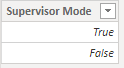
I have a table with all employee emails and their manager emails, and a table that can toggle between the two modes.
I've tried creating a new column in my employee table "if(selectedvalue(supervisor mode)=True, manger email, email)" with no luck. It only returns the employee email.
The employee table (employee and supervisor data) is used in relationships to several other tables. Ideally, the supervisor mode will filter the employee table and therefore filter the tables it has a relationship to.
Any help is appreciated, been hitting my head against a wall trying to figure it out.

Solved! Go to Solution.


- Mark as New
- Bookmark
- Subscribe
- Mute
- Subscribe to RSS Feed
- Permalink
- Report Inappropriate Content
Hi, @Anonymous
Based on your description, I created data to reproduce your scenario. The pbix file is attached in the end.
Table:
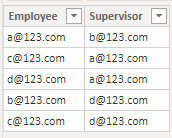
Mode:

You may create a measurea as below.
Visual Control =
var emp = SELECTEDVALUE('Table'[Employee],"")
var sup = SELECTEDVALUE('Table'[Supervisor],"")
return
IF(
    ISFILTERED(Mode[Mode]),
    IF(
        "employee mode" in DISTINCT(Mode[Mode])&&NOT("supervisor mode" in DISTINCT(Mode[Mode])),
        IF(
            emp=USERPRINCIPALNAME(),1,0
        ),
        IF(
            "supervisor mode" in DISTINCT(Mode[Mode])&&NOT("employee mode" in DISTINCT(Mode[Mode])),
            IF(
                sup=USERPRINCIPALNAME(),
                1,0
            ),
            IF(
                "employee mode" in DISTINCT(Mode[Mode])&&"supervisor mode" in DISTINCT(Mode[Mode]),
                IF(
                    OR(
                        emp=USERPRINCIPALNAME(),
                        sup=USERPRINCIPALNAME()
                    ),
                    1,0
                )
            )
        )
    )
)
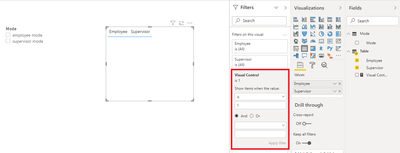
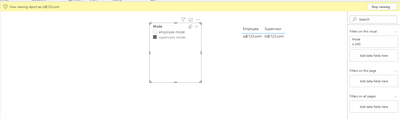
Then you need to put the measure in the visual level filter and use 'Mode' column from 'Mode' table to filter the result.
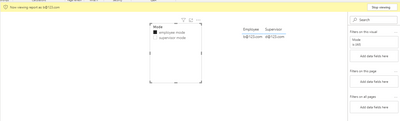
Finally you may view as 'b@123.com'. Here are the results.
Best Regards
Allan
If this post helps, then please consider Accept it as the solution to help the other members find it more quickly.
- Mark as New
- Bookmark
- Subscribe
- Mute
- Subscribe to RSS Feed
- Permalink
- Report Inappropriate Content
Hi, @Anonymous
Based on your description, I created data to reproduce your scenario. The pbix file is attached in the end.
Table:
Mode:
You may create a measurea as below.
Visual Control =
var emp = SELECTEDVALUE('Table'[Employee],"")
var sup = SELECTEDVALUE('Table'[Supervisor],"")
return
IF(
    ISFILTERED(Mode[Mode]),
    IF(
        "employee mode" in DISTINCT(Mode[Mode])&&NOT("supervisor mode" in DISTINCT(Mode[Mode])),
        IF(
            emp=USERPRINCIPALNAME(),1,0
        ),
        IF(
            "supervisor mode" in DISTINCT(Mode[Mode])&&NOT("employee mode" in DISTINCT(Mode[Mode])),
            IF(
                sup=USERPRINCIPALNAME(),
                1,0
            ),
            IF(
                "employee mode" in DISTINCT(Mode[Mode])&&"supervisor mode" in DISTINCT(Mode[Mode]),
                IF(
                    OR(
                        emp=USERPRINCIPALNAME(),
                        sup=USERPRINCIPALNAME()
                    ),
                    1,0
                )
            )
        )
    )
)
Then you need to put the measure in the visual level filter and use 'Mode' column from 'Mode' table to filter the result.
Finally you may view as 'b@123.com'. Here are the results.
Best Regards
Allan
If this post helps, then please consider Accept it as the solution to help the other members find it more quickly.
- Mark as New
- Bookmark
- Subscribe
- Mute
- Subscribe to RSS Feed
- Permalink
- Report Inappropriate Content
Hey Allan! @v-alq-msft
Thanks for the help, I adapted your code to my PBIX. IS there anyway to adapt the solution to have the mode directly filter the Employee Table inplace of just a visual filter?
I neglected to mention that my Employee table is related to several other tables that it filters.
- Mark as New
- Bookmark
- Subscribe
- Mute
- Subscribe to RSS Feed
- Permalink
- Report Inappropriate Content
Hi, @Anonymous
I don't think you can adapt the solution to have the model directly filter the Employee Table. You may try using query parameter to filter the model in Power Query. However, you are unable to get the current user e-mail to filter the specific user.
About query parameters in Power BI, you may refer to the following links.
Deep Dive into Query Parameters and Power BI Templates
Power BI Desktop Query Parameters
Best Regards
Allan
If this post helps, then please consider Accept it as the solution to help the other members find it more quickly.


- Mark as New
- Bookmark
- Subscribe
- Mute
- Subscribe to RSS Feed
- Permalink
- Report Inappropriate Content
You could use the following
Create 3 tables:
table 1: "User list" (unique email id)
table 2 : "employee view"
table 3 : "supervisor view"
Table 2 and 3 are coipies of each other.
Then you can create relationships
1. user list with employee email in table 2
2. user list with supervisiou email in table 3
Then apply RLS on table 1 user.
This way you can create 2 views. The views using columns from table 2 will be the "employee view" and the views using columns from the table 3 will be the "supervisor view"
PS: Please mark this post as a "solution" if this helps solving the issue and/or hit the "thumbs-up" button if you found this insighful. Thanks.
- Mark as New
- Bookmark
- Subscribe
- Mute
- Subscribe to RSS Feed
- Permalink
- Report Inappropriate Content
Hey @Helper !
If I understand your solution correclty I would have to apply the duplication process to all of the tables that my employee table is related to. Yah? (I neglected to mention these relationships in the original description)
Appreciate the feedback !
- Mark as New
- Bookmark
- Subscribe
- Mute
- Subscribe to RSS Feed
- Permalink
- Report Inappropriate Content
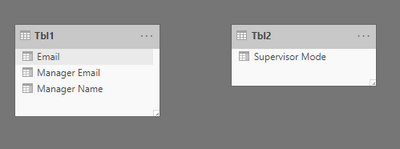
Hi @Anonymous - data seems incomplete. What i understood is you have 2 different tables? Employee and Supervisor, how are they related/Linked to each other?
Can you give some sample data and their relation please? like the one below

Thanks,
-Namish B
Helpful resources

New to Fabric Survey
If you have recently started exploring Fabric, we'd love to hear how it's going. Your feedback can help with product improvements.

Power BI DataViz World Championships - June 2026
A new Power BI DataViz World Championship is coming this June! Don't miss out on submitting your entry.

Join our Fabric User Panel
Share feedback directly with Fabric product managers, participate in targeted research studies and influence the Fabric roadmap.

Power BI Community Update - March 2026
Check out the March 2026 Power BI update to learn about new features.

| User | Count |
|---|---|
| 48 | |
| 43 | |
| 39 | |
| 19 | |
| 17 |


| User | Count |
|---|---|
| 67 | |
| 63 | |
| 30 | |
| 30 | |
| 23 |


