Join us at FabCon Atlanta from March 16 - 20, 2026, for the ultimate Fabric, Power BI, AI and SQL community-led event. Save $200 with code FABCOMM.
Register now!View all the Fabric Data Days sessions on demand. View schedule
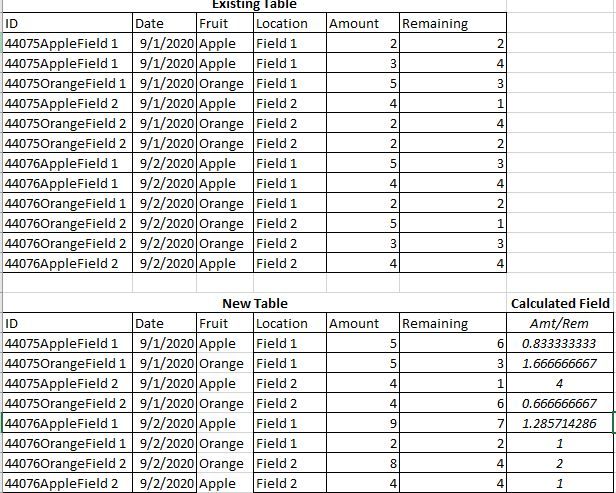
I would like to sum multiple values from one table based on a unique ID and create a new table with this information. Then, I need to create a calculated column with the new information. Example is below.
Solved! Go to Solution.
New Table =
ADDCOLUMNS(
SUMMARIZE(
'Old Awful Disgustingly Bad Table',
[ID],[Date],[Fruit],[Field],
"Amount",SUM([Amount]),
"Remaining",SUM([Remaining])
),
"Amt/Rem",DIVIDE([Amount],[Remaining],0)
)
Hi,
To your visual, drag the first 4 fields to your Table visual and write these measures:
Total amount = SUM(Data[Amount])
Remaining amount = SUM(Data[Remaining])
Amount/Rem = [Total amount]/[Remaining amount]
Hope this helps.
Hi @flyingmada
I have a slightly different solution to @Greg_Deckler :
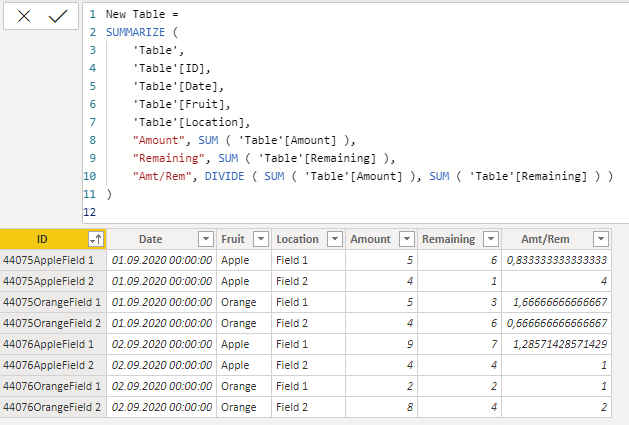
New Table =
SUMMARIZE (
'Table',
'Table'[ID],
'Table'[Date],
'Table'[Fruit],
'Table'[Location],
"Amount", SUM ( 'Table'[Amount] ),
"Remaining", SUM ( 'Table'[Remaining] ),
"Amt/Rem", DIVIDE ( SUM ( 'Table'[Amount] ), SUM ( 'Table'[Remaining] ) )
)
With kind regards from the town where the legend of the 'Pied Piper of Hamelin' is at home
FrankAT (Proud to be a Datanaut)
New Table =
ADDCOLUMNS(
SUMMARIZE(
'Old Awful Disgustingly Bad Table',
[ID],[Date],[Fruit],[Field],
"Amount",SUM([Amount]),
"Remaining",SUM([Remaining])
),
"Amt/Rem",DIVIDE([Amount],[Remaining],0)
)
Check out the November 2025 Power BI update to learn about new features.
Advance your Data & AI career with 50 days of live learning, contests, hands-on challenges, study groups & certifications and more!