cancel
Showing results for 
Search instead for 
Did you mean: 

The Power BI Data Visualization World Championships is back! Get ahead of the game and start preparing now! Learn more

Reply
Anonymous
Not applicable

Summarize filtered results

I have a table of customers and the number of times they have called each day, as below:


Date - CustomerPh - TimesCalled


I want to get to a level of displaying how many consumers have called x number of times within the date range selected on the report. The grouping will be:

1 call - [Customer Count]
2 calls - [Customer Count]

...

7+ calls - [Customer Count]


Ive tried to summarize with filter to get a total count of customers calling within the date range - this is just returning totals. 

In the dax below, Max & MinDateRng are measures that return the start and end of the selected date range


CustomerCalls = SUMMARIZE(
     filter(RepeatCallers
       ,RepeatCallers[CallDate]>=[MinDateRng] && RepeatCallers[CallDate]<=[MaxDateRng])
        ,RepeatCallers[CallerNumber]
        ,"CustCount"
        ,sum(RepeatCallers[CountOfCalls]
       )
      )


Edit: after playing around some moreit looks like Summarize is evaluated prior to the report filter being applied, and therefore the date isn't picked up in the measure so i get totals instead.. is that right?? if so is there any way around that?

1 ACCEPTED SOLUTION
Anonymous
Not applicable

Hi @Anonymous,


You can refer to below sample to get the total count of specify range.


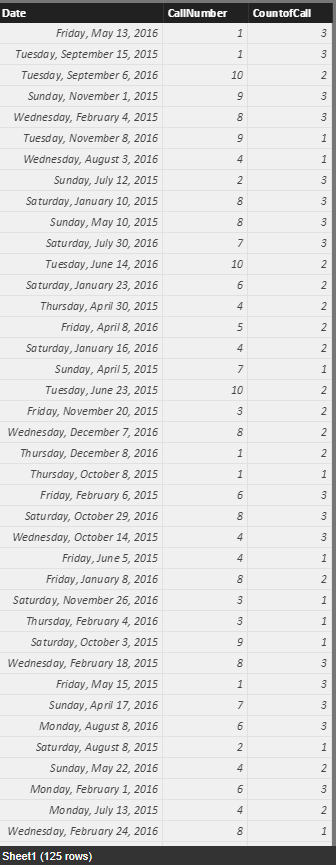
Original Table:

Capture.PNG


Create a CALENDAR table with original date:


Table = CALENDAR(MIN(Sheet1[Date]),MAX(Sheet1[Date]))


Add two measures to get the date range.


MinDate = FIRSTDATE(ALLSELECTED('Table'[Date]))

MaxDate = LASTDATE(ALLSELECTED('Table'[Date]))


Write a measure to get the total count bease on select date range.


CountOfSpecifyRange =
var currNumber=LASTNONBLANK(Sheet1[CallNumber],[CallNumber])
return
SUMX(FILTER(ALL(Sheet1),Sheet1[CallNumber]=currNumber&&AND([Date]>=[MinDate],[Date]<=[MaxDate])),[CountofCall])


Create visuals:


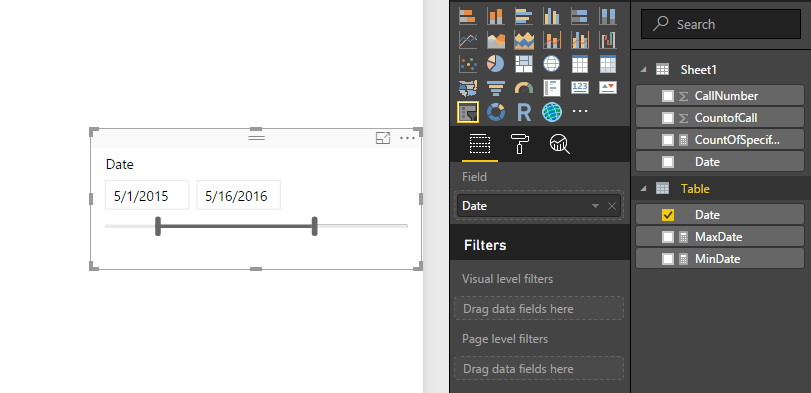
Slicer.

Capture2.PNG


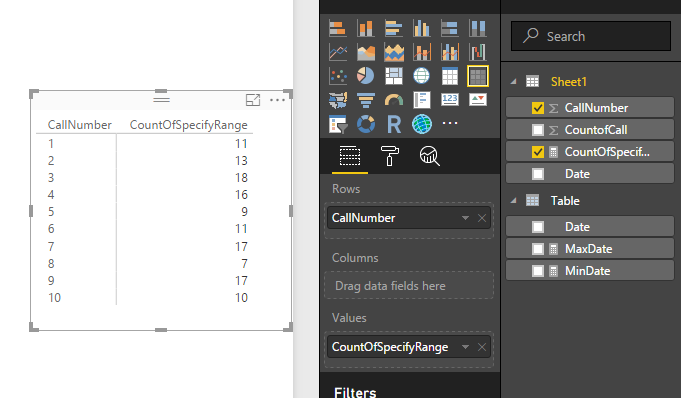
Matrix.

Capture4.PNG

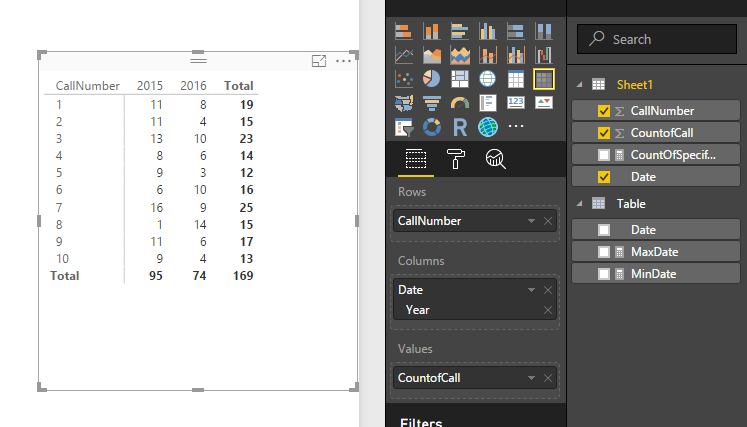
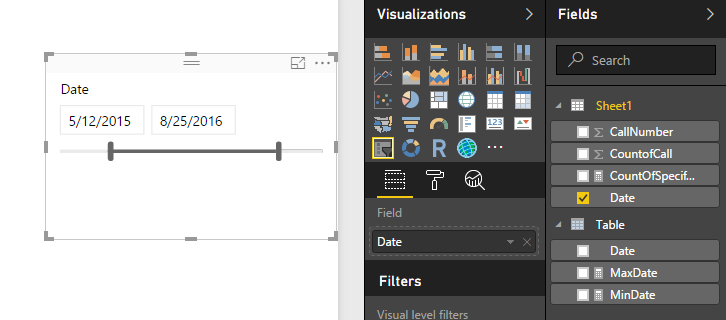
In addition, you can direct use the original table to get the result:

Capture5.PNGCapture6.PNG


Regards,

Xiaoxin Sheng

View solution in original post

3 REPLIES 3
Anonymous
Not applicable

Hi @Anonymous,


You can try to use below formula if it suitable for your requirement:


CustomerCalls
var temp=  filter(All(RepeatCallers),RepeatCallers[CallDate]>=[MinDateRng] && RepeatCallers[CallDate]<=[MaxDateRng])
return
SUMMARIZE(temp,[CallerNumber],"CustCount",SUMX(FILTER(temp,[CallerNumber]=EARLIER([CallerNumber])),[CountOfCalls]))


If above is not help, please share some sample data.


Regards,

Xiaoxin Sheng

Anonymous
Not applicable

Thanks @Anonymous


That doesn't work either - still returning all rows from my Repeat Callers table, regardless of the date range selected on the report itself.


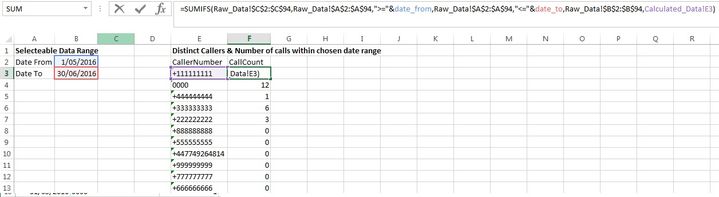
The screenshots below are from a spreadsheet i've created that shows what i'm trying to do..

Raw Data:

RawDataRawData


Calculated counts within selected date range

Calc_Data.jpg

Anonymous
Not applicable

Hi @Anonymous,


You can refer to below sample to get the total count of specify range.


Original Table:

Capture.PNG


Create a CALENDAR table with original date:


Table = CALENDAR(MIN(Sheet1[Date]),MAX(Sheet1[Date]))


Add two measures to get the date range.


MinDate = FIRSTDATE(ALLSELECTED('Table'[Date]))

MaxDate = LASTDATE(ALLSELECTED('Table'[Date]))


Write a measure to get the total count bease on select date range.


CountOfSpecifyRange =
var currNumber=LASTNONBLANK(Sheet1[CallNumber],[CallNumber])
return
SUMX(FILTER(ALL(Sheet1),Sheet1[CallNumber]=currNumber&&AND([Date]>=[MinDate],[Date]<=[MaxDate])),[CountofCall])


Create visuals:


Slicer.

Capture2.PNG


Matrix.

Capture4.PNG

In addition, you can direct use the original table to get the result:

Capture5.PNGCapture6.PNG


Regards,

Xiaoxin Sheng

Helpful resources

Announcements
Power BI DataViz World Championships

Power BI Dataviz World Championships

The Power BI Data Visualization World Championships is back! Get ahead of the game and start preparing now!

December 2025 Power BI Update Carousel

Power BI Monthly Update - December 2025

Check out the December 2025 Power BI Holiday Recap!

FabCon Atlanta 2026 carousel

FabCon Atlanta 2026

Join us at FabCon Atlanta, March 16-20, for the ultimate Fabric, Power BI, AI and SQL community-led event. Save $200 with code FABCOMM.