Get Fabric or SQL Certified for Free.
Get certified for free when you join Fabric Data Days 2026 and dive into Fabric, Power BI, SQL, AI, and other essential data skills.
Join now- Power BI forums
- Get Help with Power BI
- Desktop
- Service
- Report Server
- Power Query
- Mobile Apps
- Developer
- DAX Commands and Tips
- Custom Visuals Development Discussion
- Health and Life Sciences
- Power BI Spanish forums
- Translated Spanish Desktop
- Training and Consulting
- Instructor Led Training
- Dashboard in a Day for Women, by Women
- Galleries
- Data Stories Gallery
- Themes Gallery
- Contests Gallery
- QuickViz Gallery
- Quick Measures Gallery
- Visual Calculations Gallery
- Notebook Gallery
- Translytical Task Flow Gallery
- TMDL Gallery
- R Script Showcase
- Webinars and Video Gallery
- Ideas
- Custom Visuals Ideas (read-only)
- Issues
- Issues
- Events
- Upcoming Events
July 7 - July 17 | Round 2 of the Power BI Dataviz World Championships. Don't miss your chance! Learn more
- Power BI forums
- Forums
- Get Help with Power BI
- Desktop
- Re: Summarize absolute error of values
- Subscribe to RSS Feed
- Mark Topic as New
- Mark Topic as Read
- Float this Topic for Current User
- Bookmark
- Subscribe
- Printer Friendly Page


- Mark as New
- Bookmark
- Subscribe
- Mute
- Subscribe to RSS Feed
- Permalink
- Report Inappropriate Content
Summarize DAX
Hi,
Trying to create a new measure, TotalCount_Sum=39+2= 41.
Me a DAX dummy, can advise what is wrong with below DAX?
TotalCount_Sum = SUMMARIZE(data2
	,Data2[3Station]
	,Data2[TotalCount],sum(Data2[TotalCount])
)

Solved! Go to Solution.
- Mark as New
- Bookmark
- Subscribe
- Mute
- Subscribe to RSS Feed
- Permalink
- Report Inappropriate Content
Hi @vincentakatoh,
SUMMARIZE function will return a table as the result, it is impossible to store these result in calculated column or measure.
You need to summary these records and return the result.
For example:
TotalCount_Sum =
SUMX (
    SUMMARIZE (
        Data2,
        Data2[3Station],
        Data2[TotalCount],
        "TotalCount", SUM ( Data2[FailCount] )
    ),
    [TotalCount]
)
Reference:
Returns a summary table for the requested totals over a set of groups.
Notice: if your data contains any privacy data, please do mask sensitive data before sharing.
Regards,
Xiaoxin Sheng

- Mark as New
- Bookmark
- Subscribe
- Mute
- Subscribe to RSS Feed
- Permalink
- Report Inappropriate Content
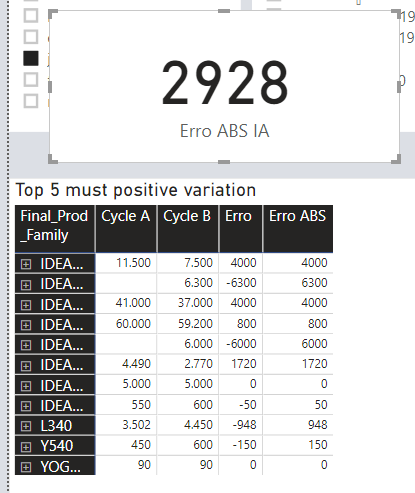
Im having problems to sum abs error values.
As you can see 2928 is wrong the correct accumulated sum should be 23.968

- Mark as New
- Bookmark
- Subscribe
- Mute
- Subscribe to RSS Feed
- Permalink
- Report Inappropriate Content
Some might want one that features a detachable net blog post. Top rated Ping Pong Robot the first time you're mosting likely to do.


- Mark as New
- Bookmark
- Subscribe
- Mute
- Subscribe to RSS Feed
- Permalink
- Report Inappropriate Content
You need a name for your column as parameter 4, just enclose it in double quotes.
Follow on LinkedIn
@ me in replies or I'll lose your thread!!!
Instead of a Kudo, please vote for this idea
Become an expert!: Enterprise DNA
External Tools: MSHGQM
YouTube Channel!: Microsoft Hates Greg
Latest book!: DAX For Humans
DAX is easy, CALCULATE makes DAX hard...
- Mark as New
- Bookmark
- Subscribe
- Mute
- Subscribe to RSS Feed
- Permalink
- Report Inappropriate Content
Can provide example, tried below but no success? Do I need to add as a Column or Measure?
TotalCount_Sum = SUMMARIZE(data2
	,Data2[3Station]
	,Data2[TotalCount]
,"TotalCount", sum(Data2[FailCount])
)
- Mark as New
- Bookmark
- Subscribe
- Mute
- Subscribe to RSS Feed
- Permalink
- Report Inappropriate Content
I have this working for me:
Table = SUMMARIZE(Cars,Cars[Asset],Cars[Damage],"Sum",SUM(Cars[Column]))
Obviously different data set, but same thing.
Follow on LinkedIn
@ me in replies or I'll lose your thread!!!
Instead of a Kudo, please vote for this idea
Become an expert!: Enterprise DNA
External Tools: MSHGQM
YouTube Channel!: Microsoft Hates Greg
Latest book!: DAX For Humans
DAX is easy, CALCULATE makes DAX hard...
- Mark as New
- Bookmark
- Subscribe
- Mute
- Subscribe to RSS Feed
- Permalink
- Report Inappropriate Content
Seems like what you have is correct, are you getting an error?
Follow on LinkedIn
@ me in replies or I'll lose your thread!!!
Instead of a Kudo, please vote for this idea
Become an expert!: Enterprise DNA
External Tools: MSHGQM
YouTube Channel!: Microsoft Hates Greg
Latest book!: DAX For Humans
DAX is easy, CALCULATE makes DAX hard...
- Mark as New
- Bookmark
- Subscribe
- Mute
- Subscribe to RSS Feed
- Permalink
- Report Inappropriate Content
hi @Greg_Deckler,
Yes, Error msg "the expression refers to multiple columns. Multiple columns cannot be converted to a scalar value".
Also attached my sample file. If possible, appreciate if you can correct the dax and upload in link.
- Mark as New
- Bookmark
- Subscribe
- Mute
- Subscribe to RSS Feed
- Permalink
- Report Inappropriate Content
Hi @vincentakatoh,
SUMMARIZE function will return a table as the result, it is impossible to store these result in calculated column or measure.
You need to summary these records and return the result.
For example:
TotalCount_Sum =
SUMX (
    SUMMARIZE (
        Data2,
        Data2[3Station],
        Data2[TotalCount],
        "TotalCount", SUM ( Data2[FailCount] )
    ),
    [TotalCount]
)
Reference:
Returns a summary table for the requested totals over a set of groups.
Notice: if your data contains any privacy data, please do mask sensitive data before sharing.
Regards,
Xiaoxin Sheng
Helpful resources

FabCon & SQLCon – Barcelona 2026
Join us in Barcelona for FabCon and SQLCon, the Fabric, Power BI, SQL, and AI community event. Save €200 with code FABCMTY200.

Data Days 2026
Join Fabric Data Days 2026: 60 days of free live/on-demand sessions, challenges, study groups, and certification opportunities.

Power BI DataViz World Championships - June 2026
A new Power BI DataViz World Championship is coming this June! Don't miss out on submitting your entry.


| User | Count |
|---|---|
| 65 | |
| 41 | |
| 40 | |
| 39 | |
| 39 |


