Join us at FabCon Atlanta from March 16 - 20, 2026, for the ultimate Fabric, Power BI, AI and SQL community-led event. Save $200 with code FABCOMM.
Register now!The Power BI Data Visualization World Championships is back! Get ahead of the game and start preparing now! Learn more
Hi everyone,
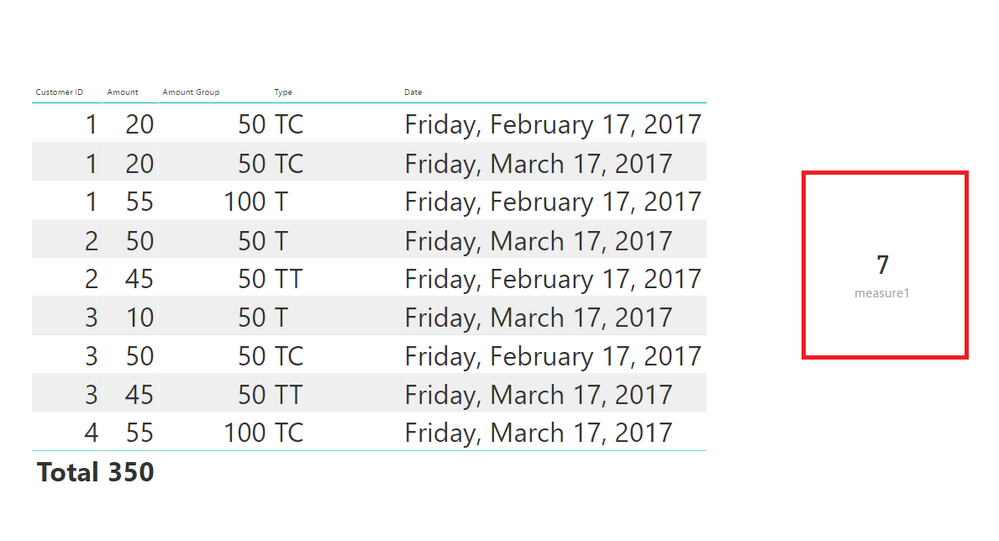
my dataset looks like this:
Customer ID | Amount | Amount Group | Type | Date |
1 | 55 | 100 | T | 02/2017 |
2 | 45 | 50 | TT | 02/2017 |
3 | 50 | 50 | TC | 02/2017 |
1 | 20 | 50 | TC | 02/2017 |
2 | 50 | 50 | T | 03/2017 |
3 | 45 | 50 | TT | 03/2017 |
4 | 55 | 100 | TC | 03/2017 |
1 | 20 | 50 | TC | 03/2017 |
3 | 10 | 50 | T | 03/2017 |
As you can see I have 3 unique Customer IDs in 02/2017 date and 4 unique Customer ID's in 03/2017. So the sum of distinct Customer IDs for these two months is 7.
How to get this sum dynamically, based of filtering across few/or more months?
What I get as result when filtering across these two months is 4, which is true since that is the number of distinct CustomerIDs.
Please note that I need filtering capability of the result with date, type and Amount Group…
Any ideas?
Thanks!
Solved! Go to Solution.
Hi @feyd
Try this MEASURE
measure =
SUMX (
VALUES ( TableName[Date] ),
CALCULATE ( DISTINCTCOUNT ( TableName[Customer ID] ) )
)
measure = SUMX ( VALUES ( Calendar[Month-Year] ), DISTINCTCOUNT ( Table[Customer ID] ) )
Thank you for quick reply!
I've created the measure and sumx returns 8 instead of 7...
Hi @feyd
Try this MEASURE
measure =
SUMX (
VALUES ( TableName[Date] ),
CALCULATE ( DISTINCTCOUNT ( TableName[Customer ID] ) )
)
The Power BI Data Visualization World Championships is back! Get ahead of the game and start preparing now!
Check out the November 2025 Power BI update to learn about new features.
| User | Count |
|---|---|
| 62 | |
| 46 | |
| 42 | |
| 24 | |
| 18 |
| User | Count |
|---|---|
| 193 | |
| 124 | |
| 101 | |
| 67 | |
| 49 |