
Join us at FabCon Atlanta from March 16 - 20, 2026, for the ultimate Fabric, Power BI, AI and SQL community-led event. Save $200 with code FABCOMM.
Register now!The Power BI Data Visualization World Championships is back! Get ahead of the game and start preparing now! Learn more
Hi All,
I'm trying to write a DAX code to calculate the sum of values between current week to next 3 weeks.
I have written the following DAX code:
Hours for next 3 weeks =
CALCULATE(SUM('Resource Management'[Hours]),DATESINPERIOD('Calendar'[Date],TODAY(),28,DAY))
However, the above code does not take the current week values in consideration.
The example is below where the graph is showing the current result but not the table and ignoring the current week values:
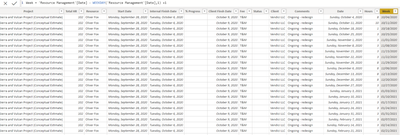
I have the weekday column in my sheet as shown below:
Could you please help me to write a current DAX code?
Your help is appreciated.
Thanks,
Nilesh
Solved! Go to Solution.
For someone who is looking for the solution for the sum of values between the current week to the next 3 weeks:
Hours for next 3 weeks =
CALCULATE
(SUM('Resource Management'[Hours]),
FILTER(ALL('Resource Management'[WEEK NUMBER]),
'Resource Management'[WEEK NUMBER]>=WEEKNUM(TODAY(),1) && 'Resource Management'[WEEK NUMBER]<=WEEKNUM(TODAY(),1)+3))
Thanks,
Nilesh Jain
If you have a week number field (anging from 1-53) you can use the following formula:
Hours for next 3 weeks =
CALCULATE(SUM('Resource Management'[Hours]),
FILTER (
ALL ( Calendar ),
Calendar[WeekID]
>= MAX ( Calendar[WeekID] )
&& Calendar[WeekID] <= MAX ( Calendar[WeekID] + 3 )
)
)
Thanks for your reply @themistoklis
I have created a separate WEEKNUM column in my sheet but I'm getting the above error.
The following is the link to the file. Please let me know if you cannot access it.
https://www.dropbox.com/s/twnck91v5tbe65s/Resource%20Management%20-%20Power%20BI.pbix?dl=0
I'm looking forward to hearing from you.
Thanks and Regards,
Nilesh
For someone who is looking for the solution for the sum of values between the current week to the next 3 weeks:
Hours for next 3 weeks =
CALCULATE
(SUM('Resource Management'[Hours]),
FILTER(ALL('Resource Management'[WEEK NUMBER]),
'Resource Management'[WEEK NUMBER]>=WEEKNUM(TODAY(),1) && 'Resource Management'[WEEK NUMBER]<=WEEKNUM(TODAY(),1)+3))
Thanks,
Nilesh Jain
Check out the November 2025 Power BI update to learn about new features.
Advance your Data & AI career with 50 days of live learning, contests, hands-on challenges, study groups & certifications and more!