cancel
Showing results for 
Search instead for 
Did you mean: 

The Power BI Data Visualization World Championships is back! Get ahead of the game and start preparing now! Learn more

Reply
Anonymous
Not applicable

Sum hierarchy in column based on levels in column

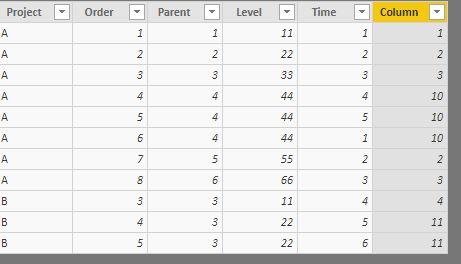
Hi i have a table and i wanna created new column, where i have a sum of all value based on each subgroup based on column: [ORDER], [PARENT] [LEVEL] and [Project]. How can i create column using DAX or PowerQuery?
I dont want create MEASURE, i need column with values.


Anyone can help me ? I tired handling, sum hierarchy, but i dont have idea how to do this.


1 REPLY 1
v-cherch-msft
Microsoft Employee
Microsoft Employee

Hi @Anonymous


It seems you may create a calculated column with EARLIER Function.If it is not your case,could you explain more about your expected output?I cannot fully understand how to get the calculated column.It's always best to post your data in text/tabular format in addition to a screen capture.

Below is a simplified sample based on my guessing.

Column =
SUMX (
    FILTER (
        Table3,
        Table3[Project] = EARLIER ( Table3[Project] )
            && Table3[Level] = EARLIER ( Table3[Level] )
    ),
    Table3[Time]
)

1.png


Regards,

Cherie

Community Support Team _ Cherie Chen
If this post helps, then please consider Accept it as the solution to help the other members find it more quickly.

Helpful resources

Announcements
Power BI DataViz World Championships

Power BI Dataviz World Championships

The Power BI Data Visualization World Championships is back! Get ahead of the game and start preparing now!

December 2025 Power BI Update Carousel

Power BI Monthly Update - December 2025

Check out the December 2025 Power BI Holiday Recap!

FabCon Atlanta 2026 carousel

FabCon Atlanta 2026

Join us at FabCon Atlanta, March 16-20, for the ultimate Fabric, Power BI, AI and SQL community-led event. Save $200 with code FABCOMM.