
Get certified for free when you join Fabric Data Days 2026 and dive into Fabric, Power BI, SQL, AI, and other essential data skills.
Join nowJuly 7 - July 17 | Round 2 of the Power BI Dataviz World Championships. Don't miss your chance! Learn more
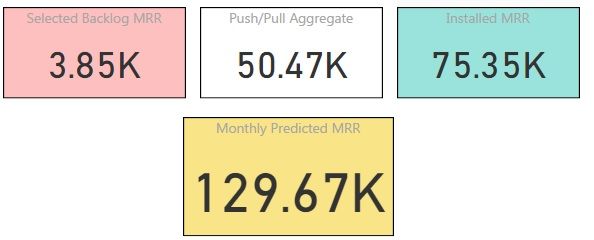
I have 3 seperate cards, reporting the following:
The changes and the backlog come from 2 different tables and are filtered differently. Is there a method in which I can sum the 3 cards together, giving me a total?
Solved! Go to Solution.
If the cards are being fed by measures, you could just make a new fourth measure that's something like:
OverallTotal = calculate([yettobill])+calculate([backlogchanges])+calculate([installedvalue])
As you're using calculate rather than just adding the three together, you can then put the relevant filter context into each bit of the formula to get your desired results, for example if the last one was just calculated over where some field foo has the value bar, you'd have calculate([installedvalue],yourtable[foo]="bar")
If the cards are being fed by measures, you could just make a new fourth measure that's something like:
OverallTotal = calculate([yettobill])+calculate([backlogchanges])+calculate([installedvalue])
As you're using calculate rather than just adding the three together, you can then put the relevant filter context into each bit of the formula to get your desired results, for example if the last one was just calculated over where some field foo has the value bar, you'd have calculate([installedvalue],yourtable[foo]="bar")
That is perfect thankyou.
To be honest, I never thought about using measures because of the filters applied, however the filters are just as applicable to the meaure, as they are the intial results....
Join us in Barcelona for FabCon and SQLCon, the Fabric, Power BI, SQL, and AI community event. Save €200 with code FABCMTY200.
Join Data Days 2026: 60 days of free live/on-demand sessions, challenges, study groups, and certification opportunities.
| User | Count |
|---|---|
| 28 | |
| 23 | |
| 18 | |
| 18 | |
| 15 |
| User | Count |
|---|---|
| 47 | |
| 44 | |
| 43 | |
| 38 | |
| 32 |