FabCon is coming to Atlanta
Join us at FabCon Atlanta from March 16 - 20, 2026, for the ultimate Fabric, Power BI, AI and SQL community-led event. Save $200 with code FABCOMM.
Register now!- Power BI forums
- Get Help with Power BI
- Desktop
- Service
- Report Server
- Power Query
- Mobile Apps
- Developer
- DAX Commands and Tips
- Custom Visuals Development Discussion
- Health and Life Sciences
- Power BI Spanish forums
- Translated Spanish Desktop
- Training and Consulting
- Instructor Led Training
- Dashboard in a Day for Women, by Women
- Galleries
- Data Stories Gallery
- Themes Gallery
- Contests Gallery
- QuickViz Gallery
- Quick Measures Gallery
- Visual Calculations Gallery
- Notebook Gallery
- Translytical Task Flow Gallery
- TMDL Gallery
- R Script Showcase
- Webinars and Video Gallery
- Ideas
- Custom Visuals Ideas (read-only)
- Issues
- Issues
- Events
- Upcoming Events
The Power BI Data Visualization World Championships is back! Get ahead of the game and start preparing now! Learn more
- Power BI forums
- Forums
- Get Help with Power BI
- Desktop
- Subtract index numbers from water meters for actua...
- Subscribe to RSS Feed
- Mark Topic as New
- Mark Topic as Read
- Float this Topic for Current User
- Bookmark
- Subscribe
- Printer Friendly Page

- Mark as New
- Bookmark
- Subscribe
- Mute
- Subscribe to RSS Feed
- Permalink
- Report Inappropriate Content
Subtract index numbers from water meters for actual consumption
Hi, Community Power bi
I would like to know how to solve the following problem? I have a table with number of days, the month, the year, the name of the various meters (12 in total), as well as its index in m3 of waterPour arriver à mon objectif je dois faire la soustraction par le relevé précédent.
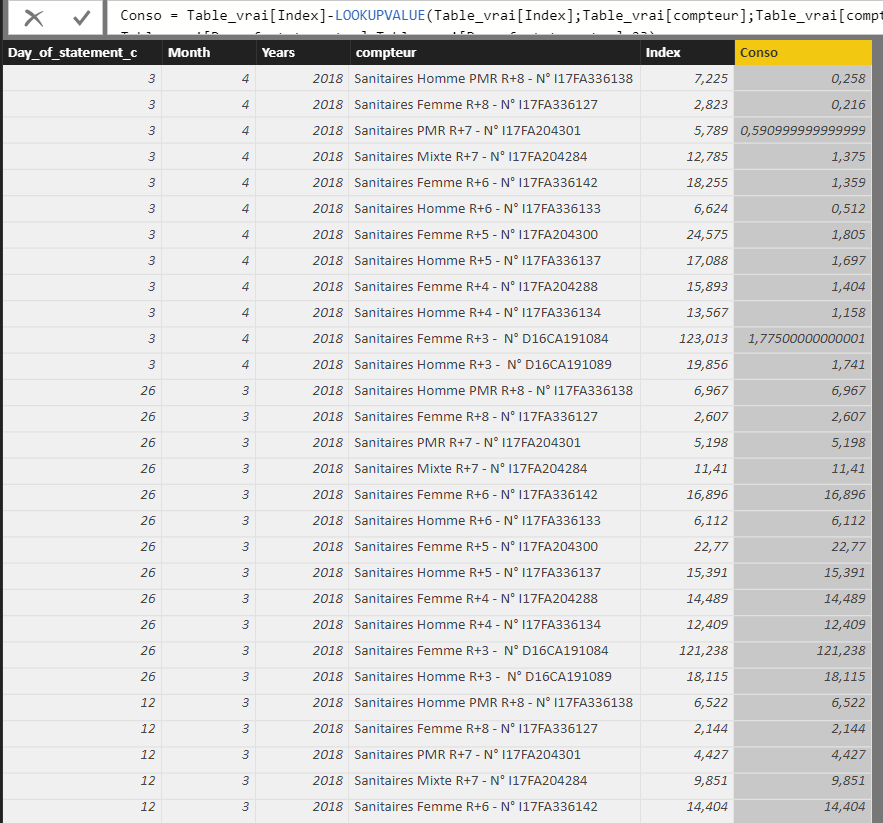
In the case that I have a value per month, I can use the following formula by fessant a decrementation of -1 the month:
Conso = Table_vrai[Index]-LOOKUPVALUE(Table_vrai[Index];Table_vrai[compteur];Table_vrai[compteur];Table_vrai[Years];Table_vrai[Years];Table_vrai[Month];Table_vrai[Month]-1)
My problem is when I have multiple values in the month, how can I please?
I'm thinking of a formula that compares the month of the line to the lower month or if condition ?
Thank you
Regards,
Solved! Go to Solution.


- Mark as New
- Bookmark
- Subscribe
- Mute
- Subscribe to RSS Feed
- Permalink
- Report Inappropriate Content
You may try to use SUMMARIZE Function to create a calculated table first.
If this post helps, then please consider Accept it as the solution to help the other members find it more quickly.
- Mark as New
- Bookmark
- Subscribe
- Mute
- Subscribe to RSS Feed
- Permalink
- Report Inappropriate Content
thank you for your reply.
I found one solution in site power bi.
" Calculate monthly consumption from daily meter reads"
https://community.powerbi.com/t5/Desktop/Calculate-monthly-consumption-from-daily-meter-reads/m-p/16...
I will tried later your solution
- Mark as New
- Bookmark
- Subscribe
- Mute
- Subscribe to RSS Feed
- Permalink
- Report Inappropriate Content
Hello, I have find solution
Conso Max Atif = Elec[Max actif]-LOOKUPVALUE(Elec[Max actif];Elec[compteurs];Elec[compteurs];Elec[Année];IF(Elec[Mois]=1;2017;2018);Elec[Mois];IF(Elec[Mois]=1;Elec[Mois]+11;Elec[Mois]-1))
- Mark as New
- Bookmark
- Subscribe
- Mute
- Subscribe to RSS Feed
- Permalink
- Report Inappropriate Content
You may try to use SUMMARIZE Function to create a calculated table first.
If this post helps, then please consider Accept it as the solution to help the other members find it more quickly.
- Mark as New
- Bookmark
- Subscribe
- Mute
- Subscribe to RSS Feed
- Permalink
- Report Inappropriate Content
thank you for your reply.
I found one solution in site power bi.
" Calculate monthly consumption from daily meter reads"
https://community.powerbi.com/t5/Desktop/Calculate-monthly-consumption-from-daily-meter-reads/m-p/16...
I will tried later your solution
- Mark as New
- Bookmark
- Subscribe
- Mute
- Subscribe to RSS Feed
- Permalink
- Report Inappropriate Content
Hello

My table to multiple time value. I have the years 2018 and 2017.
Conso Max Atif = Elec[Max actif]-LOOKUPVALUE(Elec[Max actif];Elec[compteurs];Elec[compteurs];Elec[Year];Elec[Year];Elec[Month];Elec[Month]-1)
I though put function IF
Elec[Year];Elec[Year]-If(Elec[Year] <2018;+1;0);Elec[Month];Elec[Month]-If(Elec[Month]>2017;+1;0)
I not understant why does not work ?
Please help.
Regards,
- Mark as New
- Bookmark
- Subscribe
- Mute
- Subscribe to RSS Feed
- Permalink
- Report Inappropriate Content
Hello, I have find solution
Conso Max Atif = Elec[Max actif]-LOOKUPVALUE(Elec[Max actif];Elec[compteurs];Elec[compteurs];Elec[Année];IF(Elec[Mois]=1;2017;2018);Elec[Mois];IF(Elec[Mois]=1;Elec[Mois]+11;Elec[Mois]-1))

Helpful resources

Power BI Dataviz World Championships
The Power BI Data Visualization World Championships is back! Get ahead of the game and start preparing now!

Power BI Monthly Update - December 2025
Check out the December 2025 Power BI Holiday Recap!

FabCon Atlanta 2026
Join us at FabCon Atlanta, March 16-20, for the ultimate Fabric, Power BI, AI and SQL community-led event. Save $200 with code FABCOMM.

| User | Count |
|---|---|
| 38 | |
| 38 | |
| 37 | |
| 28 | |
| 28 |


| User | Count |
|---|---|
| 124 | |
| 89 | |
| 73 | |
| 66 | |
| 65 |


