cancel
Showing results for 
Search instead for 
Did you mean: 

The Power BI Data Visualization World Championships is back! Get ahead of the game and start preparing now! Learn more

Reply
Anonymous
Not applicable

Subtract columns from 2 different tables

Hello, I am trying to subtract values from 2 columns from 2 different tables. When I use SUM(column1)- SUM(column2), it is subtracting the values but it ignores the date value in the table and ends up subtracting everything. I want to remove Qty from table 1 that are in table 2 with date still considered. Please attached the data sample below:

Table 1
ItemQtyDate
111102/25/2022
112212/25/2022
111152/26/2022
112232/26/2022
Table 2
ItemQtyDate
11152/25/2022
11272/25/2022
11132/26/2022
112102/26/2022
   
Required output
ItemQtyDate
11152/25/2022
112142/25/2022
111122/26/2022
112132/26/2022


I would really appreciate the help from the community!


Thank you in advance !

1 ACCEPTED SOLUTION
Anonymous
Not applicable

Hi @Anonymous ,


Using a date table and a table with an item column and creating a relationship with the original table is a workable solution.

For example. First create two calculated tables.


Date = CALENDAR(MIN('Table 1'[Date]),MAX('Table 2'[Date]))


Table 3 = VALUES('Table 1'[Item])


Then create the following relationship.
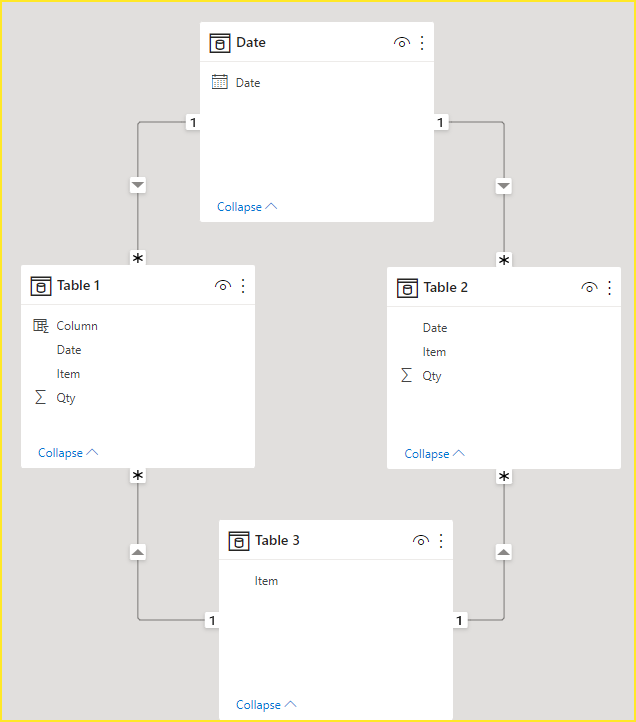
vcgaomsft_0-1647224411355.png

If you want the calculated column.


Column = 
VAR _qty_1 = CALCULATE(SUM('Table 1'[Qty]))
var _qty_2 = CALCULATE(SUM('Table 2'[Qty]))
return
_qty_1-_qty_2


vcgaomsft_1-1647224552722.png

If what you want is a measure, you can use your original expression and drag it into the visual along with columns

'Date'[Date] and 'Table 3'[Item].
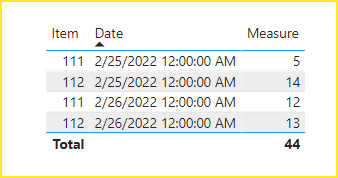
vcgaomsft_2-1647224905445.png

Attach the PBIX file for reference. Hope it helps.


Best Regards,
Community Support Team_Gao


If there is any post helps, then please consider Accept it as the solution to help the other members find it more quickly. If I misunderstand your needs or you still have problems on it, please feel free to let us know. Thanks a lot!

How to get your questions answered quickly -- How to provide sample data

View solution in original post

2 REPLIES 2
Anonymous
Not applicable

Hi @Anonymous ,


Using a date table and a table with an item column and creating a relationship with the original table is a workable solution.

For example. First create two calculated tables.


Date = CALENDAR(MIN('Table 1'[Date]),MAX('Table 2'[Date]))


Table 3 = VALUES('Table 1'[Item])


Then create the following relationship.

vcgaomsft_0-1647224411355.png

If you want the calculated column.


Column = 
VAR _qty_1 = CALCULATE(SUM('Table 1'[Qty]))
var _qty_2 = CALCULATE(SUM('Table 2'[Qty]))
return
_qty_1-_qty_2


vcgaomsft_1-1647224552722.png

If what you want is a measure, you can use your original expression and drag it into the visual along with columns

'Date'[Date] and 'Table 3'[Item].
vcgaomsft_2-1647224905445.png

Attach the PBIX file for reference. Hope it helps.


Best Regards,
Community Support Team_Gao


If there is any post helps, then please consider Accept it as the solution to help the other members find it more quickly. If I misunderstand your needs or you still have problems on it, please feel free to let us know. Thanks a lot!

How to get your questions answered quickly -- How to provide sample data

Anonymous
Not applicable

That worked! Thank you so much. @Anonymous 

Helpful resources

Announcements
Power BI DataViz World Championships

Power BI Dataviz World Championships

The Power BI Data Visualization World Championships is back! Get ahead of the game and start preparing now!

December 2025 Power BI Update Carousel

Power BI Monthly Update - December 2025

Check out the December 2025 Power BI Holiday Recap!

FabCon Atlanta 2026 carousel

FabCon Atlanta 2026

Join us at FabCon Atlanta, March 16-20, for the ultimate Fabric, Power BI, AI and SQL community-led event. Save $200 with code FABCOMM.