Join us at FabCon Atlanta from March 16 - 20, 2026, for the ultimate Fabric, Power BI, AI and SQL community-led event. Save $200 with code FABCOMM.
Register now!The Power BI Data Visualization World Championships is back! It's time to submit your entry. Live now!
Hi everyone,
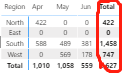
I have a column subtotal in matrix but it is bold by default. How can I clear this default format? I don't want a bold column subtotal.
Thank you in advance!
Solved! Go to Solution.
@misaki233 - Best thing you can probably do is to go to the Format pane, Subtotals | Column subtotals, change the font to Segoe UI Light.
@misaki233 , I doubt there is an option for that. You can only choose some lighter font
The Power BI Data Visualization World Championships is back! It's time to submit your entry.
Check out the January 2026 Power BI update to learn about new features.
| User | Count |
|---|---|
| 66 | |
| 44 | |
| 34 | |
| 26 | |
| 23 |
| User | Count |
|---|---|
| 137 | |
| 118 | |
| 58 | |
| 40 | |
| 35 |