Huge last-minute discounts for FabCon Vienna from September 15-18, 2025
Supplies are limited. Contact info@espc.tech right away to save your spot before the conference sells out.
Get your discount- Power BI forums
- Get Help with Power BI
- Desktop
- Service
- Report Server
- Power Query
- Mobile Apps
- Developer
- DAX Commands and Tips
- Custom Visuals Development Discussion
- Health and Life Sciences
- Power BI Spanish forums
- Translated Spanish Desktop
- Training and Consulting
- Instructor Led Training
- Dashboard in a Day for Women, by Women
- Galleries
- Data Stories Gallery
- Themes Gallery
- Contests Gallery
- Quick Measures Gallery
- Notebook Gallery
- Translytical Task Flow Gallery
- TMDL Gallery
- R Script Showcase
- Webinars and Video Gallery
- Ideas
- Custom Visuals Ideas (read-only)
- Issues
- Issues
- Events
- Upcoming Events
Score big with last-minute savings on the final tickets to FabCon Vienna. Secure your discount
- Power BI forums
- Forums
- Get Help with Power BI
- Desktop
- Substract measure from another measure: result sho...
- Subscribe to RSS Feed
- Mark Topic as New
- Mark Topic as Read
- Float this Topic for Current User
- Bookmark
- Subscribe
- Printer Friendly Page

- Mark as New
- Bookmark
- Subscribe
- Mute
- Subscribe to RSS Feed
- Permalink
- Report Inappropriate Content
Substract measure from another measure: result should show 0,0 instead of -4,0E-8
Hello,
I have created a measure 'Delta' to show the difference between 2 other measures: 'Actuals' - 'Budget' (DeltaLEMTPFY Millions = [LE Millions] - [MTP FY Millions] ) . When the result comes close to 0, the result shows -4,0E-8. However it should show 0,0 (always 1 decimal)
In the matrix visual that I see I have set the decimals to 1:
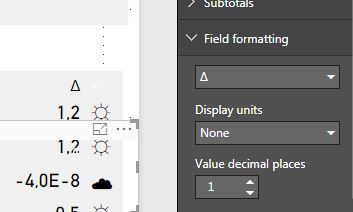
Any idea how to solve this?
Thank you in advance!
Solved! Go to Solution.


- Mark as New
- Bookmark
- Subscribe
- Mute
- Subscribe to RSS Feed
- Permalink
- Report Inappropriate Content
You can round using the below DAX for a calculated column
Column = ROUND(Table2[Value], 1)
Difference before and after rounding off is shown in screenshot below
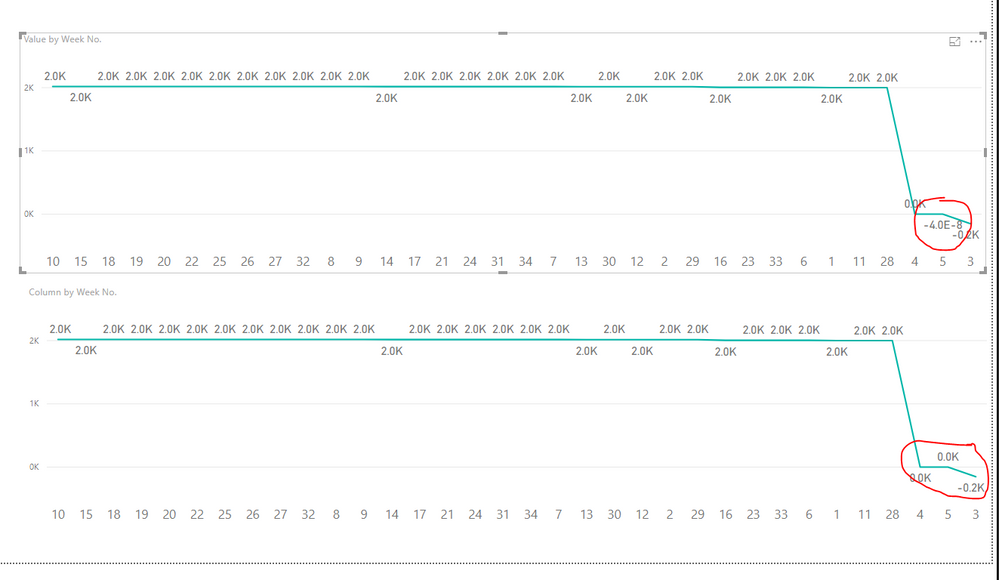
First image values are not rounded off while the 2nd image values are rounded off. The Other scenario of negative values also handled
- Mark as New
- Bookmark
- Subscribe
- Mute
- Subscribe to RSS Feed
- Permalink
- Report Inappropriate Content
Hi @Anonymous,
Power BI is showing the data as -4.0E-8 because the values for that case is -0.00000004.
So in this case you can round your values to the No. of decimals that you want. But again rounding off to 1 decimal will automatically show it as 0.0 and anyother negative value such as -5.2 will continue to show as -5.2
The Other aolution is that you should handle the negative values so that they are always replaced with 0. Once you do this the report will always show 0.0 whenever the value becomes negative. In this case a value of -5.2 will also be replaced with 0.0, which might not be desirable
- Mark as New
- Bookmark
- Subscribe
- Mute
- Subscribe to RSS Feed
- Permalink
- Report Inappropriate Content
Hi thanks, but I want to show negative values also. So, whether the value is positive of negative it should always show 1 decimal. So in this example I would expect -0,0 as end result.
- Mark as New
- Bookmark
- Subscribe
- Mute
- Subscribe to RSS Feed
- Permalink
- Report Inappropriate Content
So in this case you can round your values to the No. of decimals that you want. But again rounding off to 1 decimal will automatically show it as 0.0 and anyother negative value such as -5.2 will continue to show as -5.2
- Mark as New
- Bookmark
- Subscribe
- Mute
- Subscribe to RSS Feed
- Permalink
- Report Inappropriate Content
Do you know how to round the figure? Round function is not working (or I am using it incorrecly). Or do I need another function?
- Mark as New
- Bookmark
- Subscribe
- Mute
- Subscribe to RSS Feed
- Permalink
- Report Inappropriate Content
You can round using the below DAX for a calculated column
Column = ROUND(Table2[Value], 1)
Difference before and after rounding off is shown in screenshot below
First image values are not rounded off while the 2nd image values are rounded off. The Other scenario of negative values also handled
- Mark as New
- Bookmark
- Subscribe
- Mute
- Subscribe to RSS Feed
- Permalink
- Report Inappropriate Content
Thanks that works! I made a mistake using the round function. Thanks for helping me!
Helpful resources

Power BI Monthly Update - August 2025
Check out the August 2025 Power BI update to learn about new features.

Fabric Community Update - August 2025
Find out what's new and trending in the Fabric community.


| User | Count |
|---|---|
| 84 | |
| 74 | |
| 49 | |
| 48 | |
| 41 |


