cancel
Showing results for 
Search instead for 
Did you mean: 

Get Fabric Certified for FREE during Fabric Data Days. Don't miss your chance! Request now

Reply
meagain
New Member

Strategy for implementing a menu-style list that captures and saves user selections.

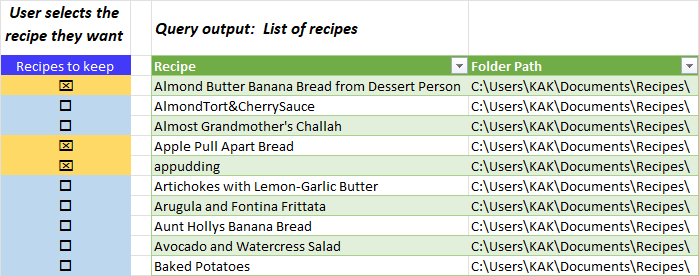
I'd like to create a PowerBI or PowerQuery interface that outputs a list created by a query and then allows users to select a subset of items, which are saved to new table -- or somewhere where they won't be overwritten. See simplified example below. 


Would anyone have suggestions for the best way to do this?  I'd prefer to use PowerBI because I could add search filters. 


In Excel I can imagine these steps ...

  1. Query #1 generates a list and loads to Column B
  2. Place a User-Selection table in Column A that's dimensioned to match the number of rows in the query output where users can check a box indicate that an item is selected. 
  3. Place a formula in Column C that references the query output in Column B if Column A is selected. 
  4. Query #2 captures the content of Column B and filters out blank rows.

I'd appreciate any suggestions!


User selection example.png

4 REPLIES 4
MFelix
Super User
Super User

Hi @meagain ,


Using the Power BI you may try and use the Power Automate visualization, that allows to create custom automations based on Power BI data.


https://powerbi.microsoft.com/en-us/blog/announcing-the-new-power-automate-visual-for-power-bi-repor...


Using this you can create/update a file or a list in sharepoint that saves returns the Query2 data.


Another option on Excel is using VBA.


Regards

Miguel Félix


Did I answer your question? Mark my post as a solution!

Proud to be a Super User!

Check out my blog: Power BI em Português


@MFelix wrote:

Hi @meagain ,


Using the Power BI you may try and use the Power Automate visualization, that allows to create custom automations based on Power BI data.


https://powerbi.microsoft.com/en-us/blog/announcing-the-new-power-automate-visual-for-power-bi-repor...


Using this you can create/update a file or a list in sharepoint that saves returns the Query2 data.


So far I haven't had success connecting PowerBI to Power Automate. 

  1. Tried using the online version of Flow but I don't seem to have access to sharepoint via either of my MS accounts (O365 at home and Office 2016 at work).
  2. In PowerBI I tried using the Power Automate visual but that also tries to connect to a MS online account.
  3. Tried downloading and installing Power Automate desktop, but I can't figure out how to connect that app to a PowerBI or Excel query as a datasource. 


Hi @meagain ,


Do you have a onedrive account? There is no need to connect to sharepoint this can be done in a series of connections.


Check out if the flow below makes what you need, if yes tyou only need to replicate this on the power automate viasualization.


https://flow.microsoft.com/en-us/galleries/public/templates/4db78650-9144-4150-ae1a-2001d58d2bf9/upd...  (This uses excel online)


But there can be made adjustment with different flows.


Regards

Miguel Félix


Did I answer your question? Mark my post as a solution!

Proud to be a Super User!

Check out my blog: Power BI em Português


Miguel, thanks for the tip about Power Automate. I'll check it out.

Helpful resources

Announcements
Fabric Data Days Carousel

Fabric Data Days

Advance your Data & AI career with 50 days of live learning, contests, hands-on challenges, study groups & certifications and more!

October Power BI Update Carousel

Power BI Monthly Update - October 2025

Check out the October 2025 Power BI update to learn about new features.

FabCon Atlanta 2026 carousel

FabCon Atlanta 2026

Join us at FabCon Atlanta, March 16-20, for the ultimate Fabric, Power BI, AI and SQL community-led event. Save $200 with code FABCOMM.

Top Solution Authors