Join us at FabCon Atlanta from March 16 - 20, 2026, for the ultimate Fabric, Power BI, AI and SQL community-led event. Save $200 with code FABCOMM.
Register now!The Power BI Data Visualization World Championships is back! Get ahead of the game and start preparing now! Learn more
Dears,
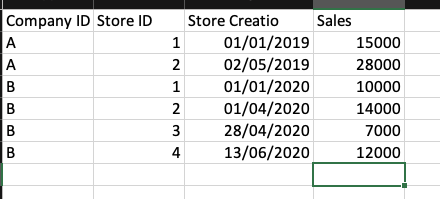
I have a customer table and these customers are opening like stores, I want to calculate the new stores that opened for each then calculates the average growth.
I have an open date and store id for each.
Solved! Go to Solution.
Hi @Anonymous
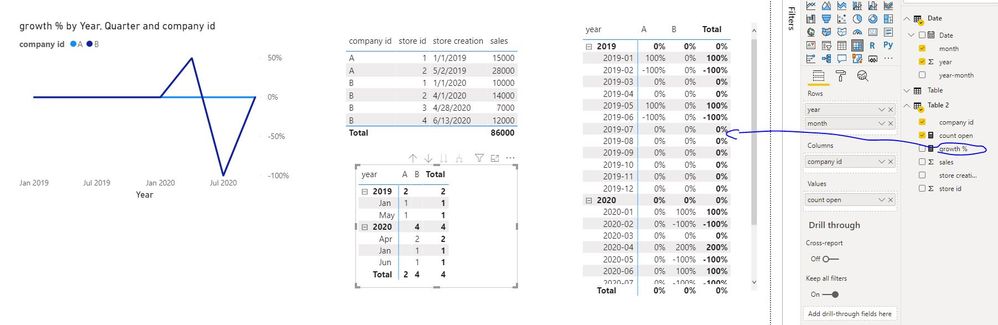
Would you like result below:
count open = DISTINCTCOUNT('Table 2'[store id])
growth % =
VAR m1 =
DISTINCTCOUNT ( 'Table 2'[store id] ) + 0
VAR m2 =
CALCULATE (
DISTINCTCOUNT ( 'Table 2'[store id] ) + 0,
DATEADD ( 'Date'[Date], -1, MONTH )
)
VAR s = m1 - m2
RETURN
IF ( m2 = 0, s / 1, s / m2 )
Date table
Date =
ADDCOLUMNS (
CALENDARAUTO (),
"year", YEAR ( [Date] ),
"month", FORMAT ( [Date], "Mmm" ),
"year-month", FORMAT ( [Date], "yyyy-mm" )
)
Best Regards
Maggie
Community Support Team _ Maggie Li
If this post helps, then please consider Accept it as the solution to help the other members find it more quickly.
Hi @Anonymous
Would you like result below:
count open = DISTINCTCOUNT('Table 2'[store id])
growth % =
VAR m1 =
DISTINCTCOUNT ( 'Table 2'[store id] ) + 0
VAR m2 =
CALCULATE (
DISTINCTCOUNT ( 'Table 2'[store id] ) + 0,
DATEADD ( 'Date'[Date], -1, MONTH )
)
VAR s = m1 - m2
RETURN
IF ( m2 = 0, s / 1, s / m2 )
Date table
Date =
ADDCOLUMNS (
CALENDARAUTO (),
"year", YEAR ( [Date] ),
"month", FORMAT ( [Date], "Mmm" ),
"year-month", FORMAT ( [Date], "yyyy-mm" )
)
Best Regards
Maggie
Community Support Team _ Maggie Li
If this post helps, then please consider Accept it as the solution to help the other members find it more quickly.
@Anonymous , growth is related to period. You can use time intelligence. You can join start date with a date table. and then have measure store open this month , last month an calculate gowth
example
MTD Sales = CALCULATE(SUM(Sales[Sales Amount]),DATESMTD('Date'[Date]))
last MTD Sales = CALCULATE(SUM(Sales[Sales Amount]),DATESMTD(dateadd('Date'[Date],-1,MONTH)))
diff = [MTD Sales]-[last MTD Sales]
diff % = divide([MTD Sales]-[last MTD Sales],[last MTD Sales])
QTD Sales = CALCULATE(SUM(Sales[Sales Amount]),DATESQTD(('Date'[Date])))
Last QTD Sales = CALCULATE(SUM(Sales[Sales Amount]),DATESQTD(dateadd('Date'[Date],-1,QUARTER)))
YTD Sales = CALCULATE(SUM(Sales[Sales Amount]),DATESYTD('Date'[Date],"12/31"))
Last YTD Sales = CALCULATE(SUM(Sales[Sales Amount]),DATESYTD(dateadd('Date'[Date],-1,Year),"12/31"))
To get the best of the time intelligence function. Make sure you have a date calendar and it has been marked as the date in model view. Also, join it with the date column of your fact/s. Refer :
https://radacad.com/creating-calendar-table-in-power-bi-using-dax-functions
https://www.archerpoint.com/blog/Posts/creating-date-table-power-bi
https://www.sqlbi.com/articles/creating-a-simple-date-table-in-dax/
See if my webinar on Time Intelligence can help: https://community.powerbi.com/t5/Webinars-and-Video-Gallery/PowerBI-Time-Intelligence-Calendar-WTD-YTD-LYTD-Week-Over-Week/m-p/1051626#M184
Appreciate your Kudos.
Hi @Anonymous ,
It will be nice to have some sample data here so that proper calculations can be suggested.
Thanks,
Pragati
The Power BI Data Visualization World Championships is back! Get ahead of the game and start preparing now!
| User | Count |
|---|---|
| 40 | |
| 36 | |
| 34 | |
| 31 | |
| 27 |
| User | Count |
|---|---|
| 136 | |
| 103 | |
| 66 | |
| 65 | |
| 56 |