cancel
Showing results for 
Search instead for 
Did you mean: 

Learn from the best! Meet the four finalists headed to the FINALS of the Power BI Dataviz World Championships! Register now

Reply
Anonymous
Not applicable

Status Card Help

I created a line and stacked column chart and am using different cards to visualize different numbers when I select the particular item from the chart.  So far, it's working as I designed it.  When I unselect an item in the chart, one card defaults to the 1st line of my data (shows project name), the other card shows the overall average, which is what I want.


How do I get the first card that shows project name to show company name vice 1st line of data (1st project name in dataset)?


Thanks

1 ACCEPTED SOLUTION
Anonymous
Not applicable

@Anonymous 

Try my solution in this post: https://community.powerbi.com/t5/Desktop/If-functions-on-cards/m-p/956277#M458252

Basically create a measure to replace the current measure that show "582nd" in card, something like:


new measure = IF(ISFILTERED(Table[Division]),[Current Measure],"Text")


 You can replace "Text" with the "overall avg" measure if needed. 


Paul Zheng _ Community Support Team
If this post helps, then please consider Accept it as the solution to help the other members find it more quickly.


View solution in original post

3 REPLIES 3
amitchandak
Super User
Super User

@Anonymous ,The information you have provided is not making the problem clear to me. Can you please explain with an example.

Appreciate your Kudos.

Share with Power BI Enthusiasts: Full Power BI Video (20 Hours) YouTube
Microsoft Fabric Series 60+ Videos YouTube
Microsoft Fabric Hindi End to End YouTube
Anonymous
Not applicable

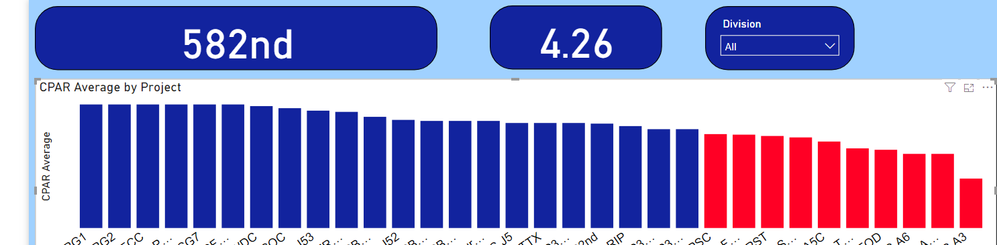
Here is a screen shot.  When I select one of the chart columns, it shows the data below and the card that shows 582nd right now changes to whichever column I select.  When I unselect the column and all are shown, I am trying to get the 582nd to display "overall avg" or other text instead of 582nd, which isn't selected.  It is defaulting to 582nd when nothing is selected.  Hope this helps explain it.


Bi-ex.PNG

Anonymous
Not applicable

@Anonymous 

Try my solution in this post: https://community.powerbi.com/t5/Desktop/If-functions-on-cards/m-p/956277#M458252

Basically create a measure to replace the current measure that show "582nd" in card, something like:


new measure = IF(ISFILTERED(Table[Division]),[Current Measure],"Text")


 You can replace "Text" with the "overall avg" measure if needed. 


Paul Zheng _ Community Support Team
If this post helps, then please consider Accept it as the solution to help the other members find it more quickly.


Helpful resources

Announcements
Join our Fabric User Panel

Join our Fabric User Panel

Share feedback directly with Fabric product managers, participate in targeted research studies and influence the Fabric roadmap.

March Power BI Update Carousel

Power BI Community Update - March 2026

Check out the March 2026 Power BI update to learn about new features.