Get Fabric certified for FREE!
Don't miss your chance to take the Fabric Data Engineer (DP-700) exam on us!
Learn more- Power BI forums
- Get Help with Power BI
- Desktop
- Service
- Report Server
- Power Query
- Mobile Apps
- Developer
- DAX Commands and Tips
- Custom Visuals Development Discussion
- Health and Life Sciences
- Power BI Spanish forums
- Translated Spanish Desktop
- Training and Consulting
- Instructor Led Training
- Dashboard in a Day for Women, by Women
- Galleries
- Data Stories Gallery
- Themes Gallery
- Contests Gallery
- QuickViz Gallery
- Quick Measures Gallery
- Visual Calculations Gallery
- Notebook Gallery
- Translytical Task Flow Gallery
- TMDL Gallery
- R Script Showcase
- Webinars and Video Gallery
- Ideas
- Custom Visuals Ideas (read-only)
- Issues
- Issues
- Events
- Upcoming Events
We've captured the moments from FabCon & SQLCon that everyone is talking about, and we are bringing them to the community, live and on-demand. Starts on April 14th. Register now
- Power BI forums
- Forums
- Get Help with Power BI
- Desktop
- Standard Diviation
- Subscribe to RSS Feed
- Mark Topic as New
- Mark Topic as Read
- Float this Topic for Current User
- Bookmark
- Subscribe
- Printer Friendly Page


- Mark as New
- Bookmark
- Subscribe
- Mute
- Subscribe to RSS Feed
- Permalink
- Report Inappropriate Content
Standard Diviation
I have a set of data for student's score for 2 years. i will get the standardard deviation of list of student on picked day. how to do that? Output will look like this.
| Name | Score | Standard deviation |
| Name 1 | 768 | |
| Name 2 | 273 | |
| Name 3 | 190 | |
| Name 4 | 96 | |
| Name 5 | 94 | |
| Name 6 | 96 | |
| Name 7 | 98 | |
| Name 8 | 98 | |
| Name 9 | 96 | |
| Name 10 | 86 |

- Mark as New
- Bookmark
- Subscribe
- Mute
- Subscribe to RSS Feed
- Permalink
- Report Inappropriate Content
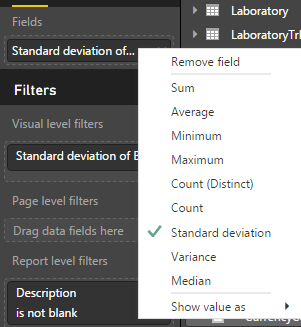
The simpliest way would be to create a Card visual and place the Score column into the Values box. As long as the Score column is of type number, you'll be able to choose Standard Deviation from the list of aggregations.
Something like this:
Alternatively, you could create a measure using either one of these functions:
https://msdn.microsoft.com/en-us/library/gg492207.aspx
https://msdn.microsoft.com/en-us/library/gg492150.aspx
- Mark as New
- Bookmark
- Subscribe
- Mute
- Subscribe to RSS Feed
- Permalink
- Report Inappropriate Content
@Anonymous the column of "STANDARD DEVIATION OF WELLNESS SCORE", I use the built in function of power bi which is the simply way you mentioned.,
The column of Score STDEV.P comes from the calculation : Score SD = CALCULATE(STDEV.P(data[Score]),ALLEXCEPT(data, data[Score], data[Name]))
are they supposed to be the same?
| Name | Score | Standard deviation of Wellness Score | Score STDEV.P |
| NAME 1 | 768 | 0 | 8 |
| NAME 2 | 273 | 0 | 18 |
| NAME 3 | 190 | 0 | 38 |
| NAME 4 | 96 | 0 | 7 |
| NAME 5 | 94 | 0 | 14 |
| NAME 6 | 96 | 0 | 8 |
| NAME 7 | 98 | 0 | 1 |
| NAME 8 | 98 | 0 | 5 |
| NAME 9 | 96 | 0 | 2 |
| NAME 10 | 86 | 0 | 8 |


- Mark as New
- Bookmark
- Subscribe
- Mute
- Subscribe to RSS Feed
- Permalink
- Report Inappropriate Content
Hi @ask,
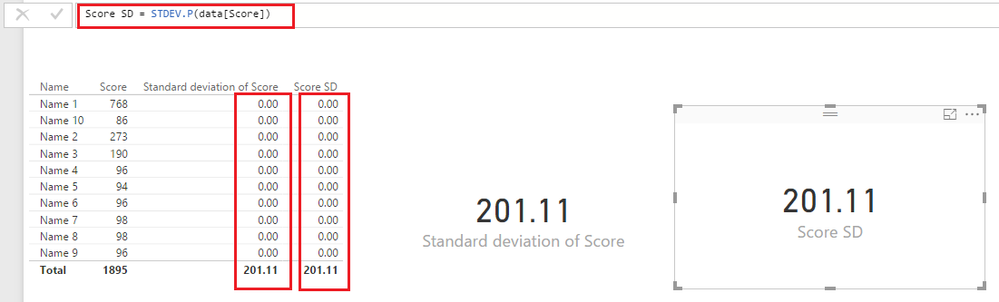
Based on my test, the build-in standard deviation function should be similar to just using the STDEV.P function without any other filters like below. 
Score SD = STDEV.P(data[Score])
Regards
- Mark as New
- Bookmark
- Subscribe
- Mute
- Subscribe to RSS Feed
- Permalink
- Report Inappropriate Content
@v-ljerr-msft have you tried to pick the specific date. for example every wednesday for the past 2 years? How to do that?
- Mark as New
- Bookmark
- Subscribe
- Mute
- Subscribe to RSS Feed
- Permalink
- Report Inappropriate Content
Hi @ask,
The formula below should work.
Score SD =
CALCULATE (
    STDEV.P ( data[Score] ),
    FILTER ( data, WEEKDAY ( data[Date] ) = 4 && YEAR ( data[Date] ) >= 2015 )
)
Regards
- Mark as New
- Bookmark
- Subscribe
- Mute
- Subscribe to RSS Feed
- Permalink
- Report Inappropriate Content
@v-ljerr-msft How about to check the dynamic date instead of wednesday, that might be Tuesday, Monday, etc, and also dynamic name selected.
Score SD =
CALCULATE (
    STDEV.P ( data[Score] ),
    FILTER ( data, WEEKDAY ( data[Date] ) = 4 && YEAR ( data[Date] ) >= 2015 )
)
- Mark as New
- Bookmark
- Subscribe
- Mute
- Subscribe to RSS Feed
- Permalink
- Report Inappropriate Content
Hi @ask,
1. Add [Year], [MonthName], [WeekName] column to your table if you have them yet.
Year = YEAR(data[Date])
MonthName = FORMAT(data[Date],"MMMM")
WeekName = FORMAT(data[Date],"DDDD")
2. Simply use the formula below to create a measure for 'Score SD', then you should be able to use the [Year], [MonthName], [WeekName], [Name] column as Slicers on the report to dynamically get the standard deviation of list of student on picked day.
Score SD =
CALCULATE (
    STDEV.P ( data[Score] )
)
Regards
- Mark as New
- Bookmark
- Subscribe
- Mute
- Subscribe to RSS Feed
- Permalink
- Report Inappropriate Content
| Name | Score | Standard deviation of Wellness Score | Score STDEV.P |
| NAME 1 | 768 | 0 | 8 |
| NAME 2 | 273 | 0 | 18 |
| NAME 3 | 190 | 0 | 38 |
| NAME 4 | 96 | 0 | 7 |
| NAME 5 | 94 | 0 | 14 |
| NAME 6 | 96 | 0 | 8 |
| NAME 7 | 98 | 0 | 1 |
| NAME 8 | 98 | 0 | 5 |
| NAME 9 | 96 | 0 | 2 |
| NAME 10 | 86 | 0 | 8 |
Hi @v-ljerr-msft the table doesn't have Year, Month, Week. Only have Name, Score, Date as shown above
- Mark as New
- Bookmark
- Subscribe
- Mute
- Subscribe to RSS Feed
- Permalink
- Report Inappropriate Content
Hi @ask,
I don't see any Date column in your sample table above. Anyway, it doesn't matter.
1. Add [Year], [MonthName], [WeekName] column to your table if you have them yet.
Year = YEAR(data[Date])MonthName = FORMAT(data[Date],"MMMM")WeekName = FORMAT(data[Date],"DDDD")
I knew your table doesn't have Year, Month, Week. As I have mentioned in Step 1: You need to add them first!!(just use the formula I have provided above)
Regards
- Mark as New
- Bookmark
- Subscribe
- Mute
- Subscribe to RSS Feed
- Permalink
- Report Inappropriate Content
@v-ljerr-msftMy requirement doesn't allow me to create slicer. Any way to calculate the SD by each name, by specific date?
Helpful resources

New to Fabric Survey
If you have recently started exploring Fabric, we'd love to hear how it's going. Your feedback can help with product improvements.

Power BI DataViz World Championships - June 2026
A new Power BI DataViz World Championship is coming this June! Don't miss out on submitting your entry.

Join our Fabric User Panel
Share feedback directly with Fabric product managers, participate in targeted research studies and influence the Fabric roadmap.

Power BI Community Update - March 2026
Check out the March 2026 Power BI update to learn about new features.

| User | Count |
|---|---|
| 53 | |
| 37 | |
| 35 | |
| 19 | |
| 17 |


| User | Count |
|---|---|
| 74 | |
| 70 | |
| 39 | |
| 35 | |
| 23 |


