cancel
Showing results for 
Search instead for 
Did you mean: 

The Power BI Data Visualization World Championships is back! Get ahead of the game and start preparing now! Learn more

Reply
WBscooby
Helper III
Helper III

Stacked column chart shows different results to table

Hi


I’ve being going around in circles with a problem – sample model attached.

https://1drv.ms/u/s!Ap6q8W-mvm27g-cbmJMXeLGVon-74A?e=7sjOzS


I’ve created a measure [#transactions] to find the earliest date of sale for each customer ID and then count where these credentials are matched and it is a new transaction.


I then have a second measure [TotalIDs] that sums these.


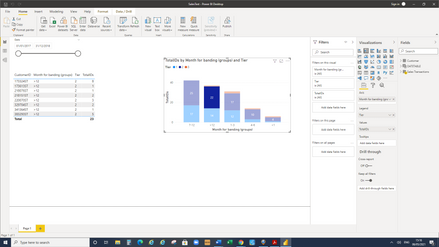
I put these into a stacked column visual against Month for banding and with a legend of Tier. The data looks correct. However, when I click on one of the levels, the table shows different numbers and I just can’t get my head around why?! The numbers are quite close so I’ve screenshot one of the discrepancies.


Can anyone help me understand what I am doing wrong?


Thank you!


Screenshot (85).png

3 REPLIES 3
V-lianl-msft
Community Support
Community Support

Hi @WBscooby ,


Please try :

TotalIDs = sumx(SUMMARIZE('Sales Transactions','Sales Transactions'[CustomerID],'Sales Transactions'[Month for banding (groups)],'Sales Transactions'[Tier],"Transactions",[#Transactions]),[Transactions])

V-lianl-msft_0-1620614699088.png


Best Regards,
Liang
If this post helps, then please consider Accept it as the solution to help the other members find it more quickly.


Sorry to ask again - I have spent hours trying to work this out for myself but no luck. Is anyone able to assist? Thank you

Hi


This is really helpful, thank you, but unfortunately it is the wrong way around - I don't think I explained that clearly. The correct number in the chart should be 22 and I am trying to get my table to show the same numbers. 


With the measure #Transactions I am trying to find the earliest DateOrigSale for each customer and then count the number of [New Sale] after this.

#Transactions =
VAR _id = MAX ('Sales Transactions'[CustomerID])
VAR _date = CALCULATE(Min('Sales Transactions'[DateOrigSale]),ALLSELECTED('Sales Transactions'),'Sales Transactions'[CustomerID] = _id)

RETURN
calculate(count('Sales Transactions'[TransactionID]),
VALUES ('Sales Transactions'[CustomerID]),'Sales Transactions'[CustomerID]= _id,
'Sales Transactions'[DateOrigSale] = _date,
'Sales Transactions'[New Sale]=1)
 
I then am trying to sum these using #TotalIDs to put them into the stacked column chart by tier and month banding
 
TotalIDs = sumx(VALUES('Sales Transactions'[TransactionID]),[#Transactions])
 
The chart looks correct but when I click on it, it appears to change the focus. I think possibly it is counting twice if a customer has transactions with different tiers. I only want to count the tier associated with the first DateOrigSale.
 
Hope that makes sense!
Thank you

Helpful resources

Announcements
Power BI DataViz World Championships

Power BI Dataviz World Championships

The Power BI Data Visualization World Championships is back! Get ahead of the game and start preparing now!

December 2025 Power BI Update Carousel

Power BI Monthly Update - December 2025

Check out the December 2025 Power BI Holiday Recap!

FabCon Atlanta 2026 carousel

FabCon Atlanta 2026

Join us at FabCon Atlanta, March 16-20, for the ultimate Fabric, Power BI, AI and SQL community-led event. Save $200 with code FABCOMM.