Join us at FabCon Atlanta from March 16 - 20, 2026, for the ultimate Fabric, Power BI, AI and SQL community-led event. Save $200 with code FABCOMM.
Register now!The Power BI Data Visualization World Championships is back! Get ahead of the game and start preparing now! Learn more
I have a data table which has Project A, B, and C. Within each project are a set of assets with a Cost associated as well as % returns. Example table is below. I have set up a stacked bar chart, which shows the WAVG of each Project (as summarized at the bottom of the table). In a separate Treemap, if I click on the Asset number, it shows the Return specific to that Asset. Is there a way to get the "Details" that's available in a Treemap into the Bar Chart show it shows the build-up to the weighted average? Said differently, is there a way to set up a stacked chart so that it totals the WAVG, but I can click on individual assets that are part of the project and have it display the associated return at the Asset level rather than at the project level?
| Project | Asset | Cost | Return |
| A | 1 | 72 | 18% |
| A | 2 | 51 | 24% |
| A | 3 | 99 | 15% |
| B | 4 | 90 | 17% |
| B | 5 | 65 | 19% |
| B | 6 | 70 | 10% |
| B | 7 | 53 | 19% |
| C | 8 | 88 | 29% |
| C | 9 | 54 | 22% |
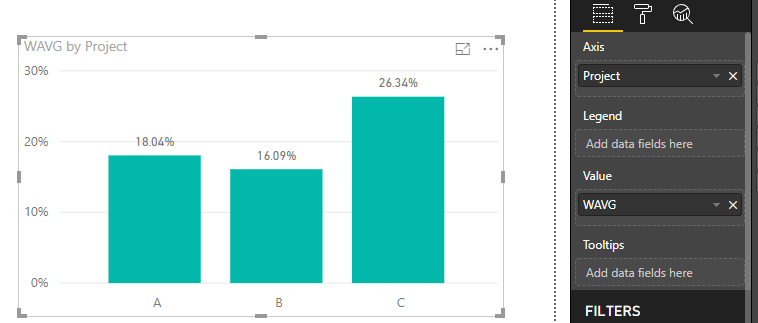
| WAVG A | 18.04% | ||
| WAVG B | 15.28% | ||
| WAVG C | 26.34% |
Solved! Go to Solution.
Hi @mrothschild,
Please add below measure to column chart.
WAVG =
VAR tempTable =
ADDCOLUMNS (
Table_1,
"Weighted average", Table_1[Cost]
/ CALCULATE ( SUM ( Table_1[Cost] ), ALLEXCEPT ( Table_1, Table_1[Project ] ) ) * Table_1[Return]
)
RETURN
IF (
ISFILTERED ( Table_1[Asset] ),
SUM ( Table_1[Return] ),
SUMX ( tempTable, [Weighted average] )
)
Best regards,
Yuliana Gu
Hi @mrothschild,
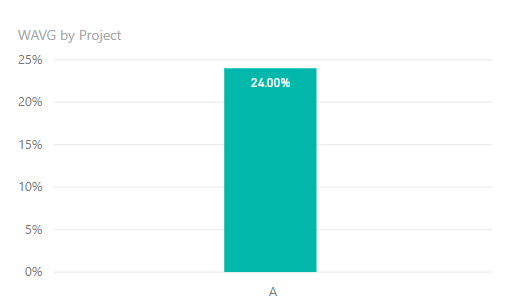
What is the calculation rule to get the weighted average for each project? What is the correct result when clicking on a specific Asset on Treemap, for example, if I click Asset 2 of ProjectA?
Regards,
Yuliana Gu
For a specific asset within a project, the return would be specifc to that asset, thus in your question, the result would be 24%.
Hi @mrothschild,
Please add below measure to column chart.
WAVG =
VAR tempTable =
ADDCOLUMNS (
Table_1,
"Weighted average", Table_1[Cost]
/ CALCULATE ( SUM ( Table_1[Cost] ), ALLEXCEPT ( Table_1, Table_1[Project ] ) ) * Table_1[Return]
)
RETURN
IF (
ISFILTERED ( Table_1[Asset] ),
SUM ( Table_1[Return] ),
SUMX ( tempTable, [Weighted average] )
)
Best regards,
Yuliana Gu
THanks very much!
The Power BI Data Visualization World Championships is back! Get ahead of the game and start preparing now!
| User | Count |
|---|---|
| 38 | |
| 38 | |
| 37 | |
| 28 | |
| 28 |
| User | Count |
|---|---|
| 124 | |
| 89 | |
| 73 | |
| 66 | |
| 65 |