cancel
Showing results for 
Search instead for 
Did you mean: 

The Power BI Data Visualization World Championships is back! Get ahead of the game and start preparing now! Learn more

Reply
vjnvinod
Impactful Individual

Stacked chart issue

Hi,


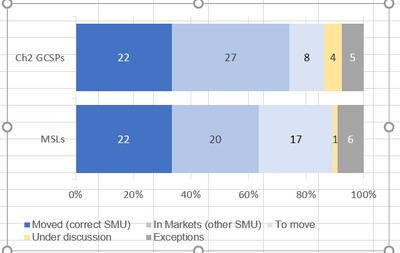
In Excel, this is what i was able to achieve but i can't do that in power BI

Basically 100% stacked bar chart doesn't shows me the value, it shows the details in % see below graphs


is there any workaround, where i can show the values like in excel below instead of %?


Capture2.PNG


Capture.PNG

1 ACCEPTED SOLUTION
v-zhenbw-msft
Community Support
Community Support

Hi @vjnvinod ,


Sorry for that 100% Stacked bar chart don’t support the value, it just shows the percentage of each value.


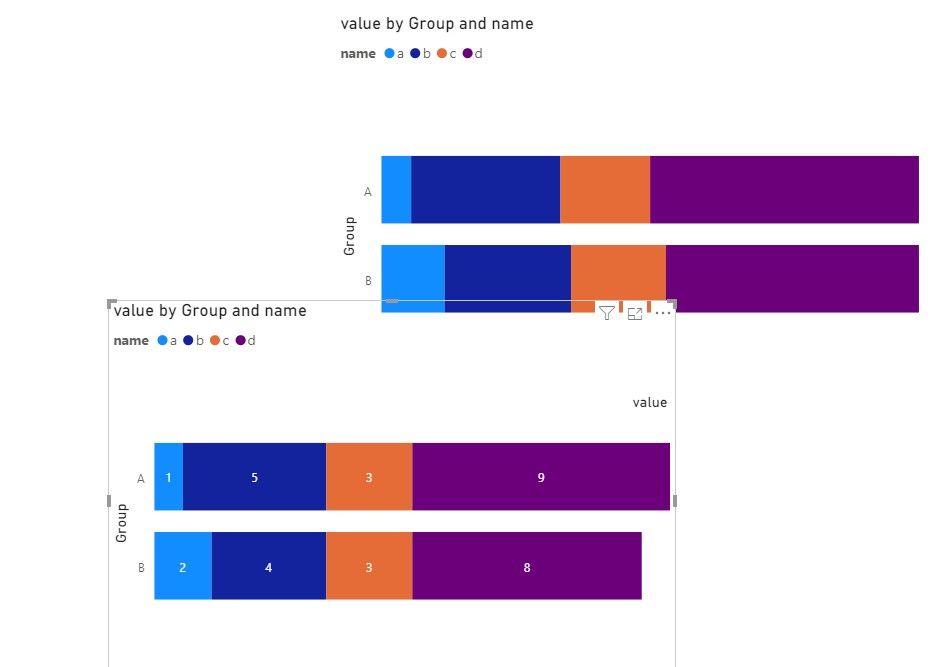
The first solution is to add value to Tooltip and put the mouse on the Column to show the value.


St1.jpg


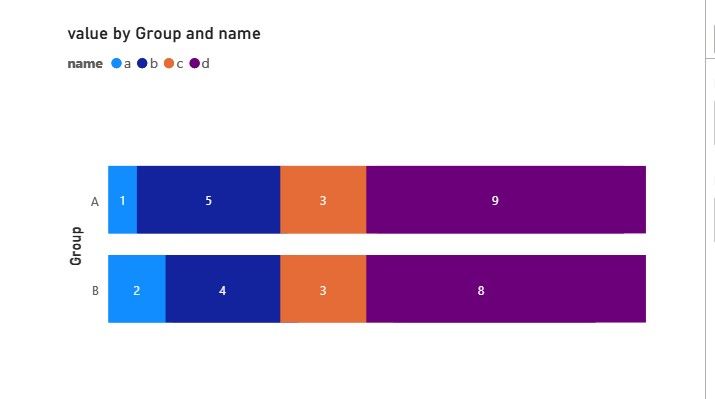
The second solution is to create a Stacked bar chart and close the background. Then put it on 100% Stacked bar chart.


St2.jpg


St3.jpg


If it doesn’t meet your requirement, perhaps you can submit the requirement to ideas and add your comments there to make this feature coming sooner : https://ideas.powerbi.com/forums/265200-power-bi-ideas


Best regards,


Community Support Team _ zhenbw

If this post helps, then please consider Accept it as the solution to help the other members find it more quickly.

View solution in original post

2 REPLIES 2
v-zhenbw-msft
Community Support
Community Support

Hi @vjnvinod ,


Sorry for that 100% Stacked bar chart don’t support the value, it just shows the percentage of each value.


The first solution is to add value to Tooltip and put the mouse on the Column to show the value.


St1.jpg


The second solution is to create a Stacked bar chart and close the background. Then put it on 100% Stacked bar chart.


St2.jpg


St3.jpg


If it doesn’t meet your requirement, perhaps you can submit the requirement to ideas and add your comments there to make this feature coming sooner : https://ideas.powerbi.com/forums/265200-power-bi-ideas


Best regards,


Community Support Team _ zhenbw

If this post helps, then please consider Accept it as the solution to help the other members find it more quickly.

amitchandak
Super User
Super User

Helpful resources

Announcements
Power BI DataViz World Championships

Power BI Dataviz World Championships

The Power BI Data Visualization World Championships is back! Get ahead of the game and start preparing now!

December 2025 Power BI Update Carousel

Power BI Monthly Update - December 2025

Check out the December 2025 Power BI Holiday Recap!

FabCon Atlanta 2026 carousel

FabCon Atlanta 2026

Join us at FabCon Atlanta, March 16-20, for the ultimate Fabric, Power BI, AI and SQL community-led event. Save $200 with code FABCOMM.