cancel
Showing results for 
Search instead for 
Did you mean: 

View all the Fabric Data Days sessions on demand. View schedule

Reply
kala2
Helper III
Helper III

Stacked Line Chart, how to stop line from continuous

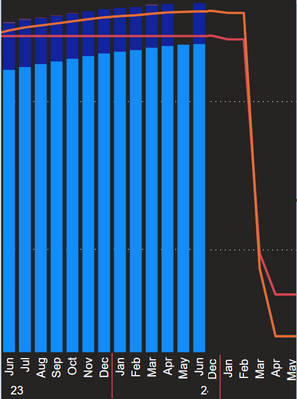
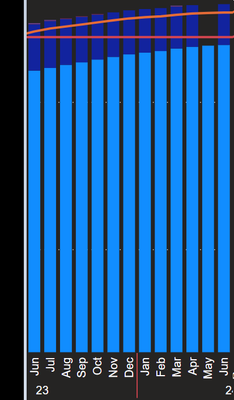
I have a Stacked Line Chart which displays data by month

kala2_0-1645196918898.png


DAX Red Line Measure is: 

MeasureRedLine = SUM(Costs[value]) + 0

I want to remove the empty gap between months and stop the red/orange line to continuous until a new value.

Expected Result:
kala2_1-1645197455315.png


Or even Better if we prevent line to continuous when bars end like:

kala2_0-1645198551212.png


Any ideas how to achieve that?


4 REPLIES 4
Mayank_Yavda
Resolver II
Resolver II

Hi @kala2  ,

here is Stacked Column chart with Non Continuous Line Chart which will help you to get the non-continuous line for parts where there is no data or values.

Stacked Column Chart with Non-Continuous Line Chart, PBIVizEdit.comStacked Column Chart with Non-Continuous Line Chart, PBIVizEdit.comStacked Column Chart with Non-Continuous Line Chart, PBIVizEdit.comStacked Column Chart with Non-Continuous Line Chart, PBIVizEdit.com
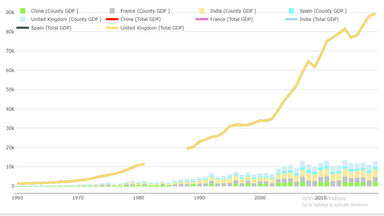


Download link for the custom visual file in this page,

https://pbivizedit.com/gallery/stacked-column-chart-with-non-continuous-lines 


This was made with our Custom Visual creator tool PBIVizEdit.com. With this tool,

  • anyone, irrespective of technical skills, can create their own visuals
  • 15 minutes to create a visual from scratch
  • opens up many additional attributes to edit (for e.g. labels, tooltips, legends position, etc)

Give this a shot and let us know if you face any problem/errors.
You can use the editor to modify your visual further (some modifications cannot be done in Power BI window and have to be in editor).

Thanks,
Team PBIVizEdit

jaipal
Resolver III
Resolver III

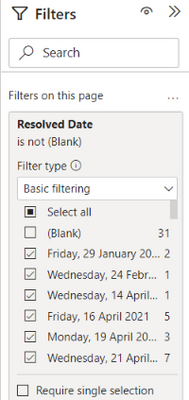
@kala2  in your filters tab,  unselect Blank like as follows

jaipal_0-1645413797402.png

@jaipal 

My Shared axis is 

kala2_0-1645428438928.png


And i dont have blank values in Year or Month 

@kala2 do you have date table? if yes, change cross filter direction to Single. 

Helpful resources

Announcements
November Power BI Update Carousel

Power BI Monthly Update - November 2025

Check out the November 2025 Power BI update to learn about new features.

Fabric Data Days Carousel

Fabric Data Days

Advance your Data & AI career with 50 days of live learning, contests, hands-on challenges, study groups & certifications and more!

FabCon Atlanta 2026 carousel

FabCon Atlanta 2026

Join us at FabCon Atlanta, March 16-20, for the ultimate Fabric, Power BI, AI and SQL community-led event. Save $200 with code FABCOMM.

Top Solution Authors
Top Kudoed Authors