This is best Fabric, Power BI, SQL and AI community event. How do we know? The last event sold out! Save €200 with code FABCMTY200.
Register nowA new Data Days event is coming soon! This time we’re going bigger than ever. Fabric, Power BI, SQL, AI and more. Don't miss out.
Hi Community,
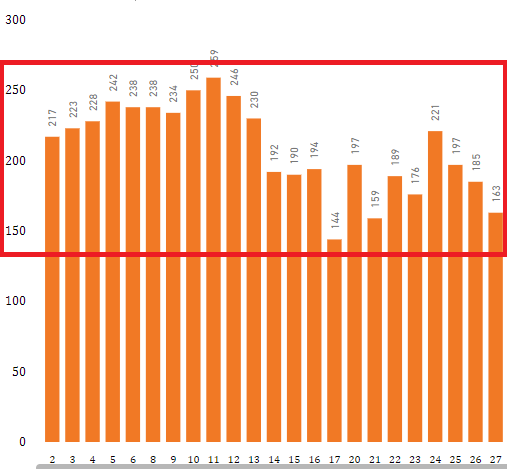
I am having issue with Stacked Column Chart. That I want to add two values in bar. While adding my 1st value y axis scale fetches exact position. i.e.,
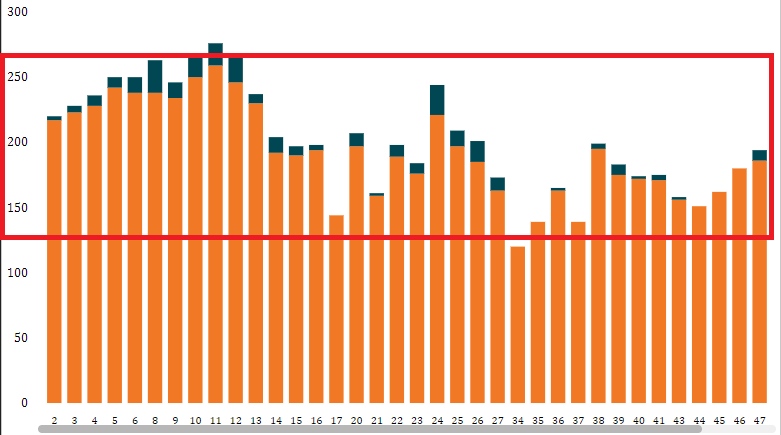
While adding 2nd value, Y axis doesnot fetches its position exactly, value added to 1st value as follows,
When add my 2nd value, consider x-axis value "1",previous y axis scale is at 217 exactly but while adding 2nd value y axis scale rises 217 to 220. I need the 2nd axis value within 1st value. How I can set the axis here. may I know If this possible to attain or not.
Thanks In Advance,
Amz
Hi @Amz_123,
Based on my test, it is not possible to meet your requirement currently.You can come up a new idea about that and add your comments there to improve Power BI and make this feature coming sooner.
https://ideas.powerbi.com/forums/265200-power-bi-ideas
Regards,
Frank
Check out the May 2026 Power BI update to learn about new features.
Sign up to receive a private message when registration opens and key events begin.
If you have recently started exploring Fabric, we'd love to hear how it's going. Your feedback can help with product improvements.
| User | Count |
|---|---|
| 32 | |
| 25 | |
| 24 | |
| 22 | |
| 13 |
| User | Count |
|---|---|
| 61 | |
| 47 | |
| 27 | |
| 24 | |
| 19 |