Join us at FabCon Atlanta from March 16 - 20, 2026, for the ultimate Fabric, Power BI, AI and SQL community-led event. Save $200 with code FABCOMM.
Register now!The Power BI Data Visualization World Championships is back! Get ahead of the game and start preparing now! Learn more
Hi all,
I'm pretty OK with DAX but not that good. I've seen multiple posts here which come close and I've tried their solutions, but it did not work.
I need to calculate the amount of people we need to recruit per day to make sure we will find enough people for our next project.
So project X group 1 for example, starts at 01/04/2023, has a recruitment window of 10 days (ending on Mar 31/03/2023, so 10 days minus 1), and recruitment can not take place in the weekend.
There's 8 working days between start recruitment and start project, so that's 100/8 = roughly 12 people per day to recruit.
So basically, I've got
a date table
and a recruitment table with people needed, recruitment window, recruitment start date and project start date
Could somebody pleae help me? I know I might end up with half numbers and stuff but that's OK.
Thanks in advance!
Hi @v-zhangti ,
Could you please again try to help me out? I still haven't found out how to solve this. To add, I can't share files here (I don't know why), but I could share them personlly by mail?
thanks in advance, I'd be really thankful if you could help me out.
Rgds,
Felix
Hi,
Thanks so much for the answer, but I'm afraid it covers only part of the solution: I want actually to have all groups in once, not separate between groups 1 and 2, but I want to see both together in the same graph.
Could you, @v-zhangti , or somebdoy else, please help me out? I'm willing to send the actual file instead of this example file if it helps.
Thanks!
Rgds,
Felix
Hi,
It did not work exactly, the measures didn't give errors but they didn't shows as I would like... could I send you my current files (both the Excel behind and the actual Pbix)? I'm afraid I can not resolve it otherwise.
Hi, @x-File
You can try the following methods.
New table:
Date = CALENDAR(MIN('Table'[Recruitment start]),MAX('Table'[Project start]))
Column:
Weekday = WEEKDAY([Date],2)
Measure:
Measure =
IF ( SELECTEDVALUE ( 'Table'[Project start] ) > SELECTEDVALUE ( 'Date'[Date] )
&& SELECTEDVALUE ( 'Table'[Recruitment start] ) <= SELECTEDVALUE ( 'Date'[Date] ),
1,
0
)
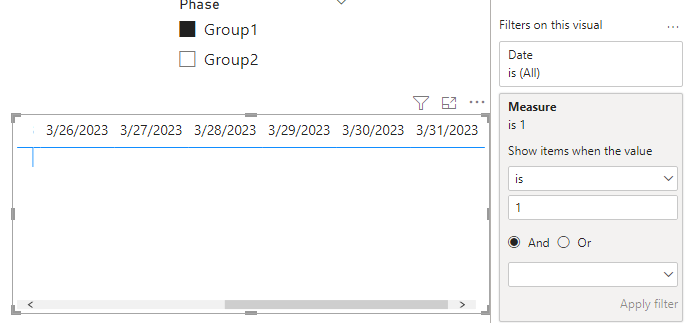
Put measure in the date matrix view and set equal to 1.
Measure:
Number =
VAR _neednumber = SUM ( 'Table'[Needed] )
VAR _countdays =
SELECTEDVALUE ( 'Table'[Recruitment window] )
- CALCULATE ( COUNT ( 'Date'[Date] ),
FILTER ( ALL ( 'Date' ),
OR ( [Weekday] = 6, [Weekday] = 7 )
&& [Date] < SELECTEDVALUE ( 'Table'[Project start] )
&& [Date] >= SELECTEDVALUE ( 'Table'[Recruitment start] ) ) )
RETURN
IF ( OR ( SELECTEDVALUE ( 'Date'[Weekday] ) = 6,
SELECTEDVALUE ( 'Date'[Weekday] ) = 7 ),
0,
DIVIDE ( _neednumber, _countdays )
)
Result:
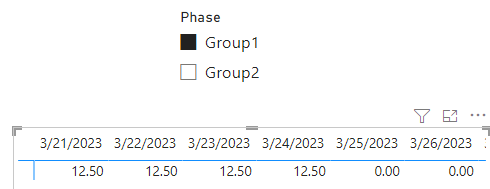
Is this the result you expect?
Best Regards,
Community Support Team _Charlotte
If this post helps, then please consider Accept it as the solution to help the other members find it more quickly.
The Power BI Data Visualization World Championships is back! Get ahead of the game and start preparing now!
Check out the November 2025 Power BI update to learn about new features.
| User | Count |
|---|---|
| 66 | |
| 46 | |
| 42 | |
| 26 | |
| 19 |
| User | Count |
|---|---|
| 196 | |
| 126 | |
| 101 | |
| 67 | |
| 49 |