Join us at FabCon Atlanta from March 16 - 20, 2026, for the ultimate Fabric, Power BI, AI and SQL community-led event. Save $200 with code FABCOMM.
Register now!The Power BI Data Visualization World Championships is back! Get ahead of the game and start preparing now! Learn more
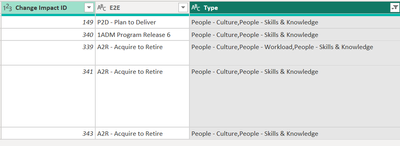
Hi! I have "Change Impacts" that have have 2 columns with infotmation. One is "E2E" and the other is "Type". Those columns can have more than one info, splited with a "," as yoy can see in the "Type" column.
I need to create graphs counting each "Chane Impact ID" by "E2E" and "Type", incuding the values that are splitted by a ",". Any idea on how I could do it?
Solved! Go to Solution.
@Anonymous
what about split to rows?
then you can count each value separately.
Proud to be a Super User!
Hi,
In the Query Editor, split the contents of the Type column by rows using the comma delimiter.
Hi,
In the Query Editor, split the contents of the Type column by rows using the comma delimiter.
@Anonymous
what about split to rows?
then you can count each value separately.
Proud to be a Super User!
Check out the November 2025 Power BI update to learn about new features.
Advance your Data & AI career with 50 days of live learning, contests, hands-on challenges, study groups & certifications and more!