Join us at FabCon Atlanta from March 16 - 20, 2026, for the ultimate Fabric, Power BI, AI and SQL community-led event. Save $200 with code FABCOMM.
Register now!The Power BI Data Visualization World Championships is back! It's time to submit your entry. Live now!
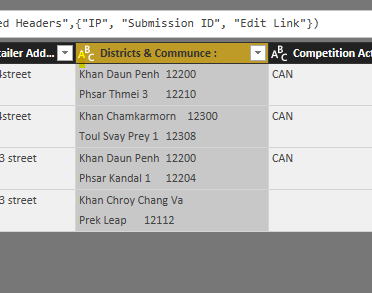
HI , i have no clue how to split the First Text in 1 column and Second Text in another column
for ex : 1 Column : Khan Daun Penh 12200
Another Column : Psar Tmei 3 12210
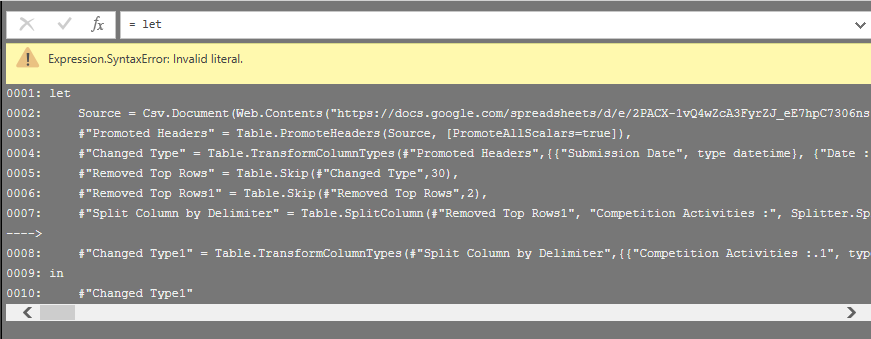
I tried all of split options , but doesn't work.
Hi @Chanleakna123,
You can use Split Column by Delimiter feature with line break #(lf). You can test with below Power Query:
let
Source = Table.FromRows(Json.Document(Binary.Decompress(Binary.FromText("i45W8s5IzFNwSSzNUwhIzctQMDQyMjBQiMkLKE4sUgjJTc1UMAaJGRooxepAFTtnJOZmJxbl5hflAaWMDQxi8kLyS3MUgssSKxUCilIrDcHCFkqxsQA=", BinaryEncoding.Base64), Compression.Deflate)), let _t = ((type text) meta [Serialized.Text = true]) in type table [Column1 = _t]),
#"Changed Type" = Table.TransformColumnTypes(Source,{{"Column1", type text}}),
#"Split Column by Delimiter" = Table.SplitColumn(#"Changed Type", "Column1", Splitter.SplitTextByDelimiter("#(lf)", QuoteStyle.Csv), {"Column1.1", "Column1.2"}),
#"Changed Type1" = Table.TransformColumnTypes(#"Split Column by Delimiter",{{"Column1.1", type text}, {"Column1.2", type text}})
in
#"Changed Type1"
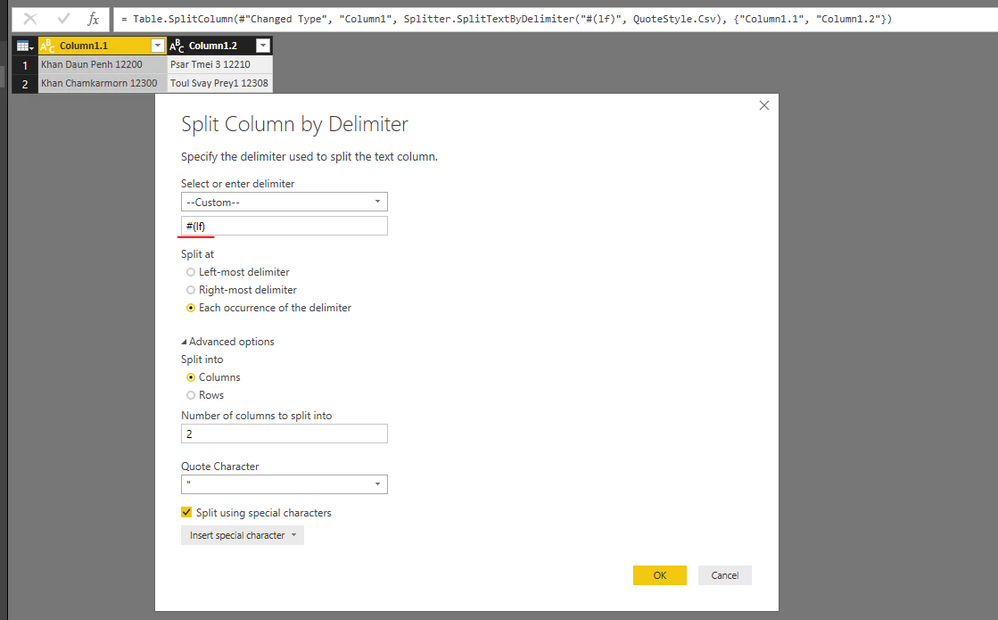
Reference:
https://www.excelguru.ca/blog/2015/10/16/split-by-line-breaks/
Best Regards,
Qiuyun Yu
See the 3 pictures i shared ,
and the other one with the table of the line up and down.
i failed to success your.
can you please advise more.
Hi @Chanleakna123,
Is the issue solved? If it is, please mark a helpful reply as an answer.
Best Regards,
Qiuyun Yu
Hi ,
i'm sorry , i can't accept this solution , due to i use multiple files , few files are worked but few are not .
i just get back to the issued file .
below is BI File i shared.
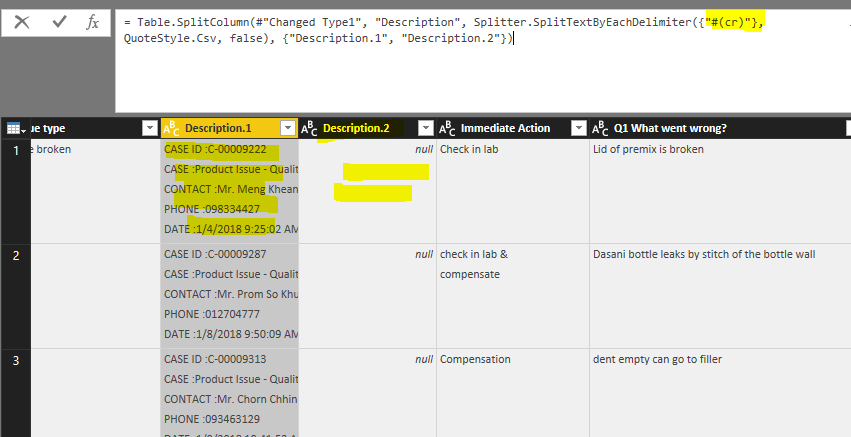
Even i try with #(If ) , #(cr) , it doesn't work. Just wanna understand how to acheive this ?
https://drive.google.com/file/d/1wc8cjIIhUpmE1-zeJARDCLWxAjWK0Irz/view?usp=sharing
here it is
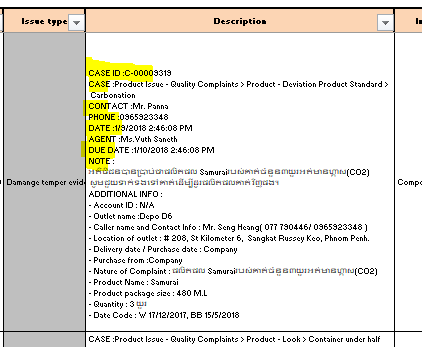
CASE ID :C-00009319
HI , what i want is : Cse in 1 column
contact in one column
Phone in one column
Date in one column
Agent in one column
Due Date in one column
Note in on column
so every drop down message needs to be in seperated column ,
i tried for almost 2 hours , still have no idea how to settle this .
CASE :Product Issue - Quality Complaints > Product - Deviation Product Standard > Carbonation
CONTACT :Mr. Panna
PHONE :0965923348
DATE :1/9/2018 2:46:08 PM
AGENT :Ms.Vuth Saneth
DUE DATE :1/10/2018 2:46:08 PM
NOTE :
អតិថិជនបានប្រាប់ថាផលិតផល Samuraiរបស់គាត់ចំនួន៣យួរអត់មានហ្គាស(CO2)
សូមជួយទាក់ទងទៅគាត់ដើម្បីដូរផលិតផលគាត់វិញផង។
ADDITIONAL INFO :
- Account ID : N/A
- Outlet name :Depo D6
- Caller name and Contact Info : Mr. Seng Heang( 077 790446/ 0965923348 )
- Location of outlet : # 208, St Kilometer 6, Sangkat Russey Keo, Phnom Penh.
- Delivery date / Purchase date : Company
- Purchase from :Company
- Nature of Complaint : ផលិតផល Samuraiរបស់គាត់ចំនួន៣យួរអត់មានហ្គាស(CO2)
- Product Name : Samurai
- Product package size : 480 M.L
- Quantity : 3 យួរ
- Date Code : W 17/12/2017, BB 15/5/2018
Hi @Chanleakna123,
Please replace #(if) as #(lf).
Best Regards,
Qiuyun Yu
The Power BI Data Visualization World Championships is back! It's time to submit your entry.
Check out the January 2026 Power BI update to learn about new features.
| User | Count |
|---|---|
| 56 | |
| 42 | |
| 39 | |
| 23 | |
| 21 |
| User | Count |
|---|---|
| 144 | |
| 106 | |
| 63 | |
| 38 | |
| 31 |