cancel
Showing results for 
Search instead for 
Did you mean: 

July 7 - July 17 | Round 2 of the Power BI Dataviz World Championships. Don't miss your chance! Learn more

Reply
Anonymous
Not applicable

Split Power Query code into Applied Steps / Steps not showing

Hi all,


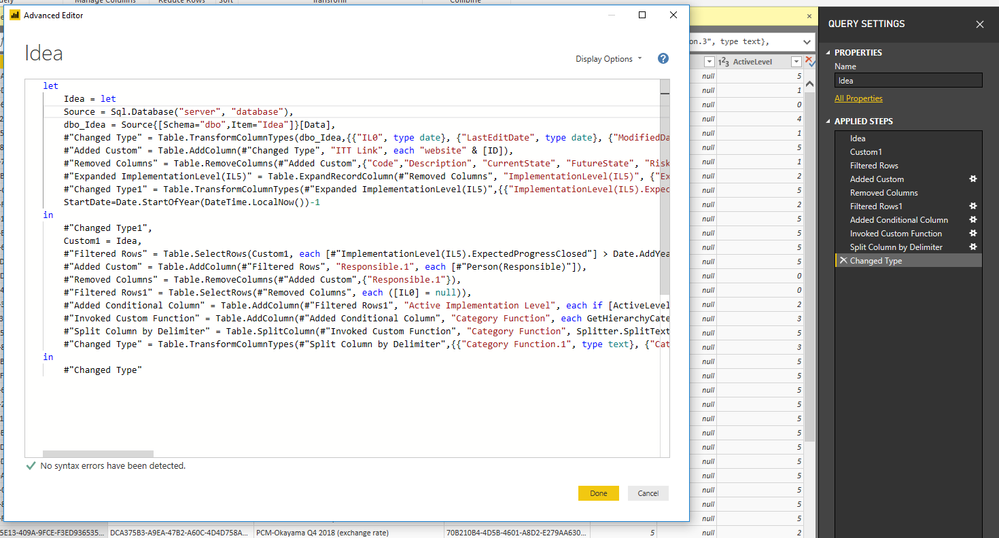
I've edited a table in advanced editor. In the process Power BI consolidated a lot of actions into one step. I would like to retain the option of having all steps shown individually. Only the second part is shown as individual steps.


let
    Idea = let
    Source = Sql.Database("Server", "database"),
    dbo_Idea = Source{[Schema="dbo",Item="Idea"]}[Data],
    #"Changed Type" = Table.TransformColumnTypes(dbo_Idea,{{"IL0", type date}, {"LastEditDate", type date}, {"ModifiedDate", type date}, {"CreatedDate", type date}}),
    #"Added Custom" = Table.AddColumn(#"Changed Type", "ITT Link", each "website" & [ID]),
    #"Removed Columns" = Table.RemoveColumns(#"Added Custom",{"Code","Description", "CurrentState", "FutureState", "RiskAssesment", "CancelReason", "ApprovedBy", "Transferred", "TransferredDescription", "LogBook", "LogBook_Backup", "LastEditDate", "LastEditUser", "_RowVersion", "Group", "Supplier", "Comments", "TCO", "VO", "Investment", "Category", "FinancialImpact", "ActivityTotalSum", "NotificationMailDaySpan", "CostExpanded", "Responsible2", "CommentsIssues", "RecommendedActions", "SupplierList", "ReasonForChange", "PriceIncreaseApproval", "ReasonForPriceChange", "FPPPilot", "CDEName", "AribaId", "Robotics","Priority", "ModifiedDate", "IsArchived"}),
    #"Expanded ImplementationLevel(IL5)" = Table.ExpandRecordColumn(#"Removed Columns", "ImplementationLevel(IL5)", {"ExpectedProgressClosed"}, {"ImplementationLevel(IL5).ExpectedProgressClosed"}),
    #"Changed Type1" = Table.TransformColumnTypes(#"Expanded ImplementationLevel(IL5)",{{"ImplementationLevel(IL5).ExpectedProgressClosed", type date}}),
    StartDate=Date.StartOfYear(DateTime.LocalNow())-1
in
    #"Changed Type1",
    Custom1 = Idea,
    #"Filtered Rows" = Table.SelectRows(Custom1, each [#"ImplementationLevel(IL5).ExpectedProgressClosed"] > Date.AddYears(Date.StartOfYear(Date.From(DateTime.LocalNow())),-1)),
    #"Added Custom" = Table.AddColumn(#"Filtered Rows", "Responsible.1", each [#"Person(Responsible)"]),
    #"Removed Columns" = Table.RemoveColumns(#"Added Custom",{"Responsible.1"}),
    #"Filtered Rows1" = Table.SelectRows(#"Removed Columns", each ([IL0] = null)),
    #"Added Conditional Column" = Table.AddColumn(#"Filtered Rows1", "Active Implementation Level", each if [ActiveLevel] = 5 then [IL5] else if [ActiveLevel] = 4 then [IL4] else if [ActiveLevel] = 3 then [IL3] else if [ActiveLevel] = 2 then [IL2] else if [ActiveLevel] = 1 then [IL1] else if [ActiveLevel] = 0 then [ID] else null),
    #"Invoked Custom Function" = Table.AddColumn(#"Added Conditional Column", "Category Function", each GetHierarchyCategoryNameDelimiter([CategoryId])),
    #"Split Column by Delimiter" = Table.SplitColumn(#"Invoked Custom Function", "Category Function", Splitter.SplitTextByDelimiter("*", QuoteStyle.Csv), {"Category Function.1", "Category Function.2", "Category Function.3", "Category Function.4"}),
    #"Changed Type" = Table.TransformColumnTypes(#"Split Column by Delimiter",{{"Category Function.1", type text}, {"Category Function.2", type text}, {"Category Function.3", type text}, {"Category Function.4", type text}})
in
    #"Changed Type"

Can you split the code before the first in into steps again?
pbisptes.PNG


1 ACCEPTED SOLUTION
v-yulgu-msft
Microsoft Employee
Microsoft Employee

Hi @Anonymous,


Is this what you want?

let
   
    Source = Sql.Database("Server", "database"),
    dbo_Idea = Source{[Schema="dbo",Item="Idea"]}[Data],
    #"Changed Type" = Table.TransformColumnTypes(dbo_Idea,{{"IL0", type date}, {"LastEditDate", type date}, {"ModifiedDate", type date}, {"CreatedDate", type date}}),
    #"Added Custom" = Table.AddColumn(#"Changed Type", "ITT Link", each "website" & [ID]),
    #"Removed Columns" = Table.RemoveColumns(#"Added Custom",{"Code","Description", "CurrentState", "FutureState", "RiskAssesment", "CancelReason", "ApprovedBy", "Transferred", "TransferredDescription", "LogBook", "LogBook_Backup", "LastEditDate", "LastEditUser", "_RowVersion", "Group", "Supplier", "Comments", "TCO", "VO", "Investment", "Category", "FinancialImpact", "ActivityTotalSum", "NotificationMailDaySpan", "CostExpanded", "Responsible2", "CommentsIssues", "RecommendedActions", "SupplierList", "ReasonForChange", "PriceIncreaseApproval", "ReasonForPriceChange", "FPPPilot", "CDEName", "AribaId", "Robotics","Priority", "ModifiedDate", "IsArchived"}),
    #"Expanded ImplementationLevel(IL5)" = Table.ExpandRecordColumn(#"Removed Columns", "ImplementationLevel(IL5)", {"ExpectedProgressClosed"}, {"ImplementationLevel(IL5).ExpectedProgressClosed"}),
    #"Changed Type1" = Table.TransformColumnTypes(#"Expanded ImplementationLevel(IL5)",{{"ImplementationLevel(IL5).ExpectedProgressClosed", type date}}),
                       StartDate=Date.StartOfYear(DateTime.LocalNow())-1,

    #"Filtered Rows" = Table.SelectRows(#"Changed Type1", each [#"ImplementationLevel(IL5).ExpectedProgressClosed"] > Date.AddYears(Date.StartOfYear(Date.From(DateTime.LocalNow())),-1)),
    #"Added Custom" = Table.AddColumn(#"Filtered Rows", "Responsible.1", each [#"Person(Responsible)"]),
    #"Removed Columns" = Table.RemoveColumns(#"Added Custom",{"Responsible.1"}),
    #"Filtered Rows1" = Table.SelectRows(#"Removed Columns", each ([IL0] = null)),
    #"Added Conditional Column" = Table.AddColumn(#"Filtered Rows1", "Active Implementation Level", each if [ActiveLevel] = 5 then [IL5] else if [ActiveLevel] = 4 then [IL4] else if [ActiveLevel] = 3 then [IL3] else if [ActiveLevel] = 2 then [IL2] else if [ActiveLevel] = 1 then [IL1] else if [ActiveLevel] = 0 then [ID] else null),
    #"Invoked Custom Function" = Table.AddColumn(#"Added Conditional Column", "Category Function", each GetHierarchyCategoryNameDelimiter([CategoryId])),
    #"Split Column by Delimiter" = Table.SplitColumn(#"Invoked Custom Function", "Category Function", Splitter.SplitTextByDelimiter("*", QuoteStyle.Csv), {"Category Function.1", "Category Function.2", "Category Function.3", "Category Function.4"}),
    #"Changed Type" = Table.TransformColumnTypes(#"Split Column by Delimiter",{{"Category Function.1", type text}, {"Category Function.2", type text}, {"Category Function.3", type text}, {"Category Function.4", type text}})
in
    #"Changed Type"

Regards,

Yuliana Gu

Community Support Team _ Yuliana Gu
If this post helps, then please consider Accept it as the solution to help the other members find it more quickly.

View solution in original post

2 REPLIES 2
v-yulgu-msft
Microsoft Employee
Microsoft Employee

Hi @Anonymous,


Is this what you want?

let
   
    Source = Sql.Database("Server", "database"),
    dbo_Idea = Source{[Schema="dbo",Item="Idea"]}[Data],
    #"Changed Type" = Table.TransformColumnTypes(dbo_Idea,{{"IL0", type date}, {"LastEditDate", type date}, {"ModifiedDate", type date}, {"CreatedDate", type date}}),
    #"Added Custom" = Table.AddColumn(#"Changed Type", "ITT Link", each "website" & [ID]),
    #"Removed Columns" = Table.RemoveColumns(#"Added Custom",{"Code","Description", "CurrentState", "FutureState", "RiskAssesment", "CancelReason", "ApprovedBy", "Transferred", "TransferredDescription", "LogBook", "LogBook_Backup", "LastEditDate", "LastEditUser", "_RowVersion", "Group", "Supplier", "Comments", "TCO", "VO", "Investment", "Category", "FinancialImpact", "ActivityTotalSum", "NotificationMailDaySpan", "CostExpanded", "Responsible2", "CommentsIssues", "RecommendedActions", "SupplierList", "ReasonForChange", "PriceIncreaseApproval", "ReasonForPriceChange", "FPPPilot", "CDEName", "AribaId", "Robotics","Priority", "ModifiedDate", "IsArchived"}),
    #"Expanded ImplementationLevel(IL5)" = Table.ExpandRecordColumn(#"Removed Columns", "ImplementationLevel(IL5)", {"ExpectedProgressClosed"}, {"ImplementationLevel(IL5).ExpectedProgressClosed"}),
    #"Changed Type1" = Table.TransformColumnTypes(#"Expanded ImplementationLevel(IL5)",{{"ImplementationLevel(IL5).ExpectedProgressClosed", type date}}),
                       StartDate=Date.StartOfYear(DateTime.LocalNow())-1,

    #"Filtered Rows" = Table.SelectRows(#"Changed Type1", each [#"ImplementationLevel(IL5).ExpectedProgressClosed"] > Date.AddYears(Date.StartOfYear(Date.From(DateTime.LocalNow())),-1)),
    #"Added Custom" = Table.AddColumn(#"Filtered Rows", "Responsible.1", each [#"Person(Responsible)"]),
    #"Removed Columns" = Table.RemoveColumns(#"Added Custom",{"Responsible.1"}),
    #"Filtered Rows1" = Table.SelectRows(#"Removed Columns", each ([IL0] = null)),
    #"Added Conditional Column" = Table.AddColumn(#"Filtered Rows1", "Active Implementation Level", each if [ActiveLevel] = 5 then [IL5] else if [ActiveLevel] = 4 then [IL4] else if [ActiveLevel] = 3 then [IL3] else if [ActiveLevel] = 2 then [IL2] else if [ActiveLevel] = 1 then [IL1] else if [ActiveLevel] = 0 then [ID] else null),
    #"Invoked Custom Function" = Table.AddColumn(#"Added Conditional Column", "Category Function", each GetHierarchyCategoryNameDelimiter([CategoryId])),
    #"Split Column by Delimiter" = Table.SplitColumn(#"Invoked Custom Function", "Category Function", Splitter.SplitTextByDelimiter("*", QuoteStyle.Csv), {"Category Function.1", "Category Function.2", "Category Function.3", "Category Function.4"}),
    #"Changed Type" = Table.TransformColumnTypes(#"Split Column by Delimiter",{{"Category Function.1", type text}, {"Category Function.2", type text}, {"Category Function.3", type text}, {"Category Function.4", type text}})
in
    #"Changed Type"

Regards,

Yuliana Gu

Community Support Team _ Yuliana Gu
If this post helps, then please consider Accept it as the solution to help the other members find it more quickly.
Anonymous
Not applicable

Hey Yuliana,


Yes, I managed to do it my self in the mean time, but your result is basically the same.


Thanks for helping!

Helpful resources

Announcements
FabCon and SQLCon Barcelona 2026

FabCon & SQLCon – Barcelona 2026

Join us in Barcelona for FabCon and SQLCon, the Fabric, Power BI, SQL, and AI community event. Save €200 with code FABCMTY200.

60 days of Data Days Carousel

Data Days 2026

Join Data Days 2026: 60 days of free live/on-demand sessions, challenges, study groups, and certification opportunities.

Power BI DataViz World Championships carousel

Power BI DataViz World Championships - June 2026

A new Power BI DataViz World Championship is coming this June! Don't miss out on submitting your entry.

Top Solution Authors