Join us at FabCon Atlanta from March 16 - 20, 2026, for the ultimate Fabric, Power BI, AI and SQL community-led event. Save $200 with code FABCOMM.
Register now!The Power BI Data Visualization World Championships is back! Get ahead of the game and start preparing now! Learn more
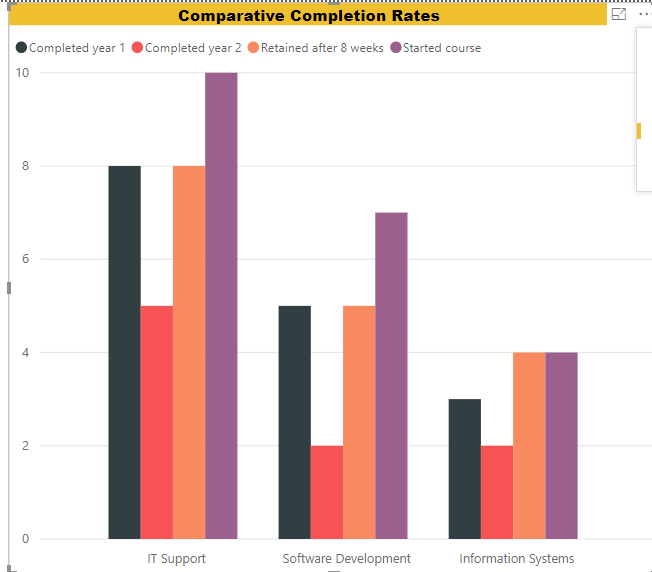
I've created a bar chart from some Further Education data, showing how students from 3 different subjects fare:
Problem is that the bars are in the wrong order - I want to get them in the logical order of:
Started course
Retained after 8 weeks
Completed year 1
Completed year 2
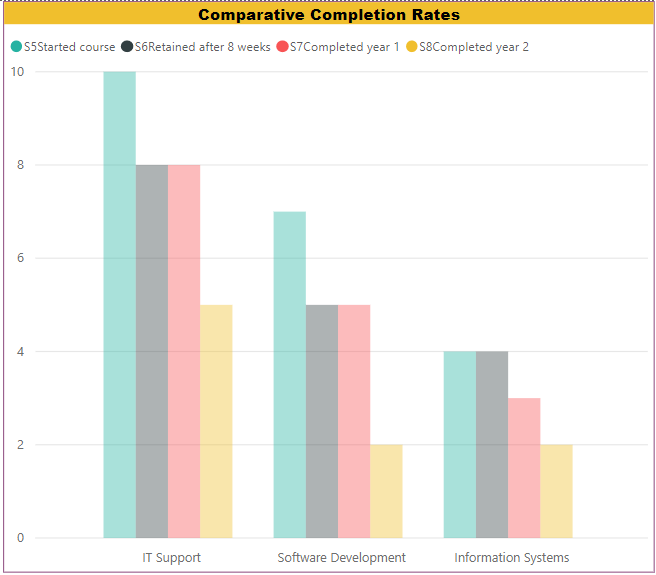
The only way I can see to do this is a bodge, i.e. concatenate the stage reference with stage name - but it's ugly
The query can be found at https://1drv.ms/u/s!AmxJyApgEAcYgo8w2xQKFiMzMkt7xQ
Any better ideas?
Thanks for your help
Solved! Go to Solution.
On the Modeling tab there is a button "Sort By Column". Click on the Stage Name column in your Field selector, click "Sort By Column" and choose "Stage Reference". Then when you choose to sort by Stage Name it will go ascending or descending based on S5, S6, etc.
Hope this helps
David
On the Modeling tab there is a button "Sort By Column". Click on the Stage Name column in your Field selector, click "Sort By Column" and choose "Stage Reference". Then when you choose to sort by Stage Name it will go ascending or descending based on S5, S6, etc.
Hope this helps
David
Fixed!
Thanks Dedelman
The Power BI Data Visualization World Championships is back! Get ahead of the game and start preparing now!
| User | Count |
|---|---|
| 38 | |
| 36 | |
| 33 | |
| 30 | |
| 28 |
| User | Count |
|---|---|
| 128 | |
| 88 | |
| 79 | |
| 67 | |
| 62 |