Join us at FabCon Atlanta from March 16 - 20, 2026, for the ultimate Fabric, Power BI, AI and SQL community-led event. Save $200 with code FABCOMM.
Register now!The Power BI Data Visualization World Championships is back! Get ahead of the game and start preparing now! Learn more
Greetings,
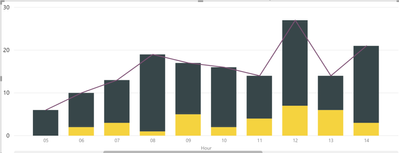
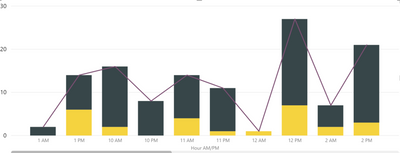
I have a Line and Stacked Column Chart visual that is oh so close to what the user wants, but not quite.
The desired X-Axis Sort is Ascending 24-Hour Time, but the desired X-Axis labels are 12-Hour AM/PM time.
I have a TimeDimension query with both an "Hour" field, formatted with leading Zero, and a calculated column
Solved! Go to Solution.
Add the label column to the axis. Click on the label column in the fields list and select "sort by column" and use the 24 hour column for sorting.
Brilliant! I had to walk through the steps a couple of times, but I got it.
Thank you @MattAllington !
The Power BI Data Visualization World Championships is back! Get ahead of the game and start preparing now!
| User | Count |
|---|---|
| 41 | |
| 38 | |
| 36 | |
| 31 | |
| 28 |
| User | Count |
|---|---|
| 129 | |
| 88 | |
| 79 | |
| 68 | |
| 63 |