cancel
Showing results for 
Search instead for 
Did you mean: 

The Power BI Data Visualization World Championships is back! Get ahead of the game and start preparing now! Learn more

Reply
Artie
Frequent Visitor

Sort Matrix visual based on specific criteria

Hi there,

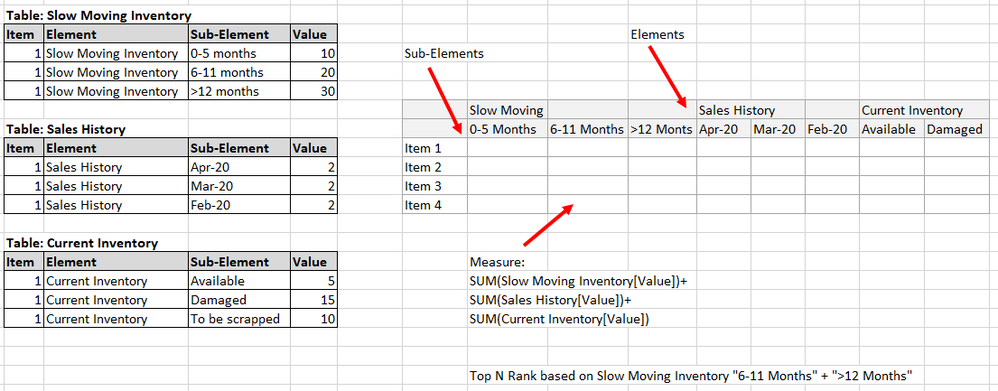
I created a matrix to summarize the slow moving inventory, historical sales and current inventory. In order to make it more "dynamic" (hide/show columns based on the applied slicers), I categorized the data into Elements and Sub-Elements.  It went fine until I wanted to sort it by the total slow moving (inventory with more than 6 months aging, which is the addition of two subcategories: 6-11 months plus 12 or more months). 

I tried adding the rank to the matrix rows but it does not accept measures.  I can not use rank in Matrix' "sort by" nor in the column's "sort by". I tired to add the rank field to the values section but I can not hide it.

Any clue?

Thanks!

Annotation 2020-05-05 200618.png


4 REPLIES 4
v-yuta-msft
Community Support
Community Support

@Artie ,


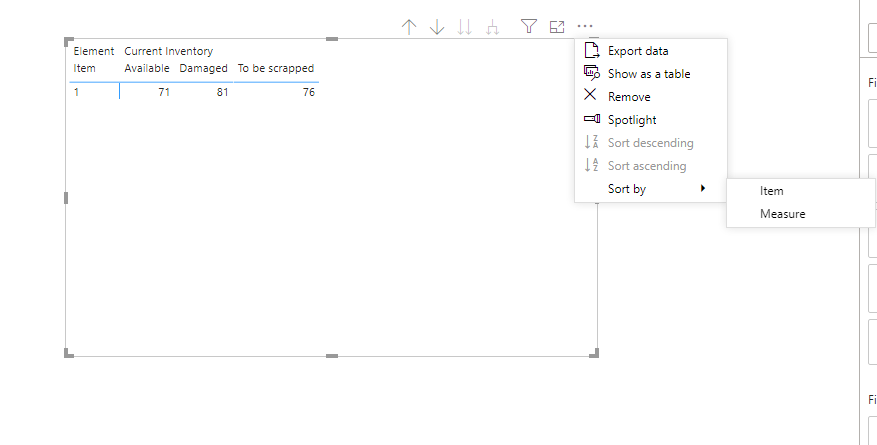
Have you added the measure to the value field? You can click ellipse on the right-top hand of the matrix visual and then select sort by Measure.

Capture.PNG 


Community Support Team _ Jimmy Tao

If this post helps, then please consider Accept it as the solution to help the other members find it more quickly.

Hi @v-yuta-msft ,

Yes, I tried, but it does not sort the information from the largest to lowest slow moving since the same measure cumputes the addition of the slow moving, the inventory and sales history.

Thanks.

amitchandak
Super User
Super User

@Artie 

Prefer to Create a common table element and subelement and have the sort order defined for them, it may be based or rank or logic. Mark sort column for element and sub-element and then use in Matrix

https://docs.microsoft.com/en-us/power-bi/desktop-sort-by-column

Share with Power BI Enthusiasts: Full Power BI Video (20 Hours) YouTube
Microsoft Fabric Series 60+ Videos YouTube
Microsoft Fabric Hindi End to End YouTube
sanimesa
Post Prodigy
Post Prodigy

@ArtieYou should be able to sort by a measure, if you can, please post some screenshots from your actual implementation and the measures you are using.

Helpful resources

Announcements
November Power BI Update Carousel

Power BI Monthly Update - November 2025

Check out the November 2025 Power BI update to learn about new features.

Fabric Data Days Carousel

Fabric Data Days

Advance your Data & AI career with 50 days of live learning, contests, hands-on challenges, study groups & certifications and more!

FabCon Atlanta 2026 carousel

FabCon Atlanta 2026

Join us at FabCon Atlanta, March 16-20, for the ultimate Fabric, Power BI, AI and SQL community-led event. Save $200 with code FABCOMM.