Join us at FabCon Atlanta from March 16 - 20, 2026, for the ultimate Fabric, Power BI, AI and SQL community-led event. Save $200 with code FABCOMM.
Register now!The Power BI Data Visualization World Championships is back! Get ahead of the game and start preparing now! Learn more
Hello,
I have a working measure, parsing through over 5 million rows (in a table named 'Overview'), which gives me the number of unique customers who have ordered for over 500 EUR worth of goods in a given period, with below info on each row:
Order# | Customer | NIS (Net Invoice Sales) | Calendar Days
DH500 Q1 = CALCULATE(DISTINCTCOUNT(Overview[Customer]);DATESBETWEEN('Calendar'[Calendar Days];"01/07/2019";"30/09/2019");filter(Overview;sum(Overview[NIS])>500))
While this measure calculated things properly at customer level, when I wanted a total by sales rep, total was wildly inaccurate (still unclear as why), which brought me to then use this measure for a sales rep total:
DH 500 Q1 = sumx(SUMMARIZE(Overview;Overview[Customer];"SUM";[DH500 Q1]);[DH500 Q1])
However, it is now painfully slow to calculate (over 5 min when filtered on ONE sales rep), meaning I cannot use it "on the go".
I am aware that FILTER drastically slows down measure calculation, and was hoping one of you guys would be able to optimize the measure calculation to something more acceptable... I was looking to use summarize on a wider level, maybe fully replacing FILTER but without any success so far.
Solved! Go to Solution.
Hi @Anonymous
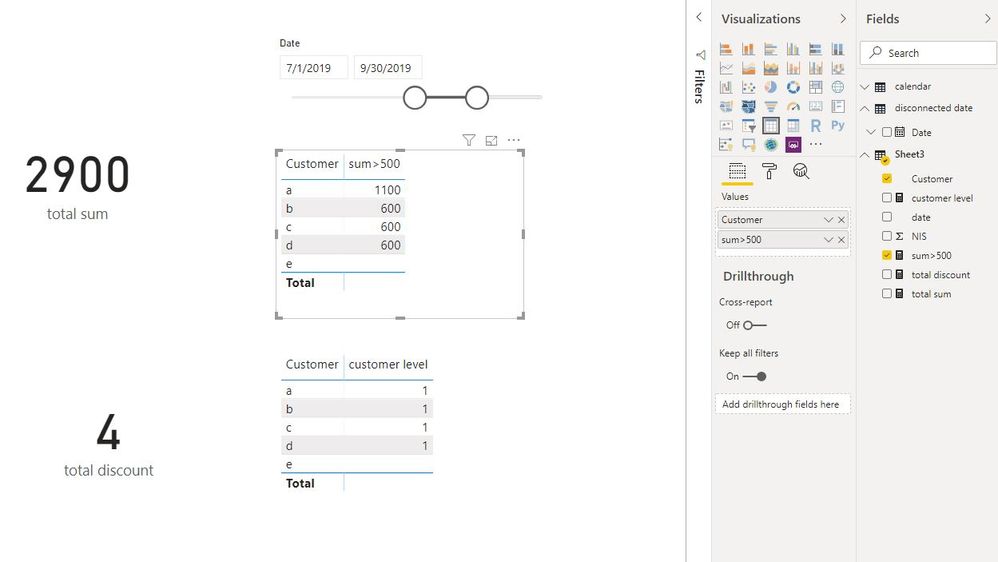
Calcualtion for two kinds of suitation.
sum of [NIS] at customer level,
sum>500 =
VAR n =
CALCULATE (
SUM ( Sheet3[NIS] ),
FILTER (
ALLSELECTED ( Sheet3 ),
Sheet3[Customer] = MAX ( Sheet3[Customer] )
&& Sheet3[date] >= MIN ( 'disconnected date'[Date] )
&& Sheet3[date] <= MAX ( 'disconnected date'[Date] )
)
)
RETURN
IF ( n > 500, n )
sum of [NIS] at total level,
total sum = SUMX(ALL(Sheet3[Customer]),[sum>500])
Distinctcount of customer who's NIS is over 500 at customer level
customer level =
VAR n =
CALCULATE (
SUM ( Sheet3[NIS] ),
FILTER (
ALLSELECTED ( Sheet3 ),
Sheet3[Customer] = MAX ( Sheet3[Customer] )
&& Sheet3[date] >= MIN ( 'disconnected date'[Date] )
&& Sheet3[date] <= MAX ( 'disconnected date'[Date] )
)
)
RETURN
IF ( n > 500, 1 )
Total Distinctcount of customer who's NIS is over 500 (at total level)
total discount = CALCULATE(DISTINCTCOUNT(Sheet3[Customer]),FILTER(Sheet3,Sheet3[customer level]=1))
In my test file, disconnected date table has no relationship with other tables.
disconnected date = CALENDARAUTO()
Best Regards
Maggie
Community Support Team _ Maggie Li
If this post helps, then please consider Accept it as the solution to help the other members find it more quickly.
Hi @Anonymous
Calcualtion for two kinds of suitation.
sum of [NIS] at customer level,
sum>500 =
VAR n =
CALCULATE (
SUM ( Sheet3[NIS] ),
FILTER (
ALLSELECTED ( Sheet3 ),
Sheet3[Customer] = MAX ( Sheet3[Customer] )
&& Sheet3[date] >= MIN ( 'disconnected date'[Date] )
&& Sheet3[date] <= MAX ( 'disconnected date'[Date] )
)
)
RETURN
IF ( n > 500, n )
sum of [NIS] at total level,
total sum = SUMX(ALL(Sheet3[Customer]),[sum>500])
Distinctcount of customer who's NIS is over 500 at customer level
customer level =
VAR n =
CALCULATE (
SUM ( Sheet3[NIS] ),
FILTER (
ALLSELECTED ( Sheet3 ),
Sheet3[Customer] = MAX ( Sheet3[Customer] )
&& Sheet3[date] >= MIN ( 'disconnected date'[Date] )
&& Sheet3[date] <= MAX ( 'disconnected date'[Date] )
)
)
RETURN
IF ( n > 500, 1 )
Total Distinctcount of customer who's NIS is over 500 (at total level)
total discount = CALCULATE(DISTINCTCOUNT(Sheet3[Customer]),FILTER(Sheet3,Sheet3[customer level]=1))
In my test file, disconnected date table has no relationship with other tables.
disconnected date = CALENDARAUTO()
Best Regards
Maggie
Community Support Team _ Maggie Li
If this post helps, then please consider Accept it as the solution to help the other members find it more quickly.
Hi @v-juanli-msft ,
First of all, thanks a lot for the time you took to prepare and draft this reply, it is much appreciated.
My reply is late because I spent most of my week trying to make it work or tweak it, yet I always end up with 2 results :
1/ Out of memory allocation (although I only have 5 million rows)
2/
CALCULATE(DISTINCTCOUNT(Overview[Customer]);filter(Overview;sum(Overview[NIS])>500);DATESBETWEEN('Calendar'[Date];"01/07/2019";"31/03/2020"))give the exact same result as
CALCULATE(DISTINCTCOUNT(Overview[Customer]);DATESBETWEEN('Calendar'[Date];"01/07/2019";"31/03/2020"))
Meaning i somehow cannot calculate a basic sumif...
Kind regards,
Brendan
It might because of your DATESBETWEEN() function. Is there a reason why these values are hard coded or are they normally in a slicer in the report?
Proud to be a Super User!
The Power BI Data Visualization World Championships is back! Get ahead of the game and start preparing now!
Check out the November 2025 Power BI update to learn about new features.
| User | Count |
|---|---|
| 66 | |
| 46 | |
| 42 | |
| 26 | |
| 19 |
| User | Count |
|---|---|
| 196 | |
| 127 | |
| 102 | |
| 67 | |
| 49 |