cancel
Showing results for 
Search instead for 
Did you mean: 

Get Fabric Certified for FREE during Fabric Data Days. Don't miss your chance! Request now

Reply
Green_Boby
Frequent Visitor

Slicer with several inclusions

Dear community,


Table "DL":


I am trying to set-up an indicator regarding delays (nammed Delay 1 above):

T15 : delays from 15 min

T60 : delays from 60 min

T180 : delays from 180 min

Thus, T15 includes T60 and T180, and so T60 includes T180.


The idea is to show the number of delays via slicer :

First of all, how can I test each Delay 1 to know whether it belongs to T180 and the others? I tried =IF(DL[Delay 1]>HOUR(3);"T180";"0"), but there is an issue with the condition.

Then assuming I can filter all Delays >180, >60 and >15, how can I include T60 into T15 and T180 into T60, so that when I tick the T15 in the slicer above, I get T15, T60 and T180 ?


Best regards,

1 ACCEPTED SOLUTION
Anonymous
Not applicable

@Green_Boby,

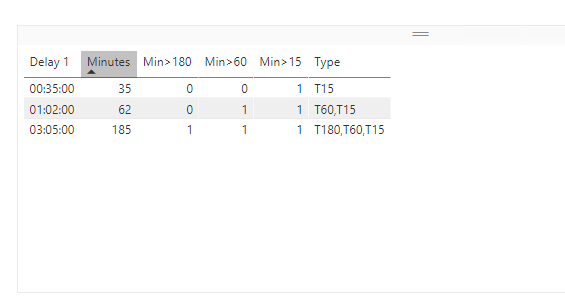
Firstly, create the following columns in DL table.

Min>180 = IF(DL[Minutes]-180>=0,1,0)
Minutes = HOUR(DL[Delay 1])*60+MINUTE(DL[Delay 1])
Min>15 = IF(DL[Minutes]-15>-0,1,0)
Min>60 = IF(DL[Minutes]-60>=0,1,0)
Type = IF(DL[Min>180]=1,"T180,T60,T15",IF(DL[Min>60]=1,"T60,T15",IF(DL[Min>15]=1,"T15",BLANK())))

1.PNG

Secondly, create a new table as follows, please note that there is no relationship between the new table and DL table.
2.PNG

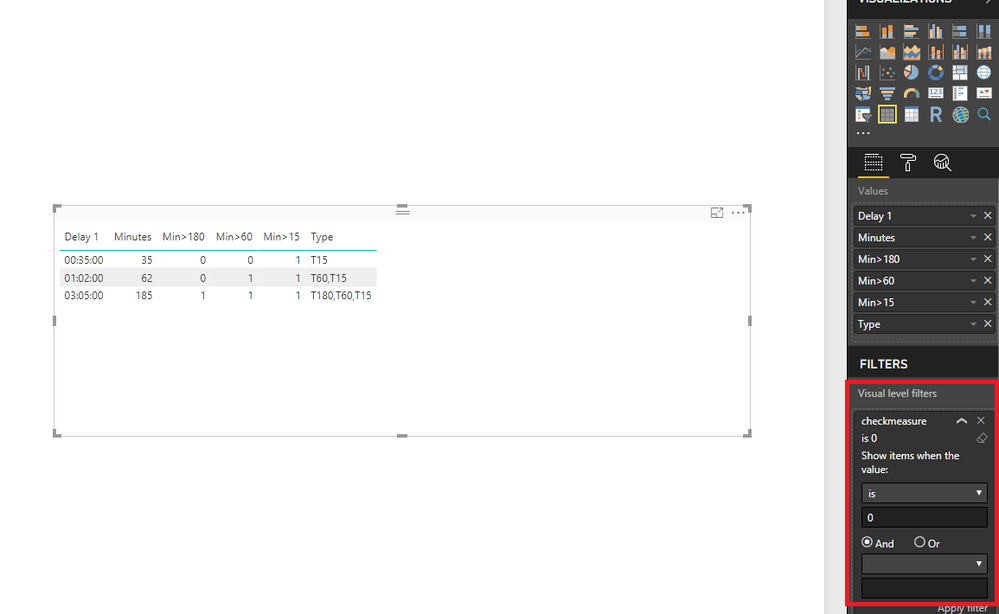
Thirdly, create the following measure in DL table.

checkmeasure = IF(ISERROR(SEARCH(FIRSTNONBLANK(Table1[Type],1),FIRSTNONBLANK(DL[Type],1))),1,0)


At last, drag checkmeasure to the first table visual and set its value to 0. This way, when you create slicer using Type field of new table and use the slicer to filter the table visual, you can get expected result.
3.PNG4.PNG

Regards,
Lydia


View solution in original post

2 REPLIES 2
Anonymous
Not applicable

@Green_Boby,

Firstly, create the following columns in DL table.

Min>180 = IF(DL[Minutes]-180>=0,1,0)
Minutes = HOUR(DL[Delay 1])*60+MINUTE(DL[Delay 1])
Min>15 = IF(DL[Minutes]-15>-0,1,0)
Min>60 = IF(DL[Minutes]-60>=0,1,0)
Type = IF(DL[Min>180]=1,"T180,T60,T15",IF(DL[Min>60]=1,"T60,T15",IF(DL[Min>15]=1,"T15",BLANK())))

1.PNG

Secondly, create a new table as follows, please note that there is no relationship between the new table and DL table.
2.PNG

Thirdly, create the following measure in DL table.

checkmeasure = IF(ISERROR(SEARCH(FIRSTNONBLANK(Table1[Type],1),FIRSTNONBLANK(DL[Type],1))),1,0)


At last, drag checkmeasure to the first table visual and set its value to 0. This way, when you create slicer using Type field of new table and use the slicer to filter the table visual, you can get expected result.
3.PNG4.PNG

Regards,
Lydia


Thank you very much! Your solution works like a charm!


Have a great day

Helpful resources

Announcements
November Power BI Update Carousel

Power BI Monthly Update - November 2025

Check out the November 2025 Power BI update to learn about new features.

Fabric Data Days Carousel

Fabric Data Days

Advance your Data & AI career with 50 days of live learning, contests, hands-on challenges, study groups & certifications and more!

FabCon Atlanta 2026 carousel

FabCon Atlanta 2026

Join us at FabCon Atlanta, March 16-20, for the ultimate Fabric, Power BI, AI and SQL community-led event. Save $200 with code FABCOMM.

Top Solution Authors
Top Kudoed Authors