Join us at FabCon Atlanta from March 16 - 20, 2026, for the ultimate Fabric, Power BI, AI and SQL community-led event. Save $200 with code FABCOMM.
Register now!The Power BI Data Visualization World Championships is back! Get ahead of the game and start preparing now! Learn more
Hello Power BI Community,
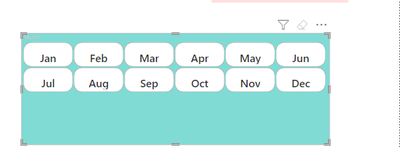
I am using the Slicer (new) visual and I'd like to get rid of the excess space at the bottom, but I couldn't find a way to get rid of the extra space at the bottom by tinkering with it.
I'd greatly appreciate it if anyone could let me know how to get rid of that space.
Thank you!
Solved! Go to Solution.
@DataNinja777
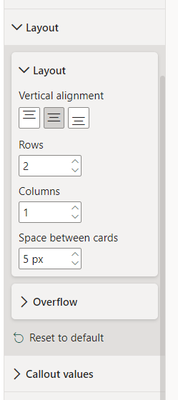
Under formating, Layout , Layout then reduce the Row count
⭕ Subscribe and learn Power BI from these videos
⚪ Website ⚪ LinkedIn ⚪ PBI User Group
can I add value in the slicer with title
@DataNinja777
Under formating, Layout , Layout then reduce the Row count
⭕ Subscribe and learn Power BI from these videos
⚪ Website ⚪ LinkedIn ⚪ PBI User Group
The Power BI Data Visualization World Championships is back! Get ahead of the game and start preparing now!
| User | Count |
|---|---|
| 39 | |
| 38 | |
| 38 | |
| 28 | |
| 27 |
| User | Count |
|---|---|
| 124 | |
| 88 | |
| 73 | |
| 66 | |
| 65 |