Join us at FabCon Atlanta from March 16 - 20, 2026, for the ultimate Fabric, Power BI, AI and SQL community-led event. Save $200 with code FABCOMM.
Register now!Vote for your favorite vizzies from the Power BI Dataviz World Championship submissions. Vote now!
Hi All,
Is there anyway to pass a selected value from a slicer to a T-SQL query or a T-SQL Stored Procedure? You can do it with Parameters but that requires opening power query every time and then changing parameter I can't ask the users to do that.
Thanks
Solved! Go to Solution.
Hi @Anonymous
You can always use Composite Models Aggregations, this is a mixed model and should improve the overall experience.
https://docs.microsoft.com/en-us/power-bi/desktop-aggregations
Hi @Anonymous
It's not possible to use slicers to pass parameters to SQL as slicers work on a model that is already loaded into memory.
If your model is too big then you can switch to direct quey mode, else just load whole data into the model and use slicers.
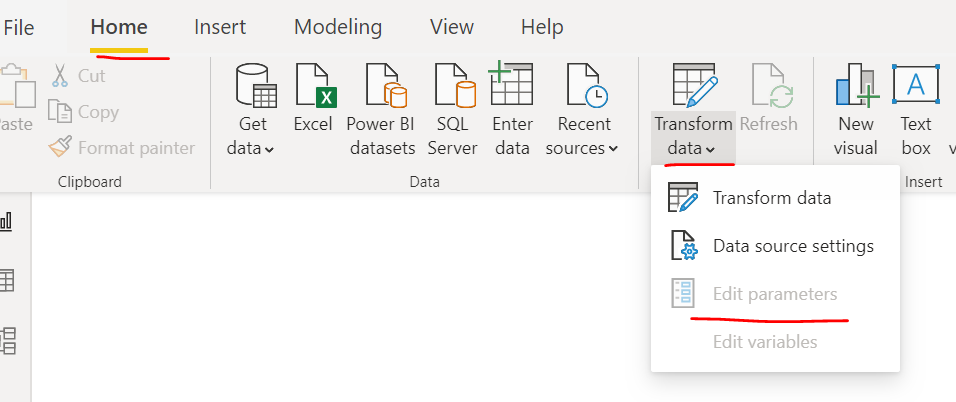
btw, you don't need open Power Query to adjust parameters, you can just expand Transform data and edit parameter from the report view
Please watch the video for the ref
Thanks for the reply, yeah I realise that you can use the manage parameters button as well. But unfortunately that's not what the client is asking for.
I will have to use direct query and put up the lack of performance, i have over a billion rows in the table so unpractical to use import mode.
Hi @Anonymous
You can always use Composite Models Aggregations, this is a mixed model and should improve the overall experience.
https://docs.microsoft.com/en-us/power-bi/desktop-aggregations
I doubt that from visualization. Refer these
https://community.powerbi.com/t5/Power-Query/parameters-to-SP-or-Sql-query/td-p/57734
You are running in Import Mode?
Vote for your favorite vizzies from the Power BI World Championship submissions!
If you love stickers, then you will definitely want to check out our Community Sticker Challenge!
Check out the January 2026 Power BI update to learn about new features.
| User | Count |
|---|---|
| 70 | |
| 51 | |
| 42 | |
| 29 | |
| 22 |
| User | Count |
|---|---|
| 142 | |
| 121 | |
| 56 | |
| 37 | |
| 32 |